
Introduction
This manual provides detailed instructions for the installation, operation, maintenance, and troubleshooting of your CO-Z Solar Powered Sliding Gate Opener. Please read this manual thoroughly before installation and operation to ensure proper function and safety. This gate opener is designed for gates up to 1100 lb. and 40 ft. in length, offering convenient and secure access to your property.
Product Components
The CO-Z Solar Powered Sliding Gate Opener kit includes the main gate opener unit, a solar panel, two backup batteries, and two remote controls. Additional compatible accessories such as wireless keypads and alarm lamps can be integrated (sold separately).

Image: Overview of the CO-Z Solar Powered Sliding Gate Opener kit, showing the main motor unit, solar panel, battery box, and a remote control.
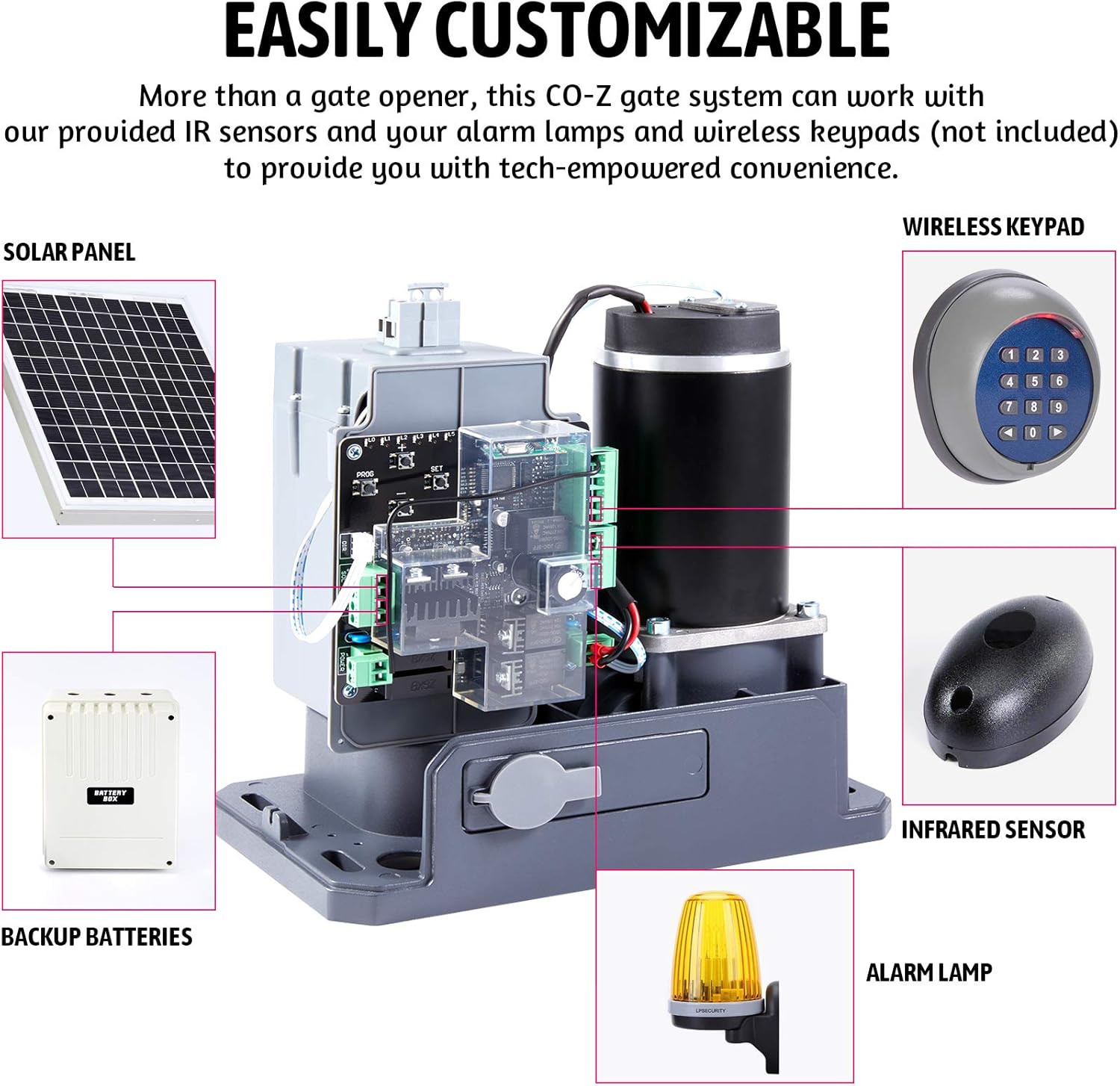
Image: Diagram illustrating the various components of the CO-Z gate system, including the solar panel, backup batteries, gate opener unit, wireless keypad, infrared sensor, and alarm lamp.
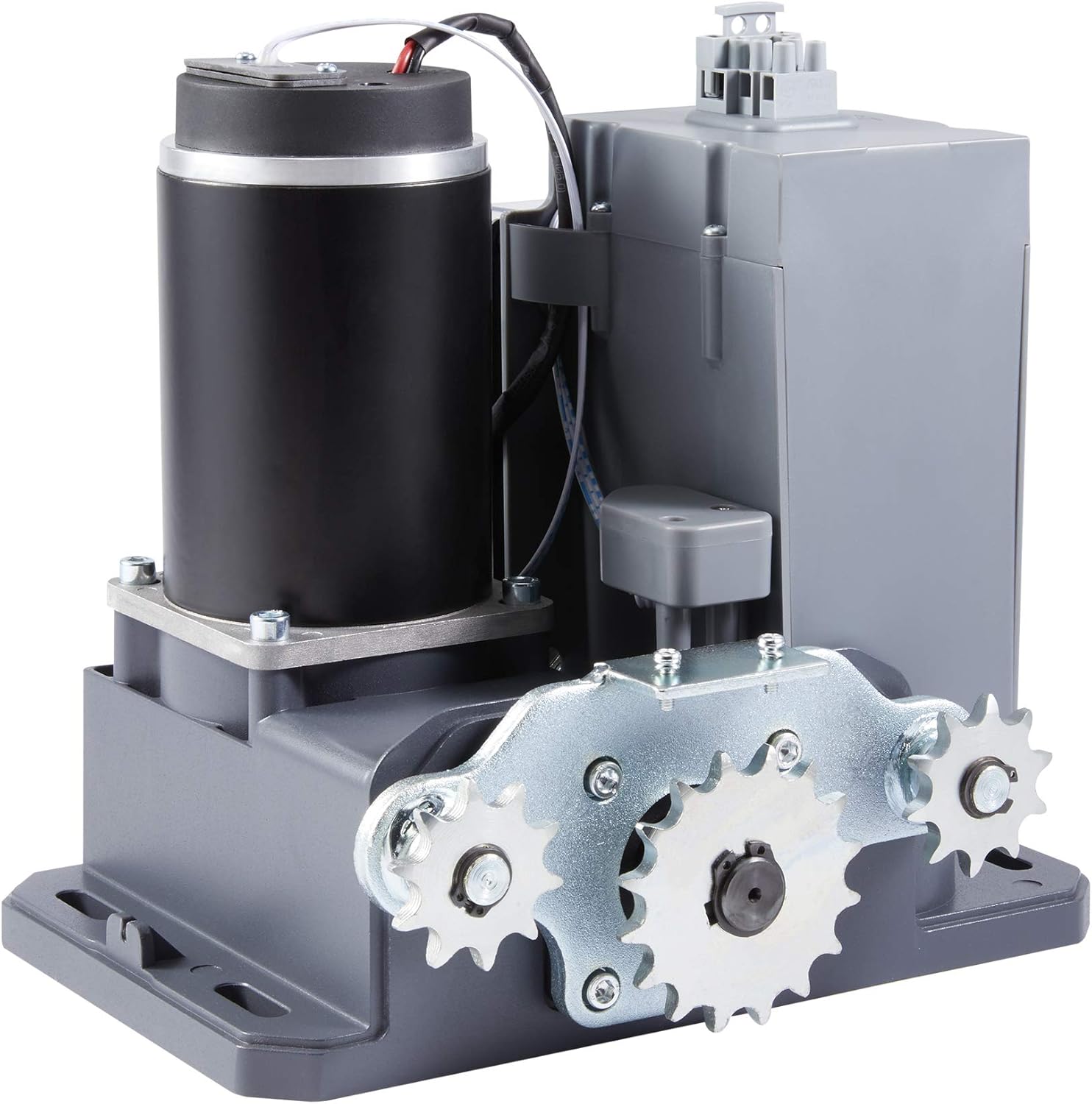
Image: Close-up view of the internal motor and control board of the CO-Z gate opener, showing the robust construction.
Specifications
| Feature | Specification |
|---|---|
| Manufacturer | CO-Z |
| Model Number | SGO05SEUS |
| Motor Power | 150W |
| Max. Gate Weight | 1100 lb. |
| Max. Gate Length | 40 ft. |
| Gate Speed | Approx. 52-59 ft. per minute |
| Solar Panel | 20W |
| Backup Batteries | Two large capacity batteries |
| Remote Control Range | Nearly 100 feet |
| Included Remotes | 2 (supports up to 25 total) |
| Product Dimensions | 11.42 x 12.8 x 19.88 inches |
| Item Weight | 57.3 pounds |

Image: The CO-Z gate opener unit with key technical specifications listed alongside it, including motor power, output torque, max gate weight, max gate length, gate speed, and chain length.
Setup and Installation
The CO-Z Solar Powered Sliding Gate Opener is designed for straightforward installation. All necessary tools are included in the package. Please note that the host unit and solar energy components are shipped separately, resulting in two packages.
Pre-Installation Checklist:
- Ensure you have received both packages containing the gate opener host and solar components.
- Verify all parts listed in the packing list are present and undamaged.
- Confirm your gate's weight and length are within the specified limits (1100 lb. and 40 ft.).
- Prepare a stable, level mounting surface for the gate opener unit.
- Plan the routing for the chain and any necessary wiring, especially for the infrared sensor.
Installation Steps:
- Mount the Gate Opener Unit: Securely attach the main gate opener unit to a solid foundation next to your sliding gate.
- Install the Chain: Attach the roller chain to your gate and route it around the opener's sprocket. Ensure the chain is taut but allows for smooth movement. You may need a chain cutting tool to size the chain correctly.
- Connect Solar Panel and Batteries: Install the 20W solar panel in a location with ample sunlight. Connect the solar panel to the battery box, which houses the two backup batteries. Ensure all connections are secure and follow the wiring diagrams provided in the detailed manual.
- Wire the System: Connect the battery system to the gate opener motor. The system includes a charge controller; ensure all wires are connected correctly to avoid issues.
- Install Safety Sensors: Mount the infrared sensor on either side of the gate. These sensors detect obstacles and are crucial for safe operation. Bury the cable connecting them if necessary for a clean and secure installation.
- Initial Power-Up: Once all components are installed and wired, power up the system. Observe the indicator lights on the control board.
Refer to the detailed wiring diagrams and step-by-step instructions provided in your physical manual for precise connection points and programming procedures.
Operating Instructions
Your CO-Z Solar Powered Sliding Gate Opener is designed for convenient and automatic operation. It comes with two remote controls for easy access.

Image: A hand holding a remote control, with a CO-Z gate opener and a sliding gate in the background, demonstrating remote operation.
Using the Remote Controls:
- The included remote controls allow you to open and close your gate from nearly 100 feet away.
- Press the designated button on the remote to initiate the gate's movement.
- The system supports up to 25 remote controls, allowing multiple users to access the gate.
- Refer to your manual for instructions on programming additional remote controls.
Automatic Closing Feature:
The gate opener is equipped with an automatic closing function. After opening, the gate will automatically close after a set delay. This delay can typically be adjusted via the control board settings.
Manual Release:
In case of power outage or system malfunction, the gate can be manually operated. Locate the manual release mechanism on the unit (usually accessed with a key) to disengage the motor and move the gate by hand.
Maintenance
Regular maintenance ensures the longevity and optimal performance of your CO-Z Solar Powered Sliding Gate Opener.
- Clean the Solar Panel: Periodically clean the surface of the solar panel to remove dirt, dust, or debris that may reduce its charging efficiency.
- Inspect the Chain: Check the gate chain for proper tension and lubrication. Lubricate the chain as needed to ensure smooth operation and prevent wear.
- Check Electrical Connections: Annually inspect all electrical connections for corrosion or looseness. Ensure wires are securely fastened.
- Battery Health: Monitor the performance of the backup batteries. While designed for durability, batteries may need replacement after several years, especially if experiencing frequent power outages.
- Clear Obstructions: Keep the gate's path clear of any debris, vegetation, or objects that could interfere with its movement or the safety sensors.
- Test Safety Features: Regularly test the infrared safety sensors to ensure they are functioning correctly and will reverse the gate if an obstruction is detected.
Troubleshooting
If you encounter issues with your CO-Z Solar Powered Sliding Gate Opener, refer to the following common problems and solutions:
- Gate Not Responding to Remote:
- Check remote battery.
- Ensure the remote is programmed correctly.
- Verify the gate opener unit has power.
- Flashing Lights on Control Board / Hall Sensor Code:
- This often indicates a programming or sensor issue.
- Some users have reported an 'e04' error on the solar controller; try changing the setting from "Scn" to "Scf" as per community feedback.
- Consult the detailed manual for specific error codes and their resolutions.
- Gate Randomly Resets or Goes Off Track:
- This could indicate an issue with the limit switches or the control board.
- Ensure the gate track is clean and free of obstructions.
- Check for any physical damage to the gate or opener mechanism.
- Battery Converter Not Working:
- Verify all battery connections are secure and correct.
- Check the charge controller display for any error messages related to battery charging.
- Ensure the solar panel is receiving adequate sunlight.
- Gate Does Not Close Automatically / Reverses Unexpectedly:
- Check the infrared safety sensors for alignment or obstructions. Clean the sensor lenses if dirty.
- Ensure the auto-close timer is set correctly on the control board.
- General Programming Difficulties:
- The instructions can sometimes be complex. Refer to the detailed manual's programming section carefully.
- If issues persist, contact CO-Z customer support for assistance.
For complex issues or if troubleshooting steps do not resolve the problem, it is recommended to contact CO-Z customer service.
Safety Information
Your safety and the safety of others are paramount. The CO-Z Solar Powered Sliding Gate Opener includes features designed to enhance safety, but proper installation and adherence to safety guidelines are essential.

Image: A gate opening with blue light beams indicating the presence of infrared safety sensors, highlighting the enhanced safety features of the CO-Z gate opener.
- Obstacle Detection: The system is equipped with an infrared sensor that detects obstacles in the gate's path. If an obstacle is detected during closing, the gate will reverse operation to prevent injury or damage.
- Frequency Encryption: The remote controls utilize frequency encryption technology to protect against spoofing and enhance the security of your gate against unauthorized access.
- Emergency Stop: Familiarize yourself with the manual release mechanism to quickly disengage the motor in an emergency.
- Keep Clear: Always ensure the gate's path is clear before and during operation. Do not allow children or pets to play near the gate.
- Professional Installation: If you are unsure about any installation steps, consider consulting a qualified professional.
Warranty and Support
The CO-Z Solar Powered Sliding Gate Opener comes with a 1-year warranty. This warranty covers defects in materials and workmanship under normal use.
For any questions, technical assistance, or warranty claims, please contact CO-Z customer service. They offer friendly 24/7 customer support to assist you with any issues or inquiries.
You can typically find contact information on the product packaging or through the retailer where you purchased the product. For purchases made on Amazon, you can reach out to the seller, Banyan Imports, through your order details.
Return Policy: This product typically includes a 30-day easy return policy for refunds or replacements, subject to the retailer's terms and conditions.