
1. Introduction
This instruction manual provides comprehensive information for the YOSUN Universal Replacement Remote Control, model RMT-TX100U. Designed for seamless compatibility with a wide range of Sony Bravia LCD LED HDTV Smart TVs, this remote offers a direct replacement solution without requiring complex programming. It aims to restore full control over your television with reliable performance and an intuitive layout.
2. Product Features
- Broad Compatibility: Fully compatible with all Sony Bravia LCD LED HDTV Smart TVs.
- No Programming Required: Ready to use straight out of the box, eliminating the need for manual setup.
- Stable Performance: Equipped with an upgraded smart chip for consistent and reliable operation.
- Extended Range: Transmits signals effectively over long distances, up to 10 meters (33 feet).
- Quick Response Time: Features a rapid transmission response time of approximately 0.2 seconds for immediate command execution.
- Durable Construction: Made from high-quality ABS and silicone materials for a sturdy, non-slip shell and comfortable, sensitive buttons.
- Identical Layout: Designed to be visually and functionally identical to the original Sony remote control.
- Netflix Shortcut: Includes a dedicated Netflix button for quick access to the streaming service.
3. Setup Guide
3.1 Battery Installation
The remote control requires two (2) AAA batteries (not included) for operation. Follow these steps to install the batteries:
- Locate the battery compartment cover on the back of the remote control.
- Slide the cover downwards to open the compartment.
- Insert two AAA batteries, ensuring the positive (+) and negative (-) terminals align correctly with the indicators inside the compartment.
- Slide the battery cover back into place until it clicks securely.

Figure 3.1: Battery installation and remote dimensions. The remote is 7.8 inches long, 1.8 inches wide, and 0.7 inches thick. The diagram shows sliding the battery cover and inserting two AAA batteries.
3.2 Initial Use (No Programming Required)
This YOSUN replacement remote control is designed to work immediately with compatible Sony TVs without any programming or pairing. Once batteries are installed, point the remote towards your TV and begin using it.
Video 3.2: Demonstration of the remote control's simple operation, highlighting that no pairing is required for use with Sony TVs.
4. Operating Instructions
The remote control features a standard layout with clearly labeled buttons for easy navigation and control of your Sony TV. Refer to the diagram below for button identification and their primary functions.
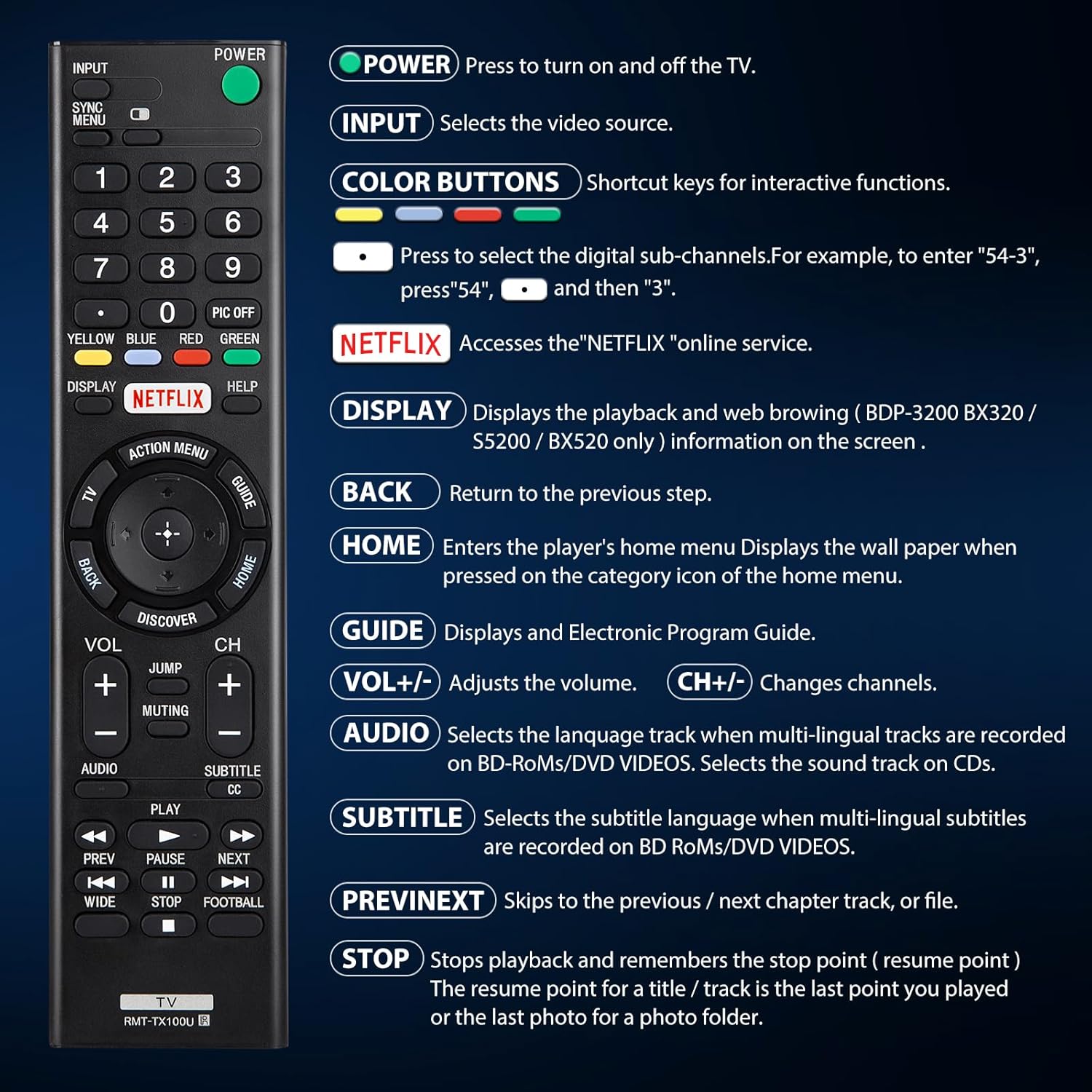
Figure 4.1: Overview of remote control buttons and their functions.
| Button | Function |
|---|---|
| POWER | Press to turn the TV on and off. |
| INPUT | Selects the video source (e.g., HDMI 1, AV). |
| COLOR BUTTONS (Yellow, Blue, Red, Green) | Shortcut keys for interactive functions or digital sub-channels (e.g., to enter "5-4", press "5", then "4"). |
| NETFLIX | Directly accesses the Netflix online streaming service. |
| DISPLAY | Displays playback and web browsing information on the screen (for compatible models like BDP-3200 BX320 / S5200 / BX520 only). |
| BACK | Returns to the previous step or menu. |
| HOME | Enters the player's home menu or displays the wallpaper when pressed on the category icon of the home menu. |
| GUIDE | Displays the Electronic Program Guide (EPG). |
| VOL +/- | Adjusts the volume level. |
| CH +/- | Changes television channels. |
| AUDIO | Selects the language track when multi-lingual tracks are recorded on BD-ROMs/DVD VIDEOS. Selects the sound track on CDs. |
| SUBTITLE CC | Selects the subtitle language when multi-lingual subtitles are recorded on BD ROMs/DVD VIDEOS. |
| PREV/NEXT | Skips to the previous or next chapter, track, or file during media playback. |
| STOP | Stops playback and remembers the stop point (resume point) for a title/track, or the last photo for a photo folder. |
5. Compatibility
5.1 Compatible Devices
This remote control is specifically designed for and compatible with the following:
- All Sony Bravia LCD LED HDTV Smart TVs.

Figure 5.1: The remote is compatible with Sony Smart TVs, Sony Bravia TVs, and Sony Google TVs.
5.2 Non-Compatible Devices
This remote control is NOT compatible with the following devices:
- Blu-ray Disc Players
- DVD Players
- AV Receivers
- Subwoofers
- Sound Bars
- Home Theater Systems

Figure 5.2: The remote is not compatible with Blu-ray players, DVD players, AV receivers, subwoofers, sound bars, or home theater systems.
6. Troubleshooting
If you experience issues with your remote control, please consider the following common troubleshooting steps:
- Check Batteries: Ensure that the batteries are correctly installed with the proper polarity and are not depleted. Replace with fresh AAA batteries if necessary.
- Line of Sight: Make sure there are no obstructions between the remote control and the TV's infrared receiver. The remote operates using an infrared signal, which requires a clear line of sight.
- Remote Compatibility: Verify that your TV model is a compatible Sony Bravia LCD LED HDTV Smart TV. Refer to Section 5 for detailed compatibility information.
- Remote Reset: Remove the batteries, press and hold any button on the remote for 5 seconds to discharge any residual power, then reinsert the batteries.
- TV Power Cycle: Unplug your TV from the power outlet for 60 seconds, then plug it back in. This can sometimes resolve minor communication issues.
7. Maintenance
To ensure the longevity and optimal performance of your remote control, follow these maintenance guidelines:
- Cleaning: Wipe the remote control regularly with a soft, dry cloth. For stubborn dirt, slightly dampen the cloth with water or a mild, non-abrasive cleaner. Avoid using harsh chemicals or abrasive materials.
- Battery Replacement: Replace batteries promptly when the remote's performance degrades or it stops responding. Remove batteries if the remote will not be used for an extended period to prevent leakage.
- Storage: Store the remote in a cool, dry place away from direct sunlight, extreme temperatures, and high humidity.
- Avoid Drops: While durable, repeated drops can damage internal components. Handle the remote with care.
8. Specifications
| Attribute | Detail |
|---|---|
| Product Dimensions | 7.87 x 1.89 x 0.78 inches |
| Item Weight | 3.17 ounces |
| Model Number | RMT-TX100U |
| Batteries Required | 2 AAA batteries (not included) |
| Special Feature | No Programming Required |
| Color | Black |
| Max Number of Supported Devices | 18 (Refers to the range of Sony TV models it can control) |
| Compatible Devices | Television (Sony Bravia LCD LED HDTV Smart TVs) |
| Manufacturer | YOSUN |
9. Warranty and Support
YOSUN offers an unlimited return and refund service for this remote control within 30 days of purchase. If you have any questions, concerns, or require assistance with your order or the product, please do not hesitate to contact YOSUN customer service directly. Our team is committed to providing support and will respond to your inquiries within 12 hours during the work week.
For further assistance, please refer to the contact information provided with your purchase or visit the official YOSUN website.
