
1. Introduction
Thank you for choosing the Zeee 11.1V 8000mAh 3S Lipo Battery. This high-performance Lithium Polymer battery is designed for various RC models, including 1/8 and 1/10 scale vehicles, truggies, and buggies. This manual provides essential information for the safe and effective use, charging, and maintenance of your battery. Please read it thoroughly before use.
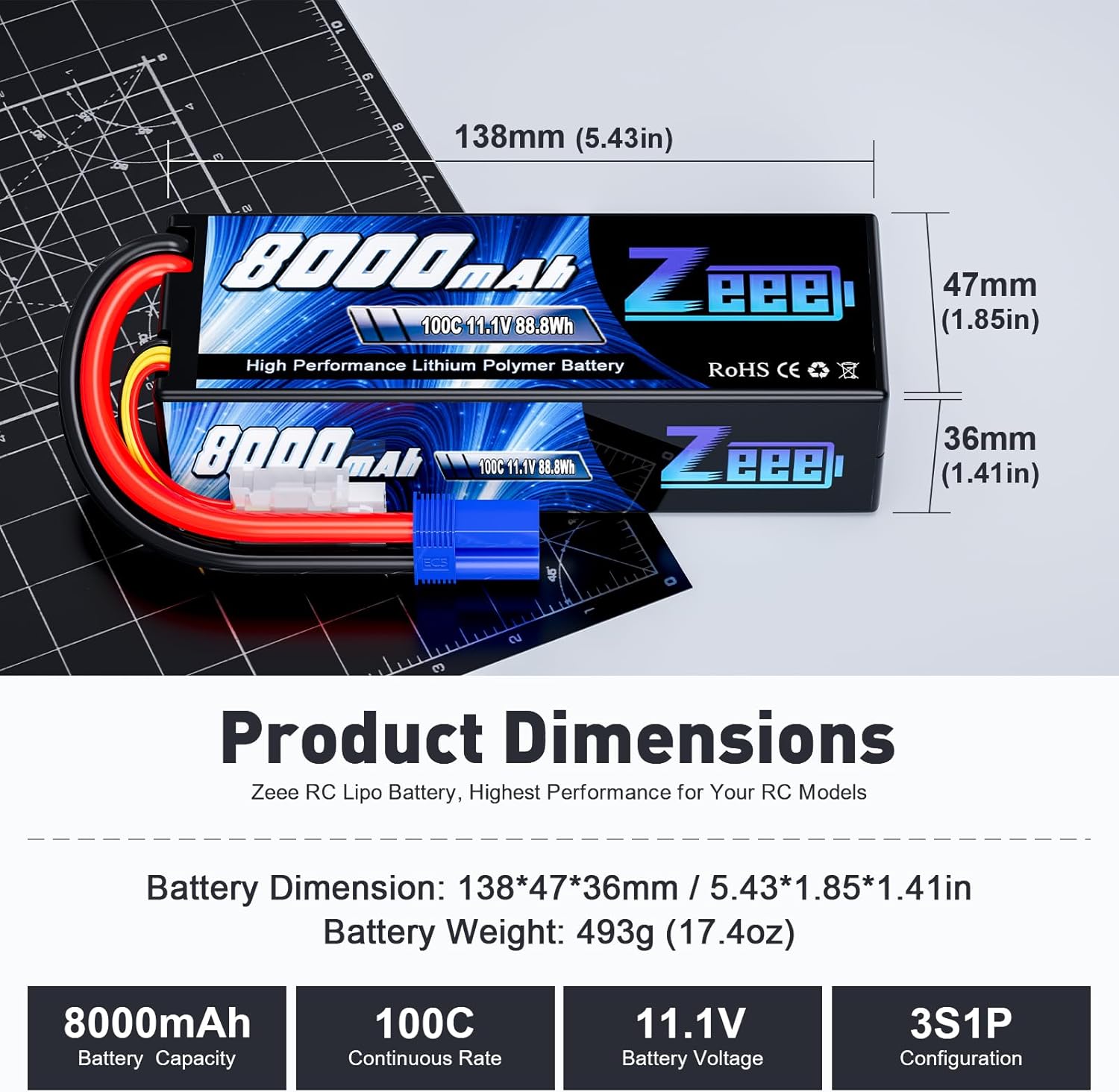
Image 1: Zeee 11.1V 8000mAh 3S Lipo Battery with EC5 connector. This image displays the battery's overall appearance, including its hard case and EC5 connector.
2. Safety Warnings
Lithium Polymer (LiPo) batteries require careful handling. Failure to follow these safety guidelines can result in fire, personal injury, and property damage.
- Users must read this safety manual before using the battery.
- Use only a Lithium Polymer (LiPo) specific balance charger for charging.
- The suggested charge rate is 0.5C - 1C. Do not exceed this rate unless the battery specifications explicitly state a higher safe charge rate.
- Never charge the battery unattended. Always monitor the charging process.
- Do not overcharge or over-discharge the battery. Overcharging can lead to fire, and over-discharging can permanently damage the battery.
- Store batteries in a fireproof container or LiPo safe bag, away from flammable materials and direct sunlight.
- Do not puncture, drop, short-circuit, or expose the battery to extreme temperatures.
- If the battery swells, leaks, or shows any signs of damage, discontinue use immediately and dispose of it properly.
- Keep batteries out of reach of children and pets.
3. Product Specifications
The Zeee 11.1V 8000mAh 3S Lipo Battery offers robust performance for your RC applications.
| Feature | Specification |
|---|---|
| Battery Voltage | 11.1V |
| Capacity | 8000mAh |
| Discharge Rate | 100C |
| Connector Type | EC5 Connector |
| Balance Connector | JST-XH |
| Configuration | 3S1P |
| Dimensions (L*W*H) | 138 x 47 x 36 mm (5.43 x 1.85 x 1.41 inches) |
| Approx. Weight | 493g (17.4oz) |
| Case Type | Hard Case |
| Wire Gauge | 10AWG |

Image 2: Detailed dimensions of the Zeee 11.1V 8000mAh 3S Lipo Battery. This image provides a visual representation of the battery's length, width, and height in both millimeters and inches.

Image 3: Close-up view of the Zeee Lipo Battery's components, including the JST-XH balance connector, EC5 discharge connector, hard case, and 10AWG wires.
4. Package Contents
Upon opening your package, you should find the following items:
- 2 x Zeee 11.1V 100C 8000mAh Lipo Battery with EC5 Plug
- 1 x User Manual (this document)
- 1 x Wrapped Box

Image 4: Contents of the Zeee Lipo Battery package, showing two batteries, the user manual, and the product box.
5. Setup and Initial Charging
Before using your Zeee Lipo battery for the first time, it is crucial to perform an initial charge.
- Inspect the Battery: Carefully examine the battery for any signs of damage, swelling, or leaks. Do not use a damaged battery.
- Prepare Your Charger: Ensure you are using a LiPo-compatible balance charger. Set the charger to the correct battery type (LiPo), cell count (3S), and capacity (8000mAh).
- Connect the Battery: Connect the main discharge plug (EC5) of the battery to the charger's main output port. Then, connect the balance lead (JST-XH) to the charger's balance port. Ensure all connections are secure and correct polarity is observed.
- Set Charge Rate: Set the charge current to 0.5C - 1C. For an 8000mAh battery, 1C is 8.0 Amps. A 0.5C rate would be 4.0 Amps.
- Begin Charging: Start the charging process. Monitor the battery and charger throughout the entire charging cycle. Never leave a charging LiPo battery unattended.
- Charging Completion: The charger will indicate when the battery is fully charged. Disconnect the battery from the charger once charging is complete.

Image 5: A Zeee Lipo Battery connected to a balance charger, illustrating the proper connection for charging. The image highlights the importance of using a compatible charger and correct connections.
6. Operating Instructions
These batteries are designed for high-performance RC applications.
- Compatibility: Ensure your RC vehicle (1/8, 1/10 scale, Slash 4x4, Bandit, Rustler, Stampede, E-Revo, Summit, Monster Jam Replicas, etc.) is compatible with 11.1V (3S) LiPo batteries and has an EC5 connector. Always verify the voltage, dimensions, and plug type match your model's requirements.
- Installation: Carefully place the battery into your RC vehicle's battery tray. Secure it firmly to prevent movement during operation.
- Connection: Connect the EC5 plug from the battery to the corresponding connector on your RC vehicle's Electronic Speed Controller (ESC).
- Discharge: Avoid over-discharging the battery. Most ESCs have a low-voltage cutoff (LVC) feature for LiPo batteries. Ensure this is set correctly for 3S LiPo (typically around 3.2V per cell). Stop using the battery as soon as you notice a significant drop in power or when the LVC activates.
- Temperature: Do not operate the battery if it becomes excessively hot. Allow it to cool down before recharging or further use.

Image 6: The Zeee Lipo Battery providing powerful performance in various RC applications, including monster trucks, airplanes, boats, and helicopters. This illustrates the versatility and intended use of the battery.
Video 1: Official Zeee Lipo Battery overview and usage demonstration. This video showcases the manufacturing process and the battery in action within various RC vehicles, highlighting its performance and application.
7. Maintenance and Storage
Proper maintenance and storage are essential for extending the lifespan and ensuring the safety of your LiPo batteries.
- Storage Voltage: For long-term storage, charge or discharge the battery to its storage voltage (typically 3.8V-3.85V per cell). Do not store fully charged or fully discharged batteries for extended periods.
- Storage Environment: Store batteries in a cool, dry place, away from direct sunlight, heat sources, and flammable materials. A temperature range of 5°C to 20°C (41°F to 68°F) is ideal.
- Physical Protection: Always store batteries in a LiPo safe bag or a fireproof container to minimize risks in case of an incident.
- Regular Inspection: Periodically inspect your batteries for any signs of damage, swelling, or unusual odors.
- Disposal: Dispose of damaged or old LiPo batteries responsibly at a designated battery recycling facility. Never throw them in household trash.

Image 7: A graph illustrating the discharge rate and cycle life performance of Zeee Lipo Batteries compared to other brands. This demonstrates the battery's efficiency and longevity under various conditions.
8. Troubleshooting
If you encounter issues with your Zeee Lipo battery, consider the following common troubleshooting steps:
- Battery Not Charging:
- Ensure all connections (main and balance leads) are secure and correctly plugged into the charger.
- Verify the charger settings (LiPo type, 3S cell count, 8000mAh capacity) are accurate.
- Check if the charger itself is functioning correctly.
- Inspect the battery for any visible damage.
- Short Run Time / Low Power:
- The battery might be over-discharged. Ensure your ESC's low-voltage cutoff is set correctly.
- The battery may be nearing the end of its lifespan.
- Check for loose connections in your RC vehicle.
- Ensure the battery was fully charged before use.
- Battery Swelling:
- Immediately discontinue use and charging.
- This indicates internal damage, often due to overcharging, over-discharging, or physical abuse.
- Dispose of the swollen battery safely and responsibly.
9. Warranty and Support
Zeee is committed to providing high-quality products and excellent customer service.
- For any product problems or inquiries, please contact Zeee customer support.
- You can reach us by:
- Visiting "Your Orders" on Amazon and clicking the "Contact Seller" option.
- Clicking "Ask a question" on our storefront.
- We aim to respond to all inquiries within 24 hours.
Please retain your proof of purchase for warranty claims.
