
Slendor HP2905IN1
Slendor 5-in-1 Heat Press Machine User Manual
Model: HP2905IN1
Brand: Slendor
1. Introduction
Thank you for choosing the Slendor 5-in-1 Heat Press Machine. This versatile digital heat transfer machine is designed for professional and home use, allowing you to transfer colorful pictures and characters onto various materials such as T-shirts, mugs, caps, ceramic plates, and other fabrics and materials. Its 360-degree swing-away design ensures safety and ease of operation, while the upgraded heating plate provides stable and even heat distribution for optimal transfer results.
This manual provides detailed instructions for setting up, operating, maintaining, and troubleshooting your heat press machine. Please read it thoroughly before use to ensure safe and efficient operation.
2. Product Components and What's Included
Your Slendor 5-in-1 Heat Press Machine package includes the following components:
- 1 x Fully-assembled machine with platen press (12"x15" T-shirt press)
- 1 x Hat press (5.5"x 3" Flat)
- 1 x Mug press (3"-3.5" Diameter, 11oz)
- 1 x Plate Press #1 (5" Max Diameter)
- 1 x Plate Press #2 (6" Max Diameter)
- 2 x Teflon sheets
- 1 x User Manual
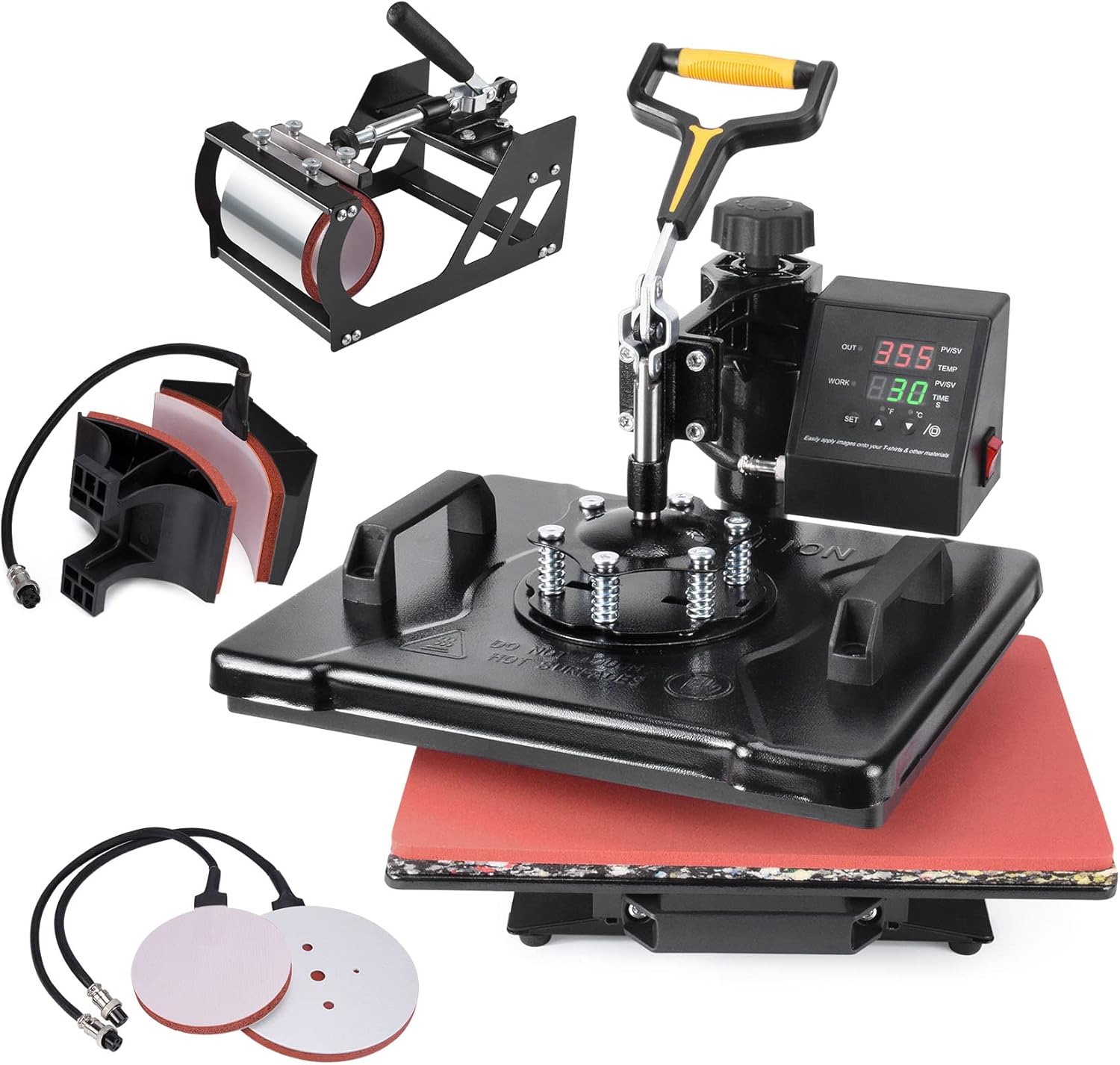
Figure 2.1: Overview of the Slendor 5-in-1 Heat Press Machine and its included accessories.
3. Setup Instructions
Follow these steps to set up your heat press machine:
- Unpacking: Carefully remove all components from the packaging. Inspect for any damage during transit.
- Placement: Place the main heat press unit on a stable, heat-resistant surface. Ensure there is adequate space around the machine for safe operation and ventilation.
- Platen Preparation: Before first use, ensure you remove any protective plastic film from the platen press. The platen is covered with a Teflon coating for protection.
- Connecting Attachments: To use the mug, hat, or plate presses, you will need to detach the main platen press and connect the desired accessory. Each attachment connects via an aviation plug. Ensure connections are secure.
- Power Connection: Connect the power cord to a grounded 110V AC outlet.

Figure 3.1: Side view illustrating the 2 layers of thermal insulation cotton, slide rail, and heating plate for efficient operation.
4. Operating Instructions
4.1 General Operation
- Power On: Turn on the machine using the power switch, typically located on the digital control box.
- Setting Temperature and Time:
- Press the 'SET' button to enter temperature setting mode. Use the 'UP' and 'DOWN' arrows to adjust the desired temperature (e.g., 350°F for most transfers).
- Press 'SET' again to enter time setting mode. Use the 'UP' and 'DOWN' arrows to adjust the desired time (e.g., 30 seconds).
- Press 'SET' one more time to exit the setting mode. The machine will begin heating to the set temperature.
- Pressure Adjustment: The machine features a full-range pressure adjustment knob. Turn the knob clockwise to increase pressure and counter-clockwise to decrease pressure. Adjust according to the thickness of your material and transfer type.
- Swing-Away Design: The 360-degree swing-away design allows the heating element to be safely moved aside, reducing the risk of accidental contact with the hot platen and providing a clear workspace for material placement.

Figure 4.1: Digital control box detailing heating indicator, working indicator, temperature indicator, time indicator, setting button, increasing key, decreasing key & starting key, and ON/OFF switch.
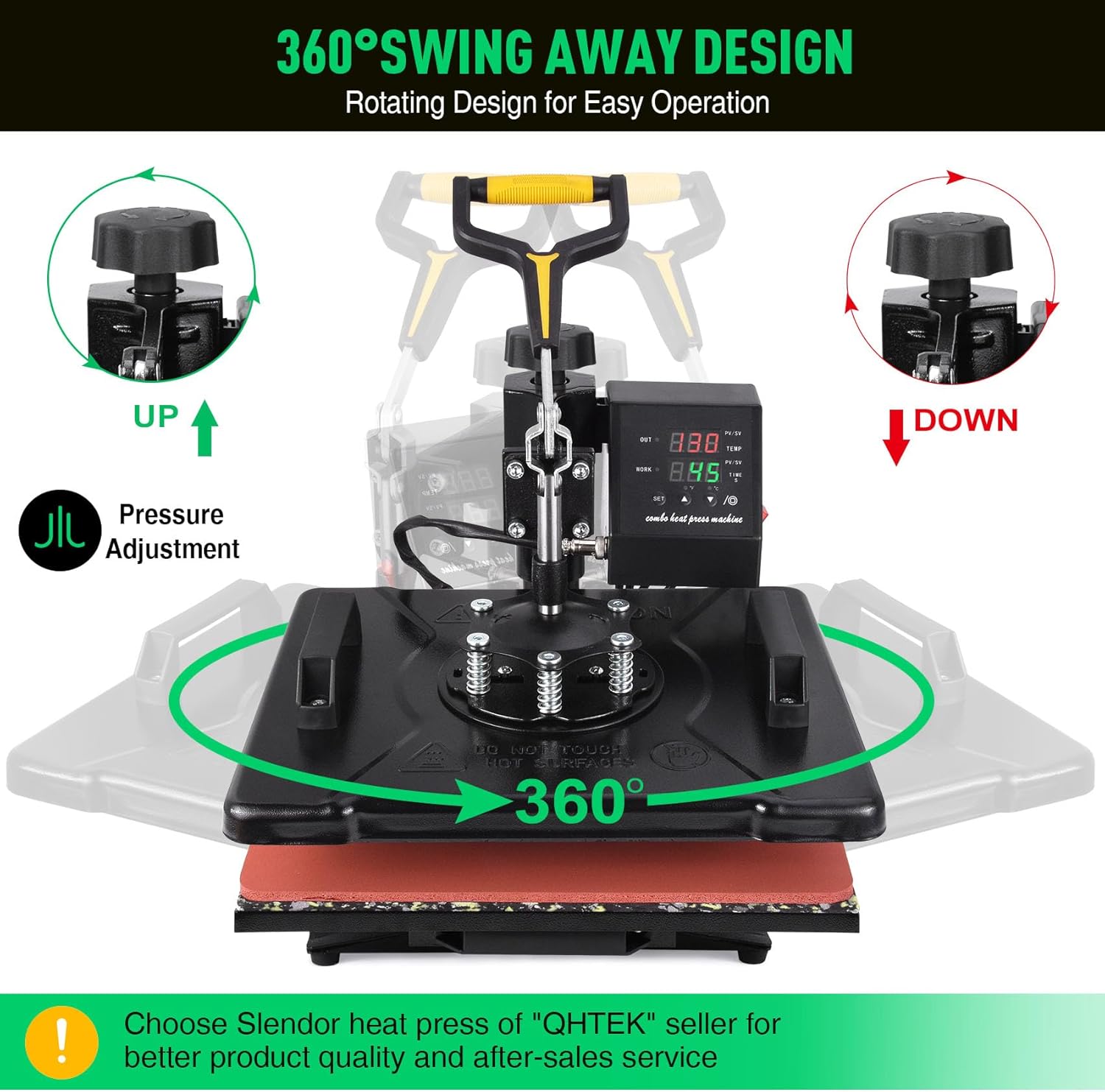
Figure 4.2: The 360-degree swing-away design allows for safe and easy operation.
4.2 Using Different Attachments
The Slendor 5-in-1 Heat Press Machine is designed for versatility. Here's how to use each attachment:

Figure 4.3: The five functions of the heat press machine: T-shirt, Mug, Hat, and two Plate presses.
4.2.1 T-shirt Heat Press (Platen Press)
- Ensure the main platen press is securely attached.
- Place your T-shirt or fabric item flat on the silicone pad.
- Position your transfer design (e.g., HTV, sublimation paper) on the fabric.
- Swing the heating platen over the material and lower the handle to apply pressure.
- Once the timer sounds, lift the handle and swing the platen away. Carefully remove your item.
4.2.2 Mug Press
- Detach the platen press and securely attach the mug press accessory.
- Adjust the pressure knob on the mug press to fit your mug snugly.
- Wrap your sublimation print around the mug and secure it with heat-resistant tape.
- Insert the mug into the mug press and close the clamp.
- Activate the heating cycle. Once complete, carefully remove the hot mug using heat-resistant gloves.
4.2.3 Hat Press
- Detach the platen press and securely attach the hat press accessory.
- Place your hat onto the curved platen.
- Position your transfer design on the hat.
- Lower the heating element onto the hat and apply pressure.
- After the timer, lift the element and remove the hat.
4.2.4 Plate Press
- Detach the platen press and securely attach the appropriate plate press accessory (5" or 6" diameter).
- Place your sublimation print onto the ceramic plate and secure it.
- Position the plate on the lower platen of the plate press.
- Lower the heating element onto the plate and apply pressure.
- Once complete, carefully remove the hot plate.
5. Maintenance
Proper maintenance ensures the longevity and optimal performance of your heat press machine:
- Cleaning the Platen: The Teflon-coated platen is easy to clean. After use, allow the platen to cool down. Wipe it gently with a soft, damp cloth to remove any residue. Do not use abrasive cleaners or sharp objects that could damage the Teflon coating.
- General Cleaning: Regularly wipe down the exterior of the machine with a dry or slightly damp cloth to remove dust and debris.
- Storage: When not in use, store the heat press machine in a clean, dry environment, away from direct sunlight and extreme temperatures.
- Inspecting Connections: Periodically check all electrical connections and plugs for any signs of wear or damage.

Figure 5.1: Key features for durability and performance, including Teflon coating and double tube heating.

Figure 5.2: Double tube heating ensures rapid and even heat distribution, saving time and improving transfer effect.
6. Troubleshooting
If you encounter issues with your Slendor Heat Press Machine, refer to the following common problems and solutions:
| Problem | Possible Cause | Solution |
|---|---|---|
| Machine does not power on. | No power supply; loose connection; faulty power switch. | Check power cord connection and wall outlet. Ensure power switch is ON. Try a different outlet. |
| Temperature not reaching set value or fluctuating. | Heating element issue; faulty sensor; control box malfunction. | Ensure the aviation plug is securely connected. Power cycle the machine. If issue persists, contact customer support. |
| Timer does not save settings. | Control box software issue. | This may be a characteristic of some control boxes. Re-enter the time setting for each use if necessary. |
| Fahrenheit/Celsius setting changes unexpectedly. | Control box software issue. | Reset the desired unit (F or C) after powering on. |
| Wobbly platen or attachment. | Loose screws; improper assembly. | Check all screws and ensure attachments are securely fastened. Refer to setup instructions. |
| Uneven pressure. | Pressure adjustment needed; uneven surface. | Adjust the pressure knob. Ensure the machine is on a flat, stable surface. |
If you experience any issues not listed here or if the suggested solutions do not resolve the problem, please contact Slendor customer support for assistance.
7. Specifications
Key technical specifications for the Slendor 5-in-1 Heat Press Machine:
| Feature | Specification |
|---|---|
| Model Number | HP2905IN1 |
| Platen Press Size | 12 x 15 inches |
| Upper Temperature Rating | 482°F (250°C) |
| Voltage | 110 Volts |
| Item Weight | 32.8 pounds |
| Product Dimensions (approx.) | 15 x 12 x 14 inches (L x W x H) |
| Material | Alloy Steel |
| Color | Black |
| Mug Press Diameter | 3"-3.5" (11oz) |
| Hat Press Size | 5.5" x 3" (Flat) |
| Plate Press #1 Diameter | 5" Max |
| Plate Press #2 Diameter | 6" Max |

Figure 7.1: Approximate dimensions of the Slendor Heat Press Machine.
8. Warranty and Support
Slendor stands behind the quality of its products. Your Slendor 5-in-1 Heat Press Machine comes with a 3-year warranty from the date of purchase.
This warranty covers manufacturing defects and issues arising from normal use. It does not cover damage caused by misuse, accidents, unauthorized modifications, or improper maintenance.
For warranty claims, technical support, or any questions regarding your product, please contact Slendor customer service. Refer to the contact information provided with your purchase or visit the official Slendor website for support details.
We are committed to providing excellent product quality and after-sales service to ensure your satisfaction.
Related documentsHP2905IN1

Ask a question about this manual
Ask about setup, troubleshooting, compatibility, parts, safety, or missing instructions. Manuals+ will review the question and use this page’s manual context to help answer it.