
Introduction
This manual provides detailed instructions for the AZIMOM 28-key remote control, designed for use with twinkle and music mode fiber optic light engines. Please read this manual carefully before use to ensure proper operation and to maximize the lifespan of your product.
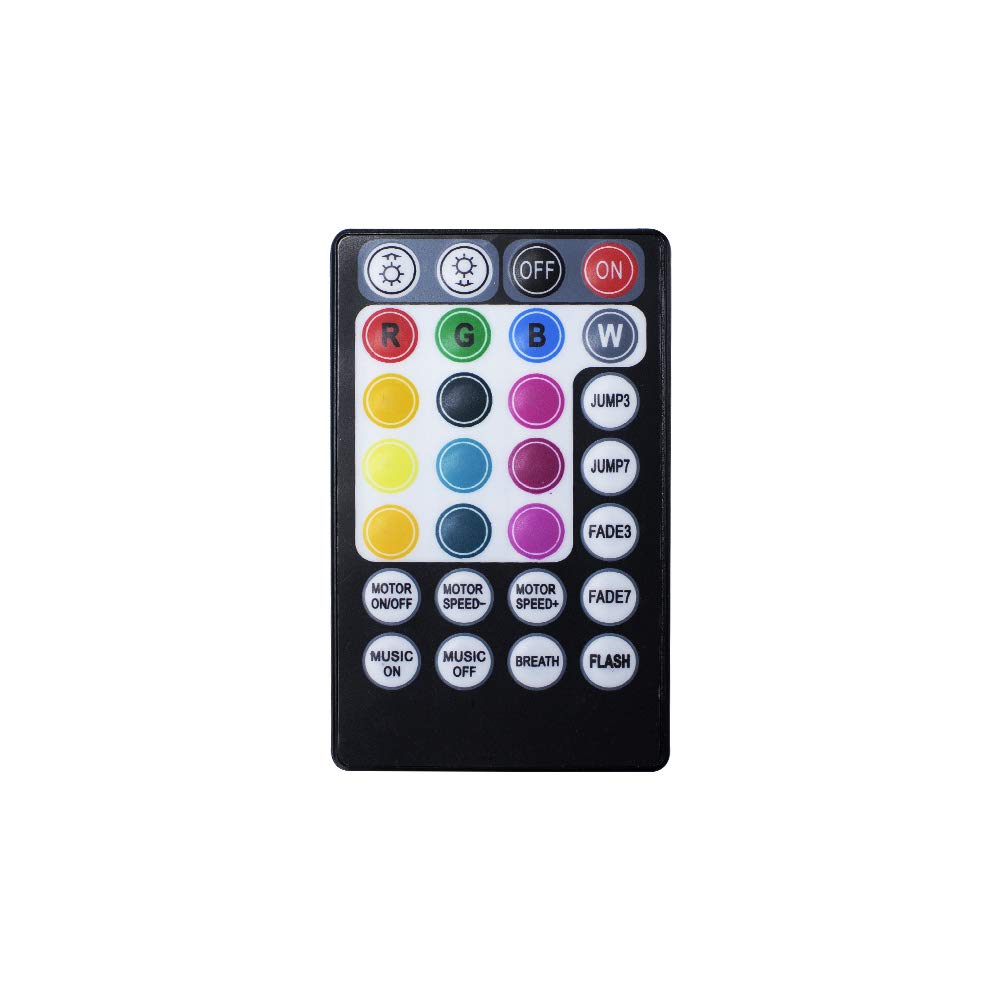
Image: The AZIMOM 28-key remote control, a compact black device with multiple colored buttons for controlling fiber optic light engines.
Product Overview
The AZIMOM 28-key remote control is an infrared (IR) device compatible with various AZIMOM fiber optic light engines that feature twinkle and music modes. These include, but are not limited to, silver 10W, silver dual port 16W, gold 16W, dual port gold 20W, silver 32W, dual port silver 32W, and black high brightness 50W twinkle version motor lights.

Image: Detailed diagram of the AZIMOM 28-key remote control, illustrating each button's function for light control, speed, brightness, and music modes. The back of the remote shows the battery compartment.
The remote features 28 buttons for comprehensive control over color, brightness, dynamic effects, motor speed, and sound activation.
Setup
- Battery Installation: The remote control requires one CR2025 or CR2032 button cell battery (not included). Locate the battery compartment on the back of the remote. Open the compartment, insert the battery with the positive (+) side facing up, and close the compartment securely.
- Initial Pairing (if required): For most compatible AZIMOM fiber optic light engines, the remote should pair automatically. Simply turn on your fiber optic light engine and then press the 'ON' button on the remote control. The remote should immediately establish a connection.
Operating Instructions
Refer to the button diagram in the Product Overview section for visual guidance.
- ON/OFF: Press the OFF button to turn the light engine off, and the ON button to turn it on.
- Color Selection: Press any of the 12 colored buttons (Red, Green, Blue, White, Yellow, Cyan, Purple, etc.) to select a static color.
- Brightness Adjustment:
- In normal mode, the 'speed+' button increases brightness for static colors.
- In normal mode, the 'speed-' button decreases brightness for static colors.
- Dynamic Modes:
- JUMP3: RGB three-color jump dynamic effect.
- JUMP7: Seven-color jump dynamic effect.
- FADE3: RGB three-color fade dynamic effect.
- FADE7: Seven-color fade dynamic effect.
- BREATH: Seven-color breath dynamic effect.
- FLASH: Seven-color flash dynamic effect.
- Dynamic Effect Speed Adjustment:
- The 'speed+' button increases the speed of dynamic effects.
- The 'speed-' button decreases the speed of dynamic effects.
- Motor Control:
- MOTOR ON/OFF: Turns the twinkle motor on or off.
- MOTOR SPEED+/MOTOR SPEED-: Adjusts the speed of the twinkle motor.
- Music Mode:
- MUSIC ON: Activates the voice function. When active, the light source will follow the sound and rhythm of music.
- MUSIC OFF: Deactivates the voice function. The light source will revert to conventional change modes.
- Voice Sensitivity Adjustment (when MUSIC ON):
- The 'speed+' button increases voice sensor sensitivity.
- The 'speed-' button decreases voice sensor sensitivity.
Maintenance
The primary maintenance for this remote control involves battery replacement.
- Battery Replacement: When the remote's range decreases or it becomes unresponsive, it's time to replace the battery. Use a CR2025 or CR2032 button cell battery. Follow the battery installation steps outlined in the 'Setup' section.
- Cleaning: Wipe the remote with a soft, dry cloth. Avoid using harsh chemicals or abrasive cleaners.
Troubleshooting
| Problem | Possible Cause | Solution |
|---|---|---|
| Remote not responding | Dead or incorrectly installed battery. Obstruction between remote and light engine. Remote out of range. |
|
| Light engine not changing modes/colors | Remote not paired or signal interference. |
|
| Music mode not working correctly | Voice function off or sensitivity incorrectly set. |
|
Specifications
- Brand: AZIMOM
- Model Name: QJ-L016
- Model Number: LS-REMOTE
- Connectivity Technology: Infrared (IR)
- Button Quantity: 28
- Controller Type: Button Control
- Compatible Devices: AZIMOM Fiber Optic Light Engines (Twinkle & Music Mode)
- Maximum Range: 10 meters (approx. 33 feet)
- Battery Type: CR2025 or CR2032 Alkaline Button Cell (not included)
- Special Features: Shatter resistant, Shock and vibration resistant
- Color: Black
- UPC: 769407394692
Warranty Information
This product does not come with a specified warranty description.
Support
For further assistance or inquiries, please visit the official AZIMOM store or contact their customer support through the platform where the product was purchased.
You can visit the AZIMOM Store at: AZIMOM Official Store