
NKF NS-RC4NA-14
NS-RC4NA-14 Remote Control for Insignia TV
Model: NS-RC4NA-14
Introduction
This manual provides comprehensive instructions for the operation and maintenance of your NS-RC4NA-14 Remote Control for Insignia TV. Please read this manual thoroughly before use to ensure proper functionality and longevity of the device.
Setup
Battery Installation
The remote control requires two AAA 1.5V alkaline batteries (not included). Follow these steps to install the batteries:
- Locate the battery compartment cover on the back of the remote control.
- Press down on the tab and slide the cover off.
- Insert two AAA batteries, ensuring the positive (+) and negative (-) terminals align correctly with the markings inside the compartment.
- Slide the battery compartment cover back into place until it clicks securely.

Figure 1: Battery installation diagram. The image displays the rear of the remote with the battery cover removed, showing the correct orientation for inserting two AAA batteries.
Operating Instructions
This remote control is designed for immediate use with compatible Insignia TV models without requiring any programming or pairing. Simply point the remote at your TV and press the desired button.
Button Functions
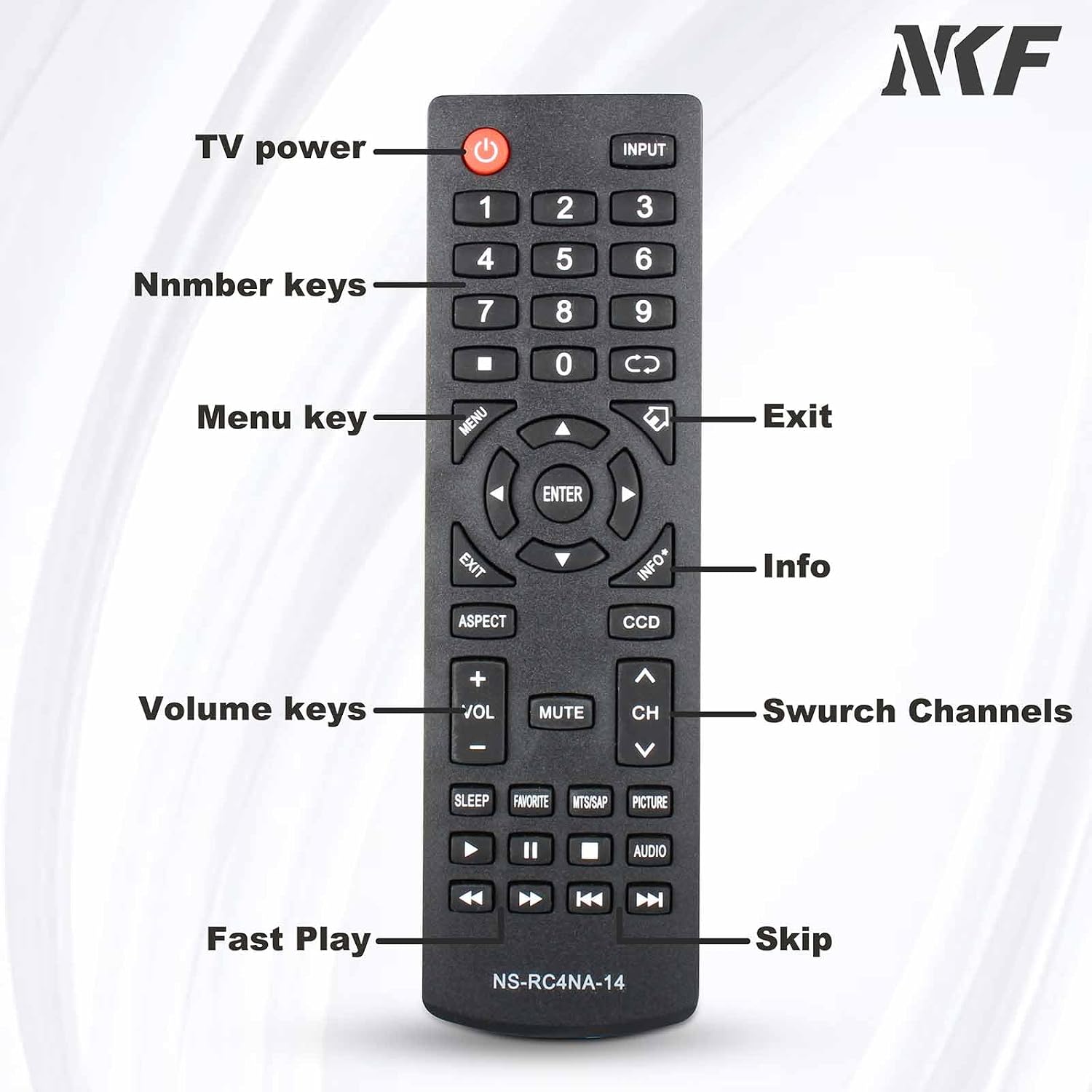
Figure 2: Remote Control Button Layout. This image illustrates the front of the remote control, highlighting and labeling key buttons such as TV power, number keys, menu, exit, info, volume, channel, fast play, and skip.
| Button | Function |
|---|---|
| Power (Red Button) | Turns the TV on or off. |
| INPUT | Selects the input source (HDMI, AV, etc.). |
| Number Keys (0-9) | Direct channel selection. |
| MENU | Accesses the TV's main menu. |
| Navigation Arrows (Up, Down, Left, Right) | Navigates through menus and options. |
| ENTER | Confirms selections. |
| EXIT | Exits the current menu or screen. |
| INFO | Displays program information. |
| VOL +/- | Adjusts the volume level. |
| MUTE | Mutes or unmutes the TV audio. |
| CH ^/v | Changes channels up or down. |
| SLEEP | Sets the sleep timer. |
| FAVORITE | Accesses favorite channels. |
| MTS/SAP | Selects audio language or SAP. |
| PICTURE | Adjusts picture settings. |
| Media Playback Controls (Play, Pause, Stop, Rewind, Fast Forward, Skip) | Controls media playback functions. |

Figure 3: Remote in use with a smart TV. This image demonstrates the remote control being used to navigate a smart TV interface, highlighting its intuitive access to live TV and applications.
Maintenance
- Cleaning: Use a soft, dry cloth to clean the remote control. Do not use liquid cleaners or abrasive materials.
- Battery Replacement: Replace batteries when the remote's response becomes sluggish or stops working. Always replace both batteries at the same time with new ones of the same type.
- Storage: If the remote will not be used for an extended period, remove the batteries to prevent leakage and corrosion. Store in a cool, dry place.
- Avoid Damage: Do not drop the remote control or expose it to extreme temperatures, humidity, or direct sunlight.
Troubleshooting
| Problem | Possible Cause | Solution |
|---|---|---|
| Remote not working. | Dead or incorrectly installed batteries. | Replace batteries with new AAA 1.5V alkaline batteries, ensuring correct polarity (+/-). |
| Remote range is poor. | Weak batteries; Obstruction between remote and TV; Remote sensor on TV is blocked. | Replace batteries. Ensure a clear line of sight to the TV's IR sensor. Remove any obstructions. |
| Specific buttons not responding. | Button stuck or damaged; Remote not compatible with all TV functions. | Check if the button is physically stuck. This remote is a direct replacement for NS-RC4NA-14 and should work for listed Insignia TV models. If issues persist, contact support. |
Specifications
- Model: NS-RC4NA-14
- Brand: NKF
- Compatible Devices: Insignia Televisions (various models including NS-19ED200NA14, NS-22E400NA14, NS-24E400NA14, NS-32E2000A14, NS-39D400NA14, NS-46E440NA14, NS-50D400NA14, etc.)
- Power Source: 2 x AAA 1.5V Alkaline Batteries (not included)
- Material: High-quality ABS
- Dimensions: 6.69 x 1.98 x 0.82 inches (approximately)
- Item Weight: 2.08 ounces (approximately)
- Special Feature: No Programming Required
- Color: Black
- Max Number of Supported Devices: 1 (Television)

Figure 4: Remote Control Dimensions. This image provides a visual representation of the remote control's length, width, and thickness, with measurements indicated.
Warranty and Support
This product is designed for durability and reliability. For any issues or inquiries, please refer to the seller's return policy or contact the manufacturer directly through their official channels. The product is built with high-quality ABS material for long-term worry-free use.
For further assistance, please contact your point of purchase or visit the NKF Store on Amazon: NKF Store.
Ask a question about this manual
Ask about setup, troubleshooting, compatibility, parts, safety, or missing instructions. Manuals+ will review the question and use this page’s manual context to help answer it.