
1. Product Overview
The Onforu 75W LED Security Light is an outdoor floodlight designed to provide high-brightness illumination for various exterior areas. It features three adjustable LED heads, a robust aluminum construction, and IP65 waterproofing for durability in diverse weather conditions. This light is switch-controlled and does not include motion sensing, solar power, or dusk-to-dawn functionality.

Figure 1: Onforu 75W LED Security Light (Model BDBC75-3)
2. Safety Information
WARNING: Risk of electric shock. Turn off power at the circuit breaker before installation or servicing.
- Ensure all electrical connections comply with local codes and ordinances.
- Use appropriate wire connectors for secure connections.
- If you are unsure about electrical wiring, consult a qualified electrician.
- Do not modify the product in any way not described in this manual.
3. Installation
This LED security light is designed for hardwired installation to a junction box. It can be mounted on a wall or soffit.
3.1 Package Contents
- Onforu 75W LED Security Light fixture
- Mounting bracket
- Gasket
- Wire nuts
- Mounting screws
3.2 Tools Required (Not Included)
- Screwdriver (Phillips head recommended)
- Wire strippers
- Electrical tape (optional, for added insulation)
3.3 Step-by-Step Installation
- Turn Off Power: Locate the circuit breaker controlling the light fixture and turn off the power. Verify power is off using a voltage tester.
- Remove Old Fixture: Carefully remove the existing light fixture from the junction box. Disconnect the old wiring.
- Install Mounting Bracket: Attach the provided mounting bracket to the junction box using the appropriate screws. Ensure the bracket is secure.
- Prepare Wiring: The security light comes with three wires: black (live), white (neutral), and green (ground). Strip the ends of the wires if necessary.
- Connect Wires: Using the provided wire nuts, connect the wires as follows:
- Black fixture wire to black supply wire.
- White fixture wire to white supply wire.
- Green fixture wire to bare copper or green ground wire from the supply, or to the green ground screw on the mounting bracket.
Figure 2: Wiring Diagram (Consult local electrical codes for specific requirements)
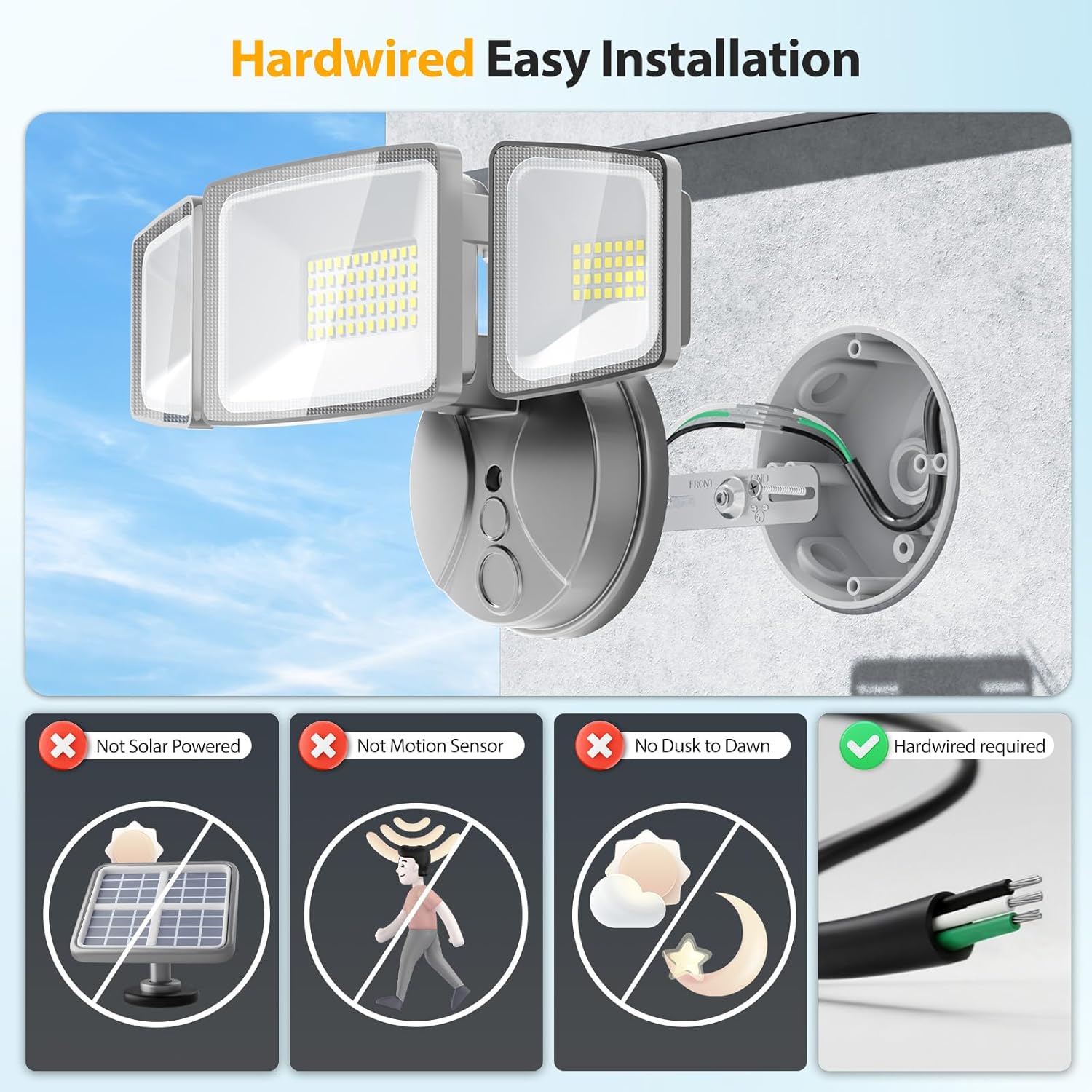
Figure 3: Hardwired installation example.
- Secure Gasket: Place the provided gasket around the lip of the junction box to ensure a waterproof seal.
- Mount Fixture: Carefully tuck all wires into the junction box. Align the light fixture with the mounting bracket and secure it with the central screw. Ensure no wires are pinched.
- Adjust Light Heads: Loosen the screws on the side of the light heads to adjust their angle and direction. Tighten the screws once the desired position is achieved. The main light can be pivoted for optimal coverage.
- Restore Power: Turn the power back on at the circuit breaker.

Figure 4: Adjustable Light Heads for customized illumination.
Video 1: Official Onforu 6000LM Energy Saving LED Flood Light overview, demonstrating features and installation flexibility.
4. Operating Instructions
This Onforu 75W LED Security Light is controlled by a standard wall switch. It does not feature a motion sensor, solar power, or dusk-to-dawn sensor. To operate:
- Flip the connected wall switch to the 'ON' position to turn the light on.
- Flip the connected wall switch to the 'OFF' position to turn the light off.

Figure 5: Manual switch control for the security light.
5. Maintenance
Regular maintenance ensures optimal performance and longevity of your security light.
- Cleaning: Periodically clean the light heads with a soft, damp cloth to remove dirt and debris. Do not use abrasive cleaners or solvents.
- Inspection: Annually inspect the wiring and mounting for any signs of wear, damage, or loose connections. Address any issues promptly.
- Heat Dissipation: The fixture is designed with efficient heat dissipation. Ensure the heat fins on the back of the light heads are not obstructed to maintain optimal cooling.
6. Troubleshooting
If your Onforu 75W LED Security Light is not functioning as expected, refer to the following common issues and solutions:
| Problem | Possible Cause | Solution |
|---|---|---|
| Light does not turn on. | No power to the fixture. | Check the circuit breaker and wall switch. Ensure power is restored. |
| Loose or incorrect wiring. | Turn off power at the breaker. Inspect wire connections and tighten if loose. Ensure correct wiring (black to black, white to white, green to ground). | |
| Light flickers. | Loose wiring connection. | Turn off power at the breaker. Check and tighten all wire connections. |
| Reduced brightness. | Dirt or debris on light heads. | Clean the light heads with a soft, damp cloth. |
| Overheating due to obstructed heat dissipation. | Ensure heat fins are clear of obstructions. |
7. Specifications
| Feature | Detail |
|---|---|
| Brand | Onforu |
| Model Name | BDBC75-3 |
| Wattage | 75 watts |
| Brightness | 7000 Lumens |
| Color Temperature | 6500K Daylight White |
| Voltage | 120 Volts |
| Material | Aluminum, PC |
| Water Resistance Level | IP65 Waterproof |
| Installation Type | Soffit Mounted, Wall Mount |
| Control Method | Switch Controlled (No motion sensor, no solar, no dusk to dawn) |
| Product Dimensions | 10.7"L x 5.8"W x 4.7"H |
| Item Weight | 1.59 pounds |
| Coverage | 1150ft² |

Figure 6: Product Dimensions and Adjustable Angles.
8. Warranty and Support
For warranty information or technical support regarding your Onforu 75W LED Security Light, please refer to the official Onforu website or contact their customer service directly. Keep your purchase receipt for warranty claims.


