
1. Introduction
The Kosmos Codix is a mechanical coding robot designed to introduce children aged 8-12 to the fundamentals of programming without the need for a smartphone or computer. This kit allows users to assemble their own robot from over 150 parts and control its functions using an innovative mechanical coding wheel. By inserting pins into the wheel in specific patterns, Codix can perform various tasks, offering a hands-on learning experience in robotics and problem-solving.
Key Features:
- Mechanical Programming: Learn programming basics without digital devices.
- 5 Robot Models: Assemble and reconfigure Codix into five different functional robots: drawing, gripping, throwing basketball, playing football, and transporting items (forklift).
- Educational Value: Promotes problem-solving skills, programming concepts, and understanding of technology.
- Comic-Based Instructions: Engaging instructions featuring characters Izzy and Tim, providing background information on robotics and programming.

Figure 1.1: The Kosmos Codix Mechanical Coding Robot kit, showcasing the product packaging and the assembled robot.
2. Setup and Assembly
Before you begin, ensure you have all necessary components and tools. The assembly process involves building the robot structure and integrating the mechanical coding wheel. Follow the comic-based instructions provided in the kit carefully for step-by-step guidance.
2.1 Required Components and Tools:
- Components for assembling the robot (over 150 parts)
- Coding wheel
- Programming pins
- Small Phillips screwdriver (included)
- Instructions manual (comic-based)
2.2 Additional Items (Not Included):
- 2 x 1.5 volt AAA (Micro) batteries
- Scissors or side cutters
- File (optional, for smoothing plastic parts if needed)
2.3 Assembly Steps Overview:
- Unpack Components: Carefully remove all parts from the packaging. Organize them to ensure easy access during assembly.
- Follow Comic Instructions: Refer to the provided comic-based manual for detailed, illustrated assembly steps. Each step is designed to be clear and engaging.
- Build the Robot Chassis: Construct the main body and frame of the robot.
- Install Motor and Gears: Integrate the motor and gear mechanisms that drive the robot's movement and functions.
- Assemble Coding Wheel: Put together the innovative coding wheel, which is central to the robot's programming.
- Insert Batteries: Once the main structure is complete, install the 2 x AAA batteries into the designated battery compartment. Ensure correct polarity.
- Attach Functional Modules: Depending on the desired robot model (e.g., football player, forklift), attach the specific functional modules.
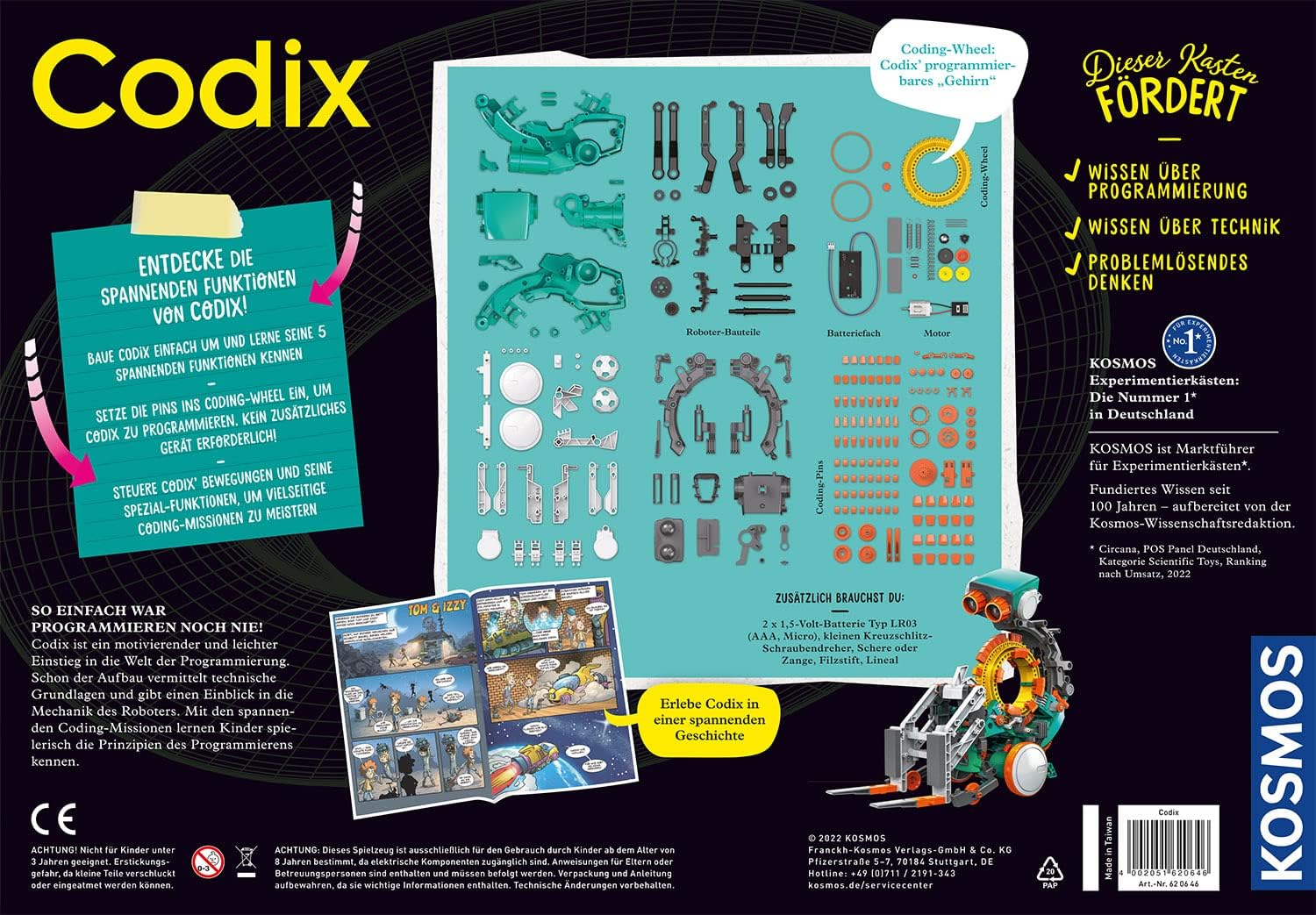
Figure 2.1: Overview of all components included in the Kosmos Codix kit, as shown on the back of the product box.

Figure 2.2: Examples of the comic-based instruction manual and detailed assembly diagrams provided with the Codix robot.
3. Operating the Codix Robot
The Codix robot is controlled mechanically using its innovative coding wheel and programming pins. This section explains how to program the robot to perform its various functions.
3.1 Understanding the Coding Wheel:
The coding wheel is the robot's 'brain'. It has multiple slots where programming pins can be inserted. The position and pattern of these pins determine the robot's actions, such as moving forward, turning, or activating a specific function.
3.2 Programming with Pins:
- Select a Function: Decide which of the five robot models you want Codix to perform (e.g., drawing, playing football).
- Consult the Manual: The instruction manual provides specific pin patterns for each function and movement.
- Insert Pins: Carefully insert the programming pins into the corresponding slots on the coding wheel according to the desired pattern. Ensure pins are firmly seated.
- Activate Robot: Turn on the robot. The coding wheel will rotate, and the pins will mechanically trigger the programmed actions.
- Experiment: Change the pin patterns to discover new movements and sequences. This iterative process is key to understanding mechanical programming.

Figure 3.1: The innovative coding wheel, demonstrating how pins are inserted to program the robot, alongside illustrations of its five distinct functions.
3.3 Robot Functions:
- Drawing Robot: Program Codix to draw patterns.
- Gripping Robot: Enable Codix to pick up and move small objects.
- Basketball Thrower: Configure Codix to throw a small basketball.
- Football Player: Program Codix to kick a football.
- Forklift: Transform Codix into a forklift to transport items.

Figure 3.2: The Codix robot demonstrating its drawing function.

Figure 3.3: The Codix robot demonstrating its gripping function.

Figure 3.4: The Codix robot demonstrating its football playing function.
4. Maintenance
Proper maintenance ensures the longevity and optimal performance of your Codix robot.
4.1 Cleaning:
- Use a soft, dry cloth to wipe down the robot's surfaces.
- Avoid using water or cleaning solutions, as they can damage electronic components.
- Gently remove any dust or debris from gears and moving parts using a small brush or compressed air.
4.2 Storage:
- Store the robot and all its components in a cool, dry place, away from direct sunlight and extreme temperatures.
- Keep small parts, especially the programming pins, in a designated container to prevent loss.
4.3 Battery Care:
- Always remove batteries from the robot if it will not be used for an extended period to prevent leakage.
- Replace all batteries at the same time with new ones of the same type (AAA Alkaline).
- Dispose of used batteries responsibly according to local regulations.
5. Troubleshooting
If your Codix robot is not functioning as expected, refer to the following common issues and solutions:
- Robot does not move or respond:
- Check if the power switch is in the 'ON' position.
- Ensure batteries are correctly installed with the correct polarity.
- Replace old batteries with fresh AAA Alkaline batteries.
- Verify that all mechanical connections and gears are properly aligned and not obstructed.
- Robot performs incorrect actions:
- Re-check the programming pin pattern on the coding wheel against the instructions for the desired function.
- Ensure pins are fully inserted and not loose.
- Inspect the coding wheel for any damage or debris that might interfere with pin detection.
- Parts are loose or fall off:
- Refer to the assembly instructions to re-attach any loose parts.
- Ensure all screws are tightened appropriately (do not overtighten).
If problems persist, consult the detailed troubleshooting section in the original product manual or contact Kosmos customer support.
6. Specifications
| Feature | Detail |
|---|---|
| Brand | Kosmos |
| Model Number | 620646 |
| Item Type Name | Robot toy |
| Material Type | Plastic |
| Item Dimensions (L x W x H) | 29 x 42.6 x 8 cm |
| Item Weight | 888 Grams |
| Battery Requirement | 2 x 1.5 volt AAA (Micro) Alkaline batteries (not included) |
| Recommended Age Range | 8-12 years (Manufacturer Minimum Age: 96 months, Maximum Age: 144 months) |
| Educational Objective | Problem Solving Skills, Programming Skills |
| Assembly Required | Yes |
| Included Components | Robot components, coding wheel, programming pins, screwdriver, instructions |
7. Warranty and Support
Specific warranty information for the Kosmos 620646 Codix Mechanical Coding Robot is typically provided within the product packaging or on the manufacturer's official website. Please refer to these sources for details regarding warranty coverage, terms, and conditions.
7.1 Customer Support:
For technical assistance, missing parts, or further inquiries, please contact Kosmos customer support directly. Contact information can usually be found in the product manual or on the Kosmos official website.
- Manufacturer: KOSMOS
- Website: Refer to the product packaging for the official Kosmos website or support portal.
