
Harman Kardon HKOS6BLKAM
Harman Kardon Onyx Studio 6 Wireless Bluetooth Speaker
User Manual
Introduction
Thank you for choosing the Harman Kardon Onyx Studio 6. This manual provides essential information for setting up, operating, and maintaining your wireless Bluetooth speaker. Please read this manual thoroughly before using the product to ensure proper operation and to maximize your listening experience.
Safety Information
- Do not expose the speaker to extreme temperatures or humidity.
- Do not disassemble, repair, or modify the speaker.
- Use only the specified charging adapter.
- Keep the speaker away from water sources when charging.
- Clean only with a dry cloth.
- Ensure proper ventilation when operating.
What's in the Box
- Harman Kardon Onyx Studio 6 Speaker
- Power Adapter and Cable
- Quick Start Guide (not included in this manual)
- Safety Sheet (not included in this manual)

Image: The retail packaging for the Harman Kardon Onyx Studio 6 speaker, showing the product inside.
Product Overview
Familiarize yourself with the various parts and controls of your Onyx Studio 6 speaker.
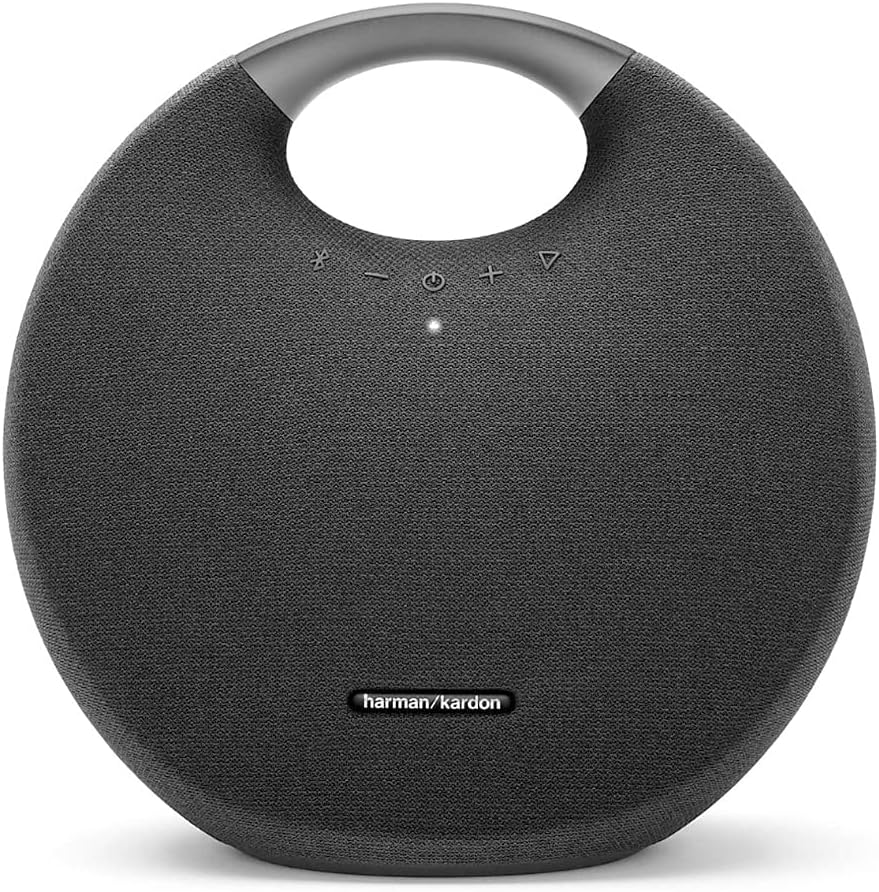
Image: Front view of the Harman Kardon Onyx Studio 6 speaker, showcasing its circular design and integrated aluminum handle.
Top Panel Controls:

Image: Close-up of the top panel of the Harman Kardon Onyx Studio 6, showing the touch-sensitive control buttons: Bluetooth pairing, Volume Down, Power, Volume Up, and Play/Pause.
- Bluetooth Button: Press to enter Bluetooth pairing mode.
- Volume Down (-): Decrease volume.
- Power Button: Press to turn the speaker on or off.
- Volume Up (+): Increase volume.
- Play/Pause Button: Play or pause audio playback.
Rear Panel Connections:

Image: Rear view of the Harman Kardon Onyx Studio 6 speaker, showing the covered ports for AUX input, Power, and Service.
- AUX Input: For connecting external audio devices via a 3.5mm audio cable.
- Power Input: For connecting the power adapter to charge the speaker.
- Service Port: For service use only.
Setup
1. Charging the Battery
Before first use, fully charge the speaker's battery. The built-in rechargeable battery supports up to 8 hours of playtime.
- Connect the power adapter to the Power Input port on the rear of the speaker.
- Plug the power adapter into a wall outlet.
- The LED indicator on the power button will show charging status. A full charge takes approximately 8 hours.
2. Powering On/Off
- To turn on: Press the Power Button. The LED indicator will light up.
- To turn off: Press the Power Button again. The LED indicator will turn off.
3. Bluetooth Pairing
The Onyx Studio 6 can connect wirelessly to up to two Bluetooth-enabled devices simultaneously.
- Turn on the speaker. It will automatically enter Bluetooth pairing mode if no device is connected, or you can press the Bluetooth Button to initiate pairing. The Bluetooth LED will flash blue.
- On your Bluetooth-enabled device (smartphone, tablet, etc.), enable Bluetooth and search for available devices.
- Select "Harman Kardon Onyx Studio 6" from the list of devices.
- Once connected, the Bluetooth LED will glow solid blue.
4. Connecting Multiple Devices
You can connect up to two smart devices at the same time and take turns playing music.
- Connect the first device via Bluetooth as described above.
- On the second device, enable Bluetooth and select "Harman Kardon Onyx Studio 6" from the list.
- Both devices will now be connected. The speaker will play audio from the device that starts playback first. If the second device starts playing, the first device's audio will pause.
Operating
Audio Playback
- Play/Pause: Press the Play/Pause Button to start or pause music.
- Volume Control: Press the Volume Up (+) or Volume Down (-) buttons to adjust the volume.
Call Handling (Built-in Microphone)
The Onyx Studio 6 features a built-in microphone for hands-free calling when connected to a smartphone.
- Answer Call: Press the Play/Pause Button once.
- End Call: Press the Play/Pause Button once during a call.
- Reject Call: Press and hold the Play/Pause Button for 2 seconds.
IPX7 Waterproof Feature
The Onyx Studio 6 is IPX7 waterproof, meaning it can be submerged in water up to 1 meter (3 feet) for up to 30 minutes. This makes it suitable for use near pools, at the beach, or in other wet environments.
- Ensure all port covers on the rear panel are securely closed before exposing the speaker to water.
- Do not charge the speaker if it is wet.
- After exposure to water, wipe the speaker dry before charging or using the ports.
Maintenance
Cleaning
- Always disconnect the speaker from power before cleaning.
- Use a soft, dry cloth to wipe the surface of the speaker.
- Do not use abrasive cleaners, alcohol, benzene, or other chemical solvents, as these may damage the finish or components.
Storage
- Store the speaker in a cool, dry place away from direct sunlight and extreme temperatures.
- If storing for an extended period, charge the battery periodically (e.g., every 3 months) to maintain battery health.
Troubleshooting
| Problem | Possible Cause | Solution |
|---|---|---|
| Speaker does not turn on. | Battery is depleted. | Connect the speaker to a power outlet using the provided adapter and charge it. |
| Cannot pair with Bluetooth device. | Bluetooth is not enabled on the device; speaker is not in pairing mode; device is too far. | Ensure Bluetooth is on. Press the Bluetooth button on the speaker. Move device closer (within 10 meters). Forget speaker from device's Bluetooth list and re-pair. |
| No sound from speaker. | Volume is too low; speaker is paused; incorrect input source. | Increase volume on speaker and device. Press Play/Pause. Ensure correct source (Bluetooth or AUX). |
| Poor sound quality. | Bluetooth interference; low battery. | Move speaker closer to the device. Charge the speaker. Avoid obstacles between speaker and device. |
Specifications
| Model Name | Harman Kardon Onyx Studio 6 |
| Model Number | HKOS6BLKAM |
| Dimensions (D x W x H) | 5.04"D x 11.46"W x 11.18"H (12.8 cm x 29.1 cm x 28.4 cm) |
| Weight | 8 Pounds (3.63 kg) |
| Speaker Type | Portable Bluetooth Speaker |
| Power Output | 50 Watts RMS |
| Woofer Diameter | 120 mm |
| Tweeter Diameter | 25 mm |
| Signal-to-Noise Ratio | 80 dB |
| Bluetooth Range | Up to 10 meters (33 feet) |
| Battery Type | Lithium Ion |
| Battery Life | Up to 8 hours (varies by volume level and content) |
| Charging Time | Approximately 8 hours |
| Waterproof Rating | IPX7 |
| Material | Aluminum, Fabric |

Image: The retail box of the Harman Kardon Onyx Studio 6 speaker, illustrating its dimensions: 11.46 inches (width), 11.18 inches (height), and 5.04 inches (depth).
Warranty and Support
Harman Kardon products are designed to provide years of trouble-free operation. For detailed warranty information and technical support, please refer to the warranty card included with your product or visit the official Harman Kardon website.
Online Support: www.harmankardon.com/support
Customer Service: Refer to your regional Harman Kardon contact information for phone support.
Related documentsHKOS6BLKAM


Ask a question about this manual
Ask about setup, troubleshooting, compatibility, parts, safety, or missing instructions. Manuals+ will review the question and use this page’s manual context to help answer it.