
SZHY-LINK DG31-00005A
Instruction Manual for DG31-00005A Convection Fan Motor
Brand: SZHY-LINK | Model: DG31-00005A
1. Introduction
This manual provides essential information for the DG31-00005A Convection Fan Motor, a replacement part designed for various Samsung range ovens. Understanding its function, compatibility, and proper handling is crucial for safe and effective operation.
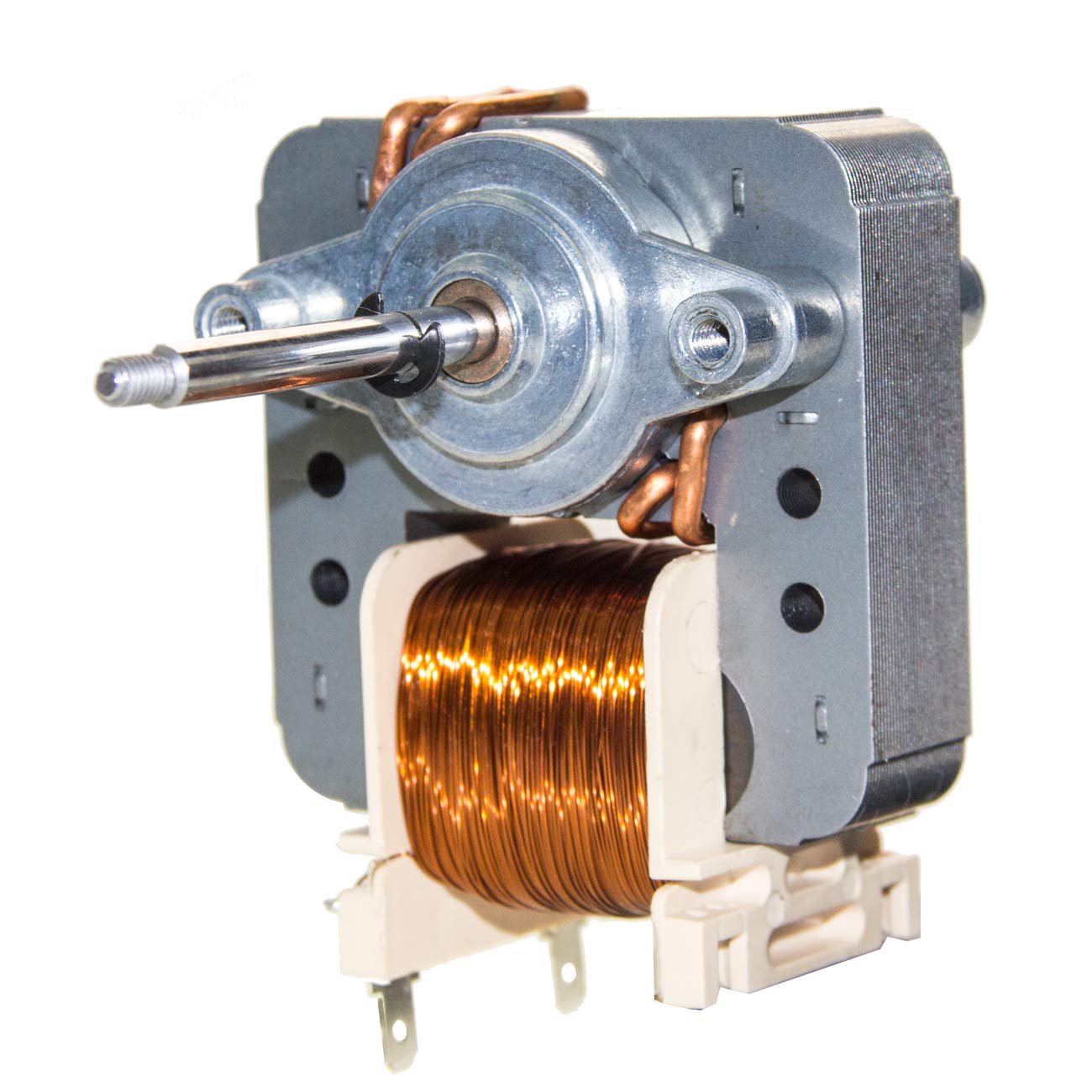
Figure 1: Front view of the DG31-00005A Convection Fan Motor. This image shows the motor's main body, copper windings, and the shaft with a threaded end.
2. Compatibility and Part Numbers
The DG31-00005A Convection Fan Motor is a direct replacement for several original equipment manufacturer (OEM) part numbers and is compatible with various Samsung range oven models. Please verify your appliance's model number and the existing part number before purchase and installation.
Replaces Part Numbers:
- AP4338602
- 2087455
- PS4240735
- Samsung FE-N500WX
- Samsung FE-N500WX/XAA-0000
- Samsung FE710DRS
- Samsung FE710DRS/XAA-0001
- Samsung FE710DRSXAA
- Samsung FEN300WX
- Samsung FEN300WXXAA

Figure 2: Dimensional comparison of DG31-00005A with another motor model (EAU61865301). This image highlights the importance of verifying dimensions to ensure correct fit. Note the different shaft lengths and overall motor sizes.
Important: Always compare the dimensions and specifications of the replacement part with your original motor to ensure proper fit and function. Incorrect part installation can lead to appliance malfunction or damage.
3. Setup and Installation
Installation of appliance parts should ideally be performed by a qualified technician. If you choose to perform the installation yourself, proceed with extreme caution and follow all safety guidelines. Improper installation can lead to electric shock, fire, or damage to the appliance.
Safety Precautions:
- Disconnect Power: Always unplug the oven from the power outlet or turn off the circuit breaker before beginning any repair or installation.
- Wear Protective Gear: Use gloves and safety glasses to protect against sharp edges and debris.
- Handle with Care: Components can be delicate. Avoid dropping or forcing parts.
- Consult Appliance Manual: Refer to your specific oven's service manual for detailed disassembly and reassembly instructions.
General Installation Steps (Consult your oven's service manual for specifics):
- Ensure the oven is completely cool and disconnected from power.
- Access the convection fan motor. This typically involves removing the back panel of the oven or internal components.
- Carefully disconnect the wiring from the old motor, noting their positions for reinstallation.
- Unscrew and remove the old motor.
- Install the new DG31-00005A motor, ensuring it is securely fastened.
- Reconnect the wiring correctly.
- Reassemble any removed panels or components.
- Restore power and test the oven's convection function.

Figure 3: Side view of the DG31-00005A Convection Fan Motor, showing the mounting points and electrical terminals. This view is helpful for understanding how the motor attaches within the oven.
4. Operating Principle
The DG31-00005A is a convection fan motor designed for use in electric and gas range ovens. Its primary function is to circulate hot air evenly throughout the oven cavity during convection baking or roasting. This circulation helps to maintain a consistent temperature, reduce cooking times, and ensure more uniform browning and cooking of food.
When the convection mode is activated, the motor powers a fan blade (not included with this motor part) that draws air from the oven, heats it, and then redistributes it. A properly functioning convection fan motor is essential for the effective operation of your oven's convection features.
5. Maintenance
The DG31-00005A convection fan motor is a sealed unit and does not require routine user maintenance such as lubrication. However, ensuring the surrounding area within the oven is clean can help prolong the life of the motor and fan assembly.
General Maintenance Tips for Oven Components:
- Regularly clean the oven interior according to your appliance's manual to prevent grease and food debris buildup, which can impede fan operation.
- Ensure the fan blade (if accessible and removable) is free from obstructions or debris.
- Avoid using abrasive cleaners near the motor or fan components.
6. Troubleshooting Common Symptoms
The DG31-00005A convection fan motor is designed to address specific issues related to the oven's convection function. If you experience any of the following symptoms, replacing the convection fan motor may resolve the problem:
- No Heat or Not Enough Heat: While many factors can cause this, a malfunctioning convection fan motor can contribute to uneven heating or insufficient heat distribution, especially in convection mode.
- Unusual Noises: Grinding, squealing, or rattling noises coming from the oven's fan area often indicate a worn-out or failing motor bearing.
- Not Baking Evenly: If food is consistently undercooked or overcooked in certain spots despite proper temperature settings, the convection fan may not be circulating air effectively due to a faulty motor.
Note: These symptoms can also be caused by other oven components. It is recommended to diagnose the issue thoroughly or consult a professional before replacing parts.
7. Product Specifications
| Specification | Value |
|---|---|
| Part Number | DG31-00005A |
| Voltage | AC 120V |
| Frequency | 60Hz |
| Brand | SZHY-LINK |
| Item Model Number | DG31-00005A |
| ASIN | B089KMRCL7 |
| UPC | 889284062085 |
| Item Weight | 0.49 Kilograms |
| Parcel Dimensions | 9.91 x 8.71 x 6.91 cm |
8. Warranty and Support
SZHY-LINK offers a satisfaction guarantee for this product. If you are not satisfied for any reason, you may request a replacement or a full refund. No questions asked.
Customer Support:
For any questions or concerns regarding the DG31-00005A Convection Fan Motor, please log in to your Amazon Buyer account and send a message to the seller. The seller aims to respond within one business day.
For more information or to purchase, visit the official product page: Product Link
Ask a question about this manual
Ask about setup, troubleshooting, compatibility, parts, safety, or missing instructions. Manuals+ will review the question and use this page’s manual context to help answer it.