
Introduction
Thank you for choosing Tribit FlyBuds NC Wireless Earbuds. These earbuds are designed to provide a superior audio experience with Active Noise Cancellation (ANC), Transparent Mode, and intuitive Smart Touch Controls. Featuring Bluetooth 5.0 connectivity and up to 35 hours of total playtime with the charging case, they are perfect for various activities, from work to home and office use.
What's in the Box
- Tribit FlyBuds NC Wireless Earbuds
- Wireless Charging Case
- USB-C Charging Cable
- Multiple Sizes of Eartips (5 additional pairs)
- User Manual

Image: Tribit FlyBuds NC Earbuds and Charging Case, along with included accessories.
Setup
1. Charging the Earbuds and Case
Before first use, ensure the charging case and earbuds are fully charged. Connect the provided USB-C cable to the charging port on the case and to a power source. The LED indicators on the case will show the charging status. Ensure the protective film on the earbud charging points is removed before placing them in the case.
2. One-Step Pairing
The Tribit FlyBuds NC earbuds feature one-step pairing for convenience.
- Open the charging case. The earbuds will automatically power on and enter pairing mode.
- On your smartphone or Bluetooth-enabled device, go to Bluetooth settings.
- Select "Tribit FlyBuds NC" from the list of available devices to connect.
- Once connected, you will hear an audible confirmation.

Image: Earbuds automatically connecting to a smartphone for easy setup.
Operating Instructions
Smart Touch Controls
The earbuds are equipped with smart touch controls for easy management of music and calls.
- Play/Pause: Single tap on either earbud.
- Answer/End Call: Single tap on either earbud.
- Reject Call: Press and hold either earbud for 2 seconds.
- Next Track: Double tap the right earbud.
- Previous Track: Double tap the left earbud.
- Volume Up: Triple tap the right earbud.
- Volume Down: Triple tap the left earbud.
- Activate Voice Assistant: Press and hold the right earbud for 2 seconds.

Image: User interacting with the touch-sensitive surface of the earbud.
Active Noise Cancellation (ANC) & Transparent Mode
Switch between different listening modes to suit your environment.
- Switch Modes: Press and hold the left earbud for 2 seconds to cycle through ANC On, Transparent Mode, and ANC Off.
- Active Noise Cancellation: Reduces ambient noise by up to 30dB, ideal for focused listening in noisy environments.
- Transparent Mode: Amplifies surrounding sounds, allowing you to stay aware of your environment without removing the earbuds.

Image: Visual representation of Active Noise Cancellation technology.

Image: User experiencing Transparent Mode while exercising outdoors.
Maintenance
To ensure the longevity and optimal performance of your Tribit FlyBuds NC earbuds, follow these maintenance guidelines:
- Regularly clean the earbuds and charging case with a soft, dry, lint-free cloth.
- Remove ear tips and clean them with mild soap and water if necessary, ensuring they are completely dry before reattaching.
- Avoid exposing the earbuds to extreme temperatures, humidity, or liquids. While they are waterproof, prolonged exposure is not recommended.
- Store the earbuds in their charging case when not in use to protect them and keep them charged.
Troubleshooting
| Issue | Possible Solution |
|---|---|
| Earbuds not pairing | Ensure earbuds are charged. Turn off and on Bluetooth on your device. Forget the device and re-pair. |
| No sound from one earbud | Ensure both earbuds are charged. Place both earbuds back in the case, close, and reopen. Re-pair if necessary. |
| Charging issues | Check USB-C cable and power source. Ensure charging contacts on earbuds and case are clean and free of debris. Remove any protective films. |
| ANC not working effectively | Ensure ear tips provide a good seal. Cycle through ANC modes (ANC On, Transparent, ANC Off) by pressing and holding the left earbud. |
Specifications
| Feature | Detail |
|---|---|
| Model Name | FlyBuds NC (BTHA1) / FlyBuds C2 / SolarBuds C2 |
| Connectivity Technology | Wireless, Bluetooth 5.0 |
| Noise Control | Active Noise Cancellation (ANC) |
| Microphones | 4 Microphones with ENC (Environmental Noise Cancellation) |
| Playtime (Single Charge) | Up to 10 Hours |
| Total Playtime (with Case) | Up to 35 Hours |
| Quick Charge | 10 minutes charge for 1 hour playtime |
| Charging Time (Earbuds/Case) | 1.5 Hours |
| Water Resistance Level | Waterproof |
| Control Type | Smart Touch Control |
| Audio Driver Type | Dynamic Driver (10mm Dual Drivers) |
| Item Weight | 0.4 Ounces |
| Product Dimensions | 2.36 x 2.36 x 1.28 inches |

Image: Visual representation of the extended 35-hour playtime.
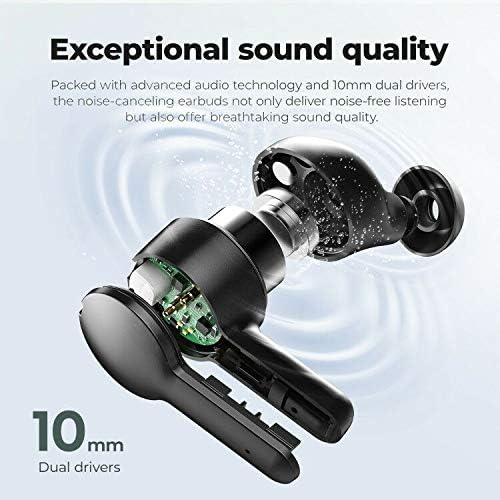
Image: Detailed view of the 10mm dual drivers for exceptional sound quality.

Image: Illustration of Environmental Noise Cancellation for clear calls.
Warranty and Support
Tribit offers comprehensive support for your product:
- 30-Day Money Back Guarantee: If you are not satisfied with your purchase.
- 18-Month Replacement Warranty: For product defects or malfunctions.
- Lifetime Support Guarantee: Ongoing technical support and assistance.
For further assistance, please visit the official Tribit website: tribitaudio.com


