
VITCOCO B089KG67YQ
VITCOCO Ear Wax Removal Tool User Manual
Model: B089KG67YQ
1. Introduction
The VITCOCO Ear Wax Removal Tool is an advanced visual ear cleaner designed for safe and effective ear wax removal. It features a 1920P HD otoscope camera with 6 adjustable LED lights, providing clear visuals of the ear canal. Its ultra-slim 3.0mm lens is suitable for various ear sizes, including those of babies, children, adults, and pets. This versatile tool can also be used for observing other body parts.

Image: The VITCOCO Ear Wax Removal Tool in use, showing the device, a smartphone displaying the ear canal, and various accessories.
2. Safety Information
- Statements regarding dietary supplements have not been evaluated by the FDA and are not intended to diagnose, treat, cure, or prevent any disease or health condition.
- Children should only use the otoscope when accompanied by an adult.
- The device incorporates a built-in intelligent temperature control chip to prevent the lens from overheating, ensuring user safety and comfort.
- Exercise caution and maintain a steady hand when operating the tool to avoid discomfort or injury.
3. Package Contents
Upon opening the package, verify that all items listed below are present and in good condition:
- VITCOCO Visual WiFi Ear Endoscope (Main Unit)
- USB Charging Cable
- User Manual
- 6-piece Stainless Steel Earwax Cleaner Kit (includes various ear picks like spring, dual-head, annuler spiral, and spoon shapes)
- Silicone Ear Tips (various sizes: ring, large, regular)
- Cleaning Brush
- Protective Caps (Kids eardrum, Eardurn)

Image: Overview of the VITCOCO Ear Wax Removal Tool and its included accessories.

Image: Detailed view of the stainless steel ear picks and silicone ear tips.
4. Product Overview
The VITCOCO Ear Wax Removal Tool integrates advanced technology for a comprehensive ear cleaning experience.
- High-Definition Camera: Equipped with a 1920P HD otoscope camera and 6 adjustable LED lights for clear visualization of the ear canal.
- Ultra-Slim Lens: Features a 3.0mm ultra-thin lens, allowing comfortable access to the eardrum and deep ear canals.
- Wide Compatibility: Compatible with various smartphones and tablets running iOS and Android operating systems.
- Multi-functional Use: Beyond ear wax removal, the device can be used to observe other body parts such as the mouth, nose, skin, and hair.
- Temperature Control: Built-in intelligent temperature control chip ensures the lens remains at a safe temperature during use.

Image: Key features of the VITCOCO Visual WiFi Otoscope.

Image: Comparison of the 3.0mm ultra-slim lens with a larger lens, demonstrating its advantage.

Image: Detail of the 1920P HD camera and its superior clarity.
5. Setup
- Download the App: Scan the QR code below or search for "Suear" in your device's app store (Google Play Store for Android, Apple App Store for iOS) and install the application.
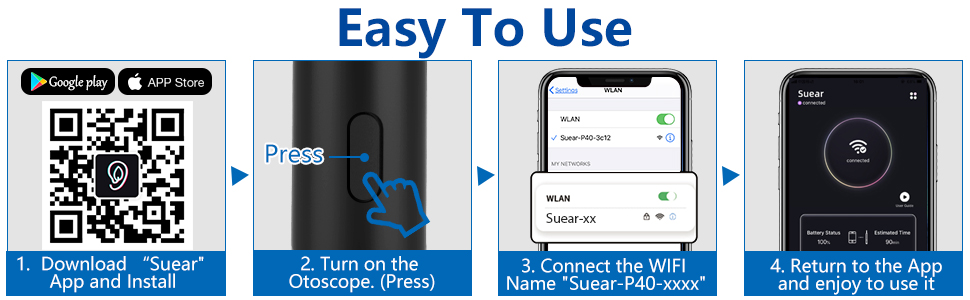
Image: Easy to Use setup guide with QR code for app download.
App Download Link: http://qr19.cn/CRUIhc
- Power On the Otoscope: Press and hold the switch button on the ear wax removal tool to turn it on.
- Connect to Wi-Fi: Go to your smartphone or tablet's Wi-Fi settings. Find and connect to the Wi-Fi network named "Suear-P40-xxxx" (the exact name may vary slightly).
- Launch the App: Return to the "Suear" app. The device should automatically connect, and you will see a live view from the otoscope camera.
6. Operating Instructions
6.1 Ear Wax Removal
Once connected, carefully insert the otoscope into the ear canal. Use the live feed on your device to guide the ear pick attachment. Gently scoop out ear wax. Always ensure a clear view and avoid pushing wax deeper into the ear canal.
Video: Demonstration of ear wax removal using the VITCOCO otoscope.
6.2 Multi-functional Applications
The VITCOCO otoscope is not limited to ear inspection. Its high-definition camera and compact design allow for various other uses:
- Mouth Inspection: Examine teeth, gums, and throat.
- Nose Inspection: View nasal passages.
- Skin Examination: Observe skin conditions or pores.
- Hair/Scalp Inspection: Check scalp health or hair follicles.
- Pet Examination: Safely inspect the ears or other areas of pets.

Image: Wide applications of the VITCOCO otoscope for various body parts and pets.
7. Maintenance
- Cleaning the Lens: The lens of the otoscope is IP67 waterproof. After each use, clean the lens thoroughly with water or an alcohol wipe.

Image: The IP67 waterproof lens being cleaned. Note: Only the lens is waterproof.
- Cleaning Accessories: Use the provided tiny brush to clean the stainless steel ear picks after each use. Ensure all accessories are dry before storage.
- Storage: Store the device and its accessories in a clean, dry place away from direct sunlight and extreme temperatures.
- Charging: Recharge the device using the provided USB cable when the battery indicator shows low power.
8. Troubleshooting
| Problem | Possible Cause | Solution |
|---|---|---|
| Device does not turn on. | Low battery. | Charge the device using the provided USB cable. |
| Cannot connect to the app / No image on screen. | Incorrect Wi-Fi connection or app issue. |
|
| Image is blurry or unclear. | Dirty lens or insufficient lighting. |
|
| Device gets hot during use. | Normal operation or prolonged use. | The device has intelligent temperature control. If it feels excessively hot, discontinue use and allow it to cool down. |
9. Specifications
| Feature | Detail |
|---|---|
| Model Number | B089KG67YQ |
| Camera Resolution | 1920P HD |
| Lens Diameter | 3.0mm |
| LED Lights | 6 adjustable LED lights |
| Waterproof Rating | IP67 (lens only) |
| Connectivity | Wi-Fi (for smartphone/tablet connection) |
| Compatibility | iOS, Android smartphones and tablets |
| Package Dimensions | 6.54 x 3.78 x 0.75 inches |
| Item Weight | 7.37 ounces |
| Manufacturer | VITCOCO |
| First Available Date | August 7, 2020 |
10. Warranty and Support
Specific warranty information for this product is not provided in the available documentation. For any product inquiries, technical support, or warranty claims, please contact VITCOCO customer service or visit the official VITCOCO store on Amazon:
Ask a question about this manual
Ask about setup, troubleshooting, compatibility, parts, safety, or missing instructions. Manuals+ will review the question and use this page’s manual context to help answer it.