
1. Introduction
This manual provides instructions for the Easytry123 Replacement Remote Control, designed for use with various Fujitsu air conditioner models. This remote control offers essential functions for operating your air conditioning unit. Please note that while this remote is a functional replacement, it may not support all advanced features present on your original remote control. Refer to the compatibility section to ensure your air conditioner model is supported.
2. Product Overview
The Easytry123 Replacement Remote Control features a clear display and intuitively placed buttons for easy operation of your Fujitsu air conditioner.
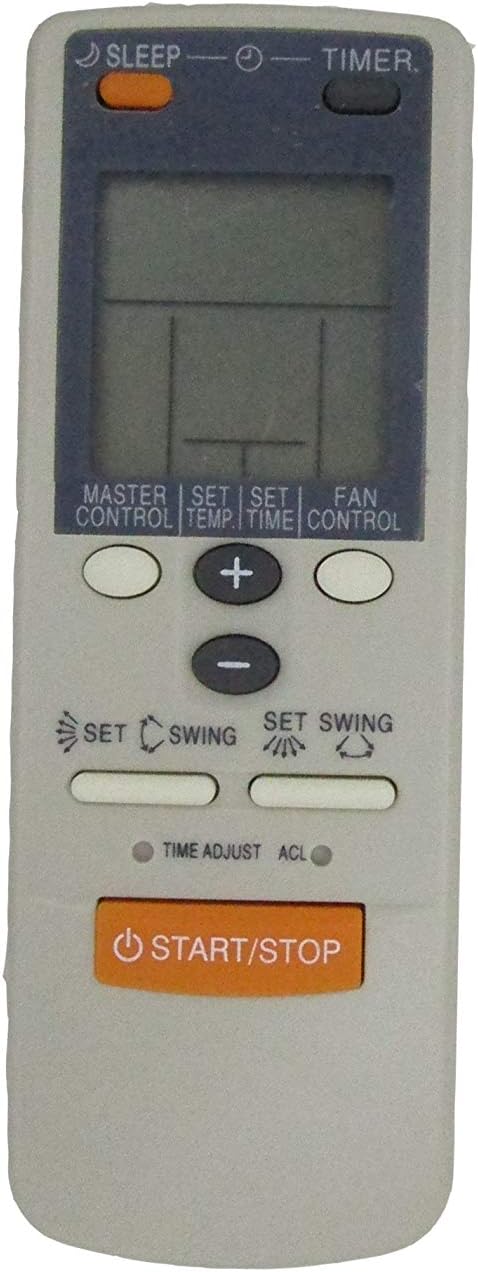
Figure 2.1: Front view of the remote control, displaying the LCD screen and various function buttons.

Figure 2.2: Angled perspective of the remote control, providing a view of its overall shape and button arrangement.
3. Setup
3.1 Battery Installation
The remote control requires two AAA batteries for operation. Batteries are not included with the remote control.
- Locate the battery compartment on the back of the remote control.
- Slide the battery compartment cover downwards or outwards to open it.
- Insert two AAA batteries, ensuring the positive (+) and negative (-) terminals align correctly with the markings inside the compartment.
- Replace the battery compartment cover by sliding it back into place until it clicks securely.

Figure 3.1: Back view of the remote control, illustrating the battery compartment and battery type requirement.
Important: Do not mix old and new batteries. Do not mix different types of batteries. Ensure correct polarity when inserting batteries.
4. Operating Instructions
Point the remote control directly at the air conditioner's receiver when operating. Ensure there are no obstructions between the remote and the unit.
- START/STOP Button: Press to turn the air conditioner ON or OFF.
- MASTER CONTROL Button: Cycles through the main operating modes such as Cool, Heat, Fan, Dry, and Auto. Press repeatedly to select the desired mode.
- SET TEMP Button: Used in conjunction with the + and - buttons to adjust the desired temperature setting.
- FAN CONTROL Button: Adjusts the fan speed. Press repeatedly to cycle through available fan speeds (e.g., Auto, Low, Medium, High).
- SLEEP Button: Activates or deactivates the sleep mode, which typically adjusts temperature and fan speed for comfortable sleep and energy saving.
- TIMER Button: Used to set the ON or OFF timer for the air conditioner. Follow the on-screen prompts or use the + and - buttons to set the time.
- SET TIME Button: Used for setting the current time or adjusting timer settings.
- + / - Buttons: Used to increase or decrease values such as temperature, time, or other settings displayed on the LCD.
- SET SWING (Horizontal Louver Icon) Button: Controls the horizontal movement of the air conditioner's louvers.
- SET SWING (Vertical Louver Icon) Button: Controls the vertical movement of the air conditioner's louvers.
- TIME ADJUST Button: Provides fine-tuning for time-related settings.
- ACL (Accessory Clear/Reset) Button: This is a recessed button, typically used for resetting the remote control's settings. Use a thin, pointed object (like a paperclip) to press it.
5. Compatibility
This Easytry123 remote control is designed to be compatible with specific Fujitsu air conditioner models, including but not limited to: AWY18FBBJ, AWY24FBBJ, AWY30FBBJ, AWY14UBBJ, AWY18UBBJ, AWY24UBBJ, AWY30UBBJ, AWY18UBAJ, AWY24UBAJ, AU18TFCMF, AU30TFCMF, and AU36TFCMF. It is crucial to verify that your air conditioner model number is listed or confirmed as compatible before use. If your model is not explicitly listed, the remote may not function correctly or may have limited functionality.
6. Troubleshooting
- Remote not responding:
- Check if the batteries are inserted correctly with the correct polarity.
- Replace old batteries with new AAA batteries.
- Ensure there are no obstructions between the remote control and the air conditioner's receiver.
- Confirm that the remote is compatible with your specific Fujitsu air conditioner model.
- Limited functionality:
- As a replacement remote, some advanced or specific functions of your original unit may not be supported. This is normal for universal or replacement remotes.
- Refer to the compatibility section to ensure your model is fully supported for basic functions.
- Display is dim or blank:
- Replace the batteries. Low battery power can cause a dim or non-functional display.
7. Specifications
- Power Source: 2 x AAA Batteries (not included)
- Compatibility: Designed for various Fujitsu Air Conditioner models (refer to Section 5)
8. Maintenance
- Cleaning: Wipe the remote control with a soft, dry cloth. Do not use liquid cleaners or abrasive materials.
- Battery Replacement: Replace batteries when the remote's range decreases or the display becomes dim. Remove batteries if the remote will not be used for an extended period to prevent leakage.
- Storage: Store the remote control in a cool, dry place away from direct sunlight and extreme temperatures.
9. Warranty and Support
For information regarding warranty coverage or technical support, please refer to the seller's policies or contact the point of purchase. As this is a replacement product, specific warranty details may vary.