
Introduction
This manual provides essential instructions for the proper setup, operation, and maintenance of your Wired AGAB412 Men's Wristwatch. The AGAB412 model features a Bluetooth link time correction function, a convenient 3-minute countdown timer, and a perpetual calendar that automatically adjusts until February 28, 2100. Designed for daily wear, this timepiece offers 10 ATM water resistance, ensuring durability and reliability. Please read this manual thoroughly to ensure optimal performance and longevity of your watch.
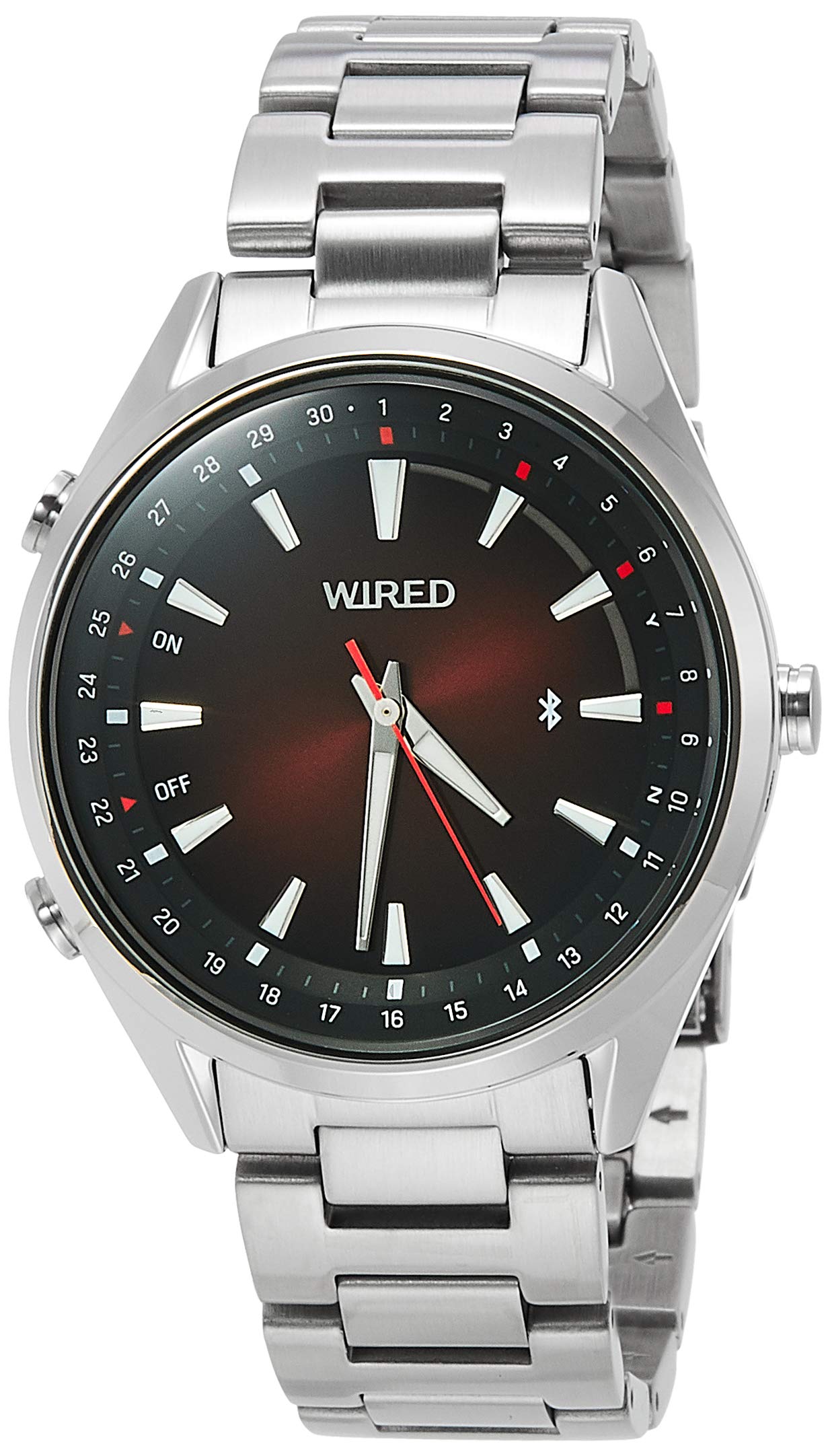
Figure 1: The Wired AGAB412 Men's Wristwatch with a silver bracelet and red dial, worn on a wrist. This image illustrates the watch's appearance and how it sits on the wearer's arm.
Setup
Before using your Wired AGAB412 wristwatch, perform the initial setup steps to ensure accurate timekeeping and functionality.
- Initial Time Setting:
If the watch is not displaying the correct time, manually set it by pulling out the crown to the first or second click (refer to the watch's specific crown positions for time and date adjustment). Rotate the crown to set the hour and minute hands. Push the crown back in to start the watch.
- Bluetooth Time Correction:
Your watch is equipped with a Bluetooth time correction function. To utilize this feature, ensure your smartphone has the dedicated Wired watch application installed. Activate Bluetooth on your phone and open the application. Follow the on-screen instructions within the app to pair your watch and synchronize the time automatically. This function also corrects the calendar.
- Perpetual Calendar:
The watch features a perpetual calendar, which automatically adjusts for different month lengths and leap years until February 28, 2100. Once the time is set via Bluetooth, the calendar will be accurately configured.
Operating Instructions
Understand the basic functions and features of your Wired AGAB412 wristwatch.
- Reading Time: The watch displays time using analog hour, minute, and second hands.
- Countdown Timer: The watch includes a 3-minute countdown timer. To activate and operate this function, refer to the specific button or crown operations detailed in the full product manual (not provided in this summary). This timer is designed for easy, one-action use.
- Water Resistance (10 ATM): Your watch is designed with 10 ATM (100 meters) water resistance, making it suitable for everyday use, including showering, swimming, and snorkeling. Caution: Do not operate the crown or pushers while the watch is wet or submerged, as this can compromise the water resistance.
Maintenance
Proper care and maintenance will help preserve the appearance and functionality of your watch.
- Cleaning: Wipe the watch case and bracelet regularly with a soft, dry cloth to remove dust and dirt. For stubborn grime, a slightly damp cloth can be used, followed by immediate drying. Avoid using harsh chemicals or abrasive materials.
- Water Resistance Care: After exposure to saltwater, rinse the watch with fresh water and dry it thoroughly. Periodically have the water resistance seals checked by an authorized service center, especially if the watch is frequently exposed to water.
- Temperature Extremes: Avoid exposing the watch to extreme temperatures (hot or cold) or sudden temperature changes, as this can affect the movement and battery life.
- Magnetic Fields: Keep the watch away from strong magnetic fields, which can interfere with the accuracy of the quartz movement.
Troubleshooting
If you encounter issues with your watch, refer to the following common troubleshooting steps.
- Watch Not Running:
Check if the crown is fully pushed in. If the watch is a quartz model, the battery may need replacement. Consult an authorized service center for battery replacement.
- Incorrect Time Display:
Attempt to manually set the time as described in the "Setup" section. If the watch has a Bluetooth time correction function, ensure it is paired with your smartphone and the app is running to synchronize the time.
- Water Inside the Watch:
If you notice condensation or water droplets inside the watch, immediately take it to an authorized service center. Do not attempt to open the watch yourself, as this can cause further damage and void the warranty.
- Bluetooth Connection Issues:
Ensure Bluetooth is enabled on your smartphone and the Wired watch application is up to date. Try restarting both your phone and the watch (if applicable) and attempt to re-pair them.
Specifications
| Feature | Detail |
|---|---|
| Model Number | AGAB412 |
| Brand | Wired |
| Display Type | Analog |
| Movement Type | Quartz |
| Water Resistance Depth | 100 Metres (10 ATM) |
| Case Material | Stainless Steel |
| Band Material | Stainless Steel |
| Case Diameter | 41.5 Millimetres |
| Case Thickness | 13.81 Millimetres |
| Band Width | 20 Millimetres |
| Dial Color | Red |
| Band Color | Silver |
| Crystal Type | Hardlex |
| Item Weight | 133 Grams |
| Additional Features | Second Hand, Bluetooth Time Correction, Perpetual Calendar, 3-Minute Countdown Timer |
Warranty Information
Specific warranty details for the Wired AGAB412 Wristwatch are typically provided with the product packaging or can be found on the official Wired (Seiko) manufacturer's website. Please retain your proof of purchase for any warranty claims. Warranty coverage generally includes manufacturing defects but may not cover damage resulting from improper use, accidents, or unauthorized repairs.
Customer Support
For further assistance, technical support, or service inquiries regarding your Wired AGAB412 Wristwatch, please refer to the contact information provided in your product's original documentation or visit the official website of the manufacturer, Wired (a brand of Seiko).