
1. Product Overview
The T-SUNUS Solar House Numbers Light is a solar-powered, LED-illuminated address sign designed to enhance visibility of your house number, especially at night. It features a built-in rechargeable battery, automatically charging during the day and illuminating at dusk. The unit is constructed from durable, IP44 waterproof stainless steel, offering protection against various weather conditions.
This product provides both cool white (6000K) and warm white (3000K) light options, allowing for customization to suit your preference. It includes multiple sets of numbers and letters for personalized address display.
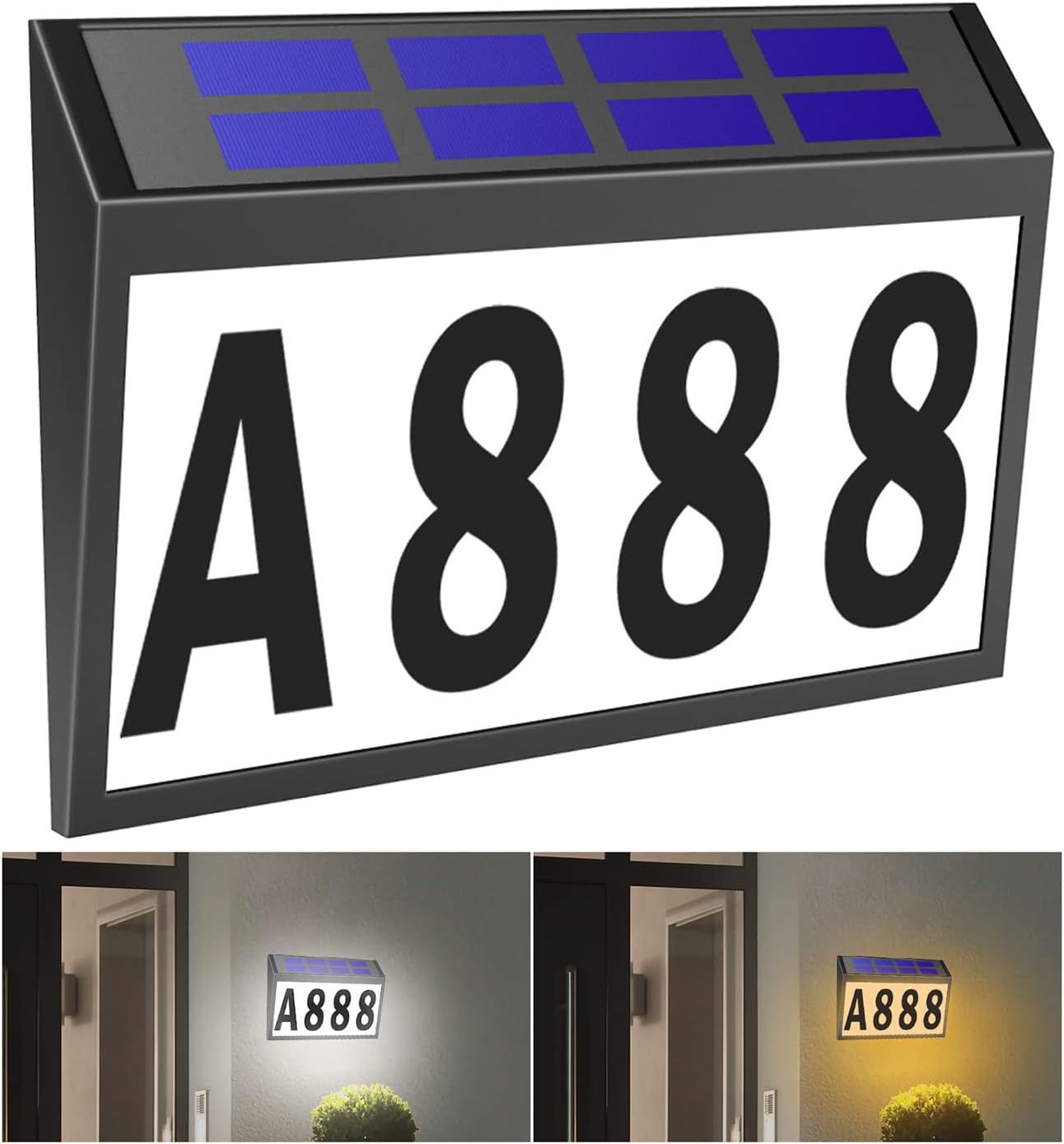
Image 1.1: T-SUNUS Solar House Numbers Light with customizable address display and dual light color options.
2. Package Contents
Verify that all items listed below are included in your package:
- Solar House Number Light Unit (x1)
- Number Stickers (0-9) (x3 sets)
- Letter Stickers (A-Z) (x1 set)
- Number Placement Template (x1)
- Mounting Screws and Wall Anchors (x2 sets)

Image 2.1: All components included in the T-SUNUS Solar House Numbers Light package.
3. Installation Guide
3.1 Applying Numbers and Letters
- Carefully peel off the desired number and letter stickers from their sheets.
- Use the provided template to ensure proper alignment and spacing of your house number/address on the light panel.
- Firmly press each sticker onto the light panel, ensuring no air bubbles are trapped underneath.
3.2 Mounting the Unit
- Choose a location that receives direct sunlight for at least 6-8 hours daily to ensure optimal charging.
- Press the ON/OFF button located on the back of the unit to activate it. Cover the solar panel briefly to confirm the light turns on.
- Mark the positions for the two screw holes on your desired mounting surface (wall, mailbox, fence, etc.).
- Drill two holes at the marked positions. Insert the wall anchors if mounting into masonry or drywall.
- Insert the screws, leaving a small portion protruding.
- Align the slots on the back of the solar light unit with the protruding screws and hang the unit securely.

Image 3.1: Visual guide for the installation process.
Video 3.2: Official T-SUNUS Solar House Number Light installation and feature overview.
4. Operating Instructions
4.1 Initial Activation
Before first use, ensure the unit is switched to the 'ON' position using the button on the back. Allow the solar panel to charge in direct sunlight for at least 8 hours to ensure the battery is fully charged.
4.2 Automatic Operation
The T-SUNUS Solar House Numbers Light is equipped with a light sensor. It will automatically turn on at dusk and turn off at dawn, providing illumination for your address throughout the night. The unit offers two lighting modes: cool white (6000K) and warm white (3000K). The desired mode can be selected via a switch on the unit.

Image 4.1: Demonstrating the cool white and warm white light options.
5. Maintenance
To ensure optimal performance and longevity of your solar house numbers light, follow these maintenance guidelines:
- Cleaning: Regularly wipe the solar panel and light surface with a soft, damp cloth to remove dust, dirt, and debris. A clean solar panel ensures efficient charging.
- Obstruction Check: Periodically check that no leaves, snow, or other obstructions are covering the solar panel, as this can hinder charging.
- Battery Life: The built-in rechargeable battery has a limited lifespan. If the light duration significantly decreases over time, the battery may need replacement. Consult customer support for guidance.

Image 5.1: The IP44 waterproof design ensures durability in various weather conditions.
6. Troubleshooting
If you encounter issues with your T-SUNUS Solar House Numbers Light, refer to the following common problems and solutions:
- Light does not turn on at night:
- Ensure the ON/OFF button on the back of the unit is in the 'ON' position.
- Verify the solar panel is receiving at least 6-8 hours of direct sunlight daily. Relocate the unit if necessary.
- Check for any obstructions (e.g., dirt, leaves) on the solar panel and clean it.
- The battery may be depleted. Allow several days of full sunlight charging. If the issue persists, the battery may need replacement.
- Light is dim or only stays on for a short period:
- This usually indicates insufficient charging. Ensure the solar panel is clean and receives adequate direct sunlight.
- The battery may be reaching the end of its lifespan.
- Water inside the unit:
- While the unit is IP44 waterproof, extreme weather or improper installation can sometimes lead to water ingress. If this occurs, discontinue use and contact customer support.
7. Product Specifications
| Feature | Specification |
|---|---|
| Model Number | TS-G6701-60 |
| Product Dimensions | 11 x 7.2 x 0.01 inches (28 x 18.3 x 0.025 cm) |
| Item Weight | 1.58 pounds (0.72 kg) |
| Material | Acrylonitrile Butadiene Styrene (ABS) |
| Light Type | LED |
| Color Options | Warm White (3000K) & Cool White (6000K) |
| Waterproof Rating | IP44 |
| Battery | 1 Lithium Ion battery (included) |
| Mounting Type | Wall Mount |

Image 7.1: Product dimensions and measurements.
8. Warranty and Support
T-SUNUS products are designed for quality and durability. For any warranty claims, technical support, or inquiries regarding your Solar House Numbers Light, please contact T-SUNUS customer service. We aim to respond to all inquiries within 24 working hours.
Please retain your proof of purchase for warranty purposes.