
1. Introduction
This manual provides essential instructions for the safe and efficient use of your Morec 15A Level 1 Portable EV Charger. Please read this manual thoroughly before operating the device and retain it for future reference. This charger is designed to provide convenient Level 1 charging for electric vehicles equipped with a SAE J1772 charging port.
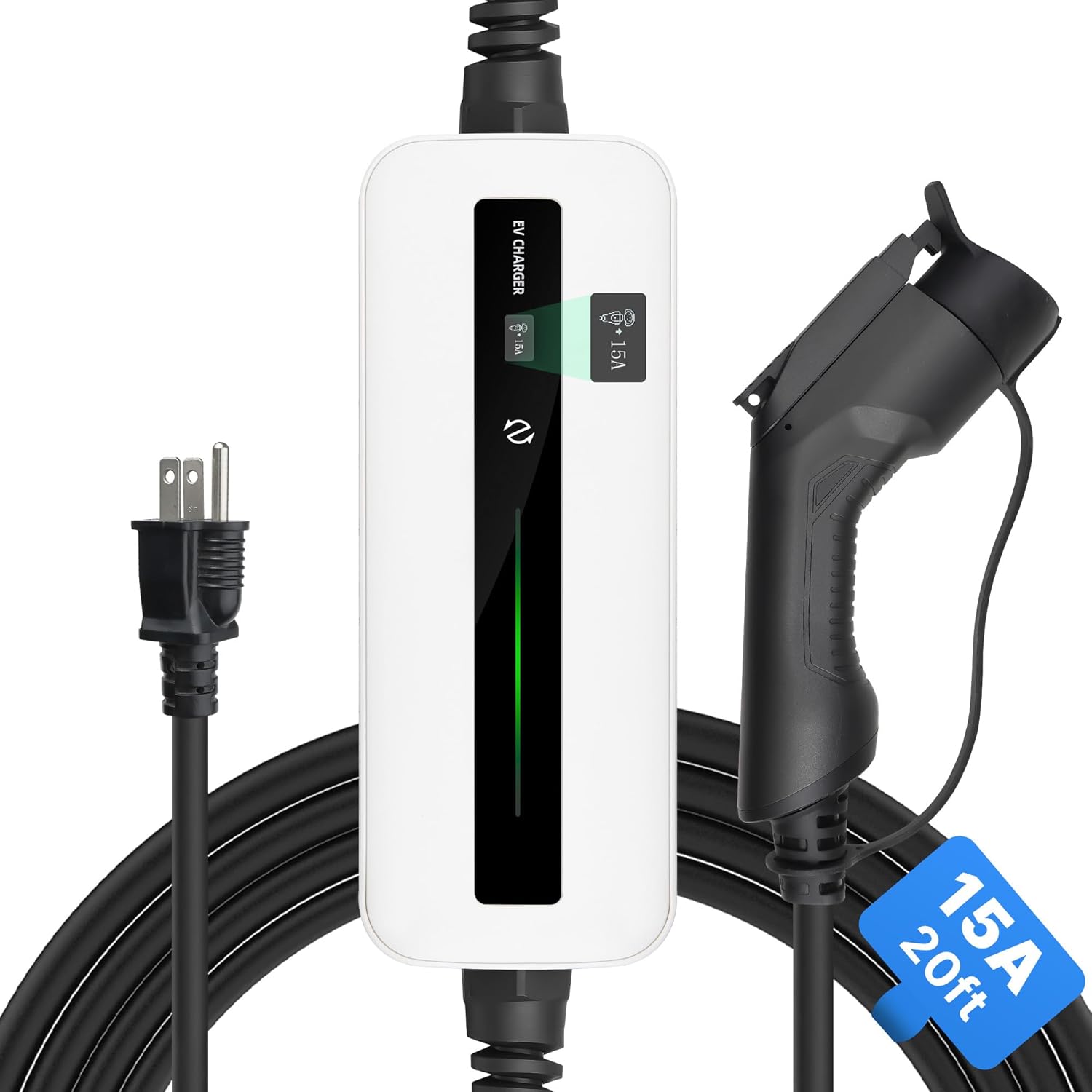
Image 1.1: Overview of the Morec 15A Level 1 Portable EV Charger, showing the control box, NEMA 5-15P plug, and J1772 connector.
2. Safety Information
Always adhere to the following safety precautions to prevent injury or damage to the product or vehicle:
- Ensure the power outlet is properly grounded and rated for 15A.
- Do not use the charger if the cable or connector is damaged.
- Avoid submerging the charger in water. While IP65 rated for weather resistance, it is not designed for submersion.
- Do not attempt to open, disassemble, or modify the charger.
- Keep children and pets away from the charging area.
- Disconnect the charger from the power outlet before cleaning or maintenance.
- For long-term use, it is recommended to adjust the charging current to 12A or less via your vehicle settings, or use a 20A dedicated outlet. Real-time current should not exceed 80% of the breaker's rating.
3. Product Overview
3.1 Components
- Control Box: Houses the intelligent chips and LCD display.
- NEMA 5-15P Plug: Standard 3-prong plug for 100V-120V household outlets.
- SAE J1772 Connector: Standard connector for electric vehicles.
- Charging Cable: 6 meters (20 feet) in length.

Image 3.1: The NEMA 5-15P plug and the 15 Amps current rating of the charger.
3.2 Features
- Level 1 Charging: Provides 100V-120V, 15A charging.
- Universal Compatibility: Compatible with all EV cars using the SAE J1772 standard. (Tesla vehicles require a J1772 to Tesla adapter, not included).
- Intelligent Chipset: Automatically detects and repairs minor charging issues.
- LCD Display: Clear LED indicators show charging status (Initial, Connected, Charging, Fault). Displays instantaneous Amps, total kWh delivered, total charging time, and temperature.
- Weatherproof Design: IP65 rated, suitable for outdoor use in various weather conditions (-25°C to +55°C).
- Temperature Monitoring: Smart temperature control system protects the home circuit. Features automatic current reduction, pause, and recovery based on temperature.
- Safety Protections: Includes over-voltage, over-current, overheating, and short-circuit protection.

Image 3.2: The charger is compatible with most J1772 electric vehicle models. Tesla vehicles require an adapter.
4. Setup
- Inspect the Charger: Before each use, visually inspect the charging cable, control box, and connectors for any signs of damage, cracks, or wear. Do not use if damaged.
- Choose a Suitable Outlet: Locate a standard NEMA 5-15P 100V-120V household outlet. Ensure the outlet is in good condition and properly grounded. For optimal safety and long-term use, a dedicated 20A circuit is recommended, or adjust vehicle charging settings to 12A or less.
- Plug in the Charger: Insert the NEMA 5-15P plug firmly into the wall outlet. The control box display should illuminate, indicating it is in "Initial Mode".
- Position the Charger: Place the control box in a stable location, avoiding direct exposure to heavy rain or snow, even though it is weatherproof. Ensure the cable is not a tripping hazard.

Image 4.1: The NEMA 5-15P plug for connecting to a standard household outlet.
5. Operating Instructions
- Connect to Vehicle: Open your electric vehicle's charging port cover. Firmly insert the SAE J1772 connector into the vehicle's charging port. You should hear a click, indicating a secure connection.
- Verify Connection: The control box display will change from "Initial Mode" to "Connected Mode", then to "Charging Mode". The LED indicators will show the current status.
- Monitor Charging: The LCD display cycles through various charging parameters:
- Current (Amps)
- Total kWh delivered
- Charging duration
- Temperature
- Charging Completion: Once your vehicle's battery is fully charged, the charger will automatically stop charging. The display will indicate charging completion or return to "Connected Mode".
- Disconnect from Vehicle: Press the release button on the J1772 connector and pull it out from the vehicle's charging port. Close the vehicle's charging port cover.
- Disconnect from Power: Unplug the NEMA 5-15P plug from the wall outlet.

Image 5.1: The LCD display provides real-time charging status and data.
6. Maintenance
- Regular Cleaning: Wipe the control box and cables with a dry, clean cloth. Do not use abrasive cleaners or solvents. Ensure the charger is unplugged before cleaning.
- Cable Inspection: Periodically check the charging cable for any cuts, fraying, or damage. Ensure the connectors are free of debris.
- Storage: When not in use, store the charger in a dry, clean place, away from direct sunlight and extreme temperatures. Coil the cable loosely to prevent kinks.
- Weather Resistance: The charger is IP65 rated, meaning it is protected against dust ingress and low-pressure water jets. It can be used outdoors in rain, but avoid prolonged exposure to heavy precipitation or standing water.

Image 6.1: The IP65 rating ensures the charger's durability in various weather conditions.
7. Troubleshooting
| Problem | Possible Cause | Solution |
|---|---|---|
| Charger not turning on / No display | No power from outlet; Loose connection; Charger fault. | Check the wall outlet with another device. Ensure the NEMA 5-15P plug is fully inserted. If problem persists, contact support. |
| Charging not starting | J1772 connector not fully inserted; Vehicle charging port issue; Charger fault; Vehicle not ready to charge. | Ensure the J1772 connector is securely latched. Check vehicle's charging schedule or settings. Disconnect and reconnect both ends. |
| "Fault Mode" indicated on display | Over-current, over-voltage, overheating, or short-circuit detected. | Unplug the charger immediately. Allow it to cool down if overheating is suspected. Check for any visible damage to cables or connectors. Reconnect after a few minutes. If the fault persists, contact support. |
| Slow charging speed | Vehicle settings limiting current; Shared circuit; High ambient temperature. | Check your vehicle's charging settings. Ensure the outlet is not shared with other high-power appliances. The charger may reduce current automatically in high temperatures. |

Image 7.1: The charger's intelligent temperature monitoring system helps prevent faults.
8. Specifications
| Parameter | Value |
|---|---|
| Model Number | Morec_Level1_15A_6m |
| Charging Level | Level 1 |
| Input Voltage | 100V-120V AC |
| Max Current | 15A |
| Max Power | 1800W (1.8 kW) |
| Plug Type | NEMA 5-15P |
| Connector Type | SAE J1772 |
| Cable Length | 6 meters (20 feet) |
| IP Rating | IP65 |
| Operating Temperature | -25°C to +55°C (-13°F to 131°F) |
| Product Dimensions | 15.75 x 14.96 x 3.15 inches (Control Box) |
| Item Weight | 5.04 pounds |
9. Warranty and Support
For warranty information and customer support, please refer to the documentation included with your product or contact Morec customer service directly. The manufacturer typically provides a warranty against defects in materials and workmanship for a specified period. Please retain your proof of purchase for warranty claims.
If you have any questions or require assistance with your Morec EV Charger, please contact the manufacturer's support channels.