
1. Product Overview
The YOUSHARES Shock Mount is specifically engineered for the Blue Yeti X microphone. Its primary function is to absorb vibrations and reduce unwanted noise, thereby improving audio quality and minimizing post-production editing time. The mount features a compact and streamlined design, making it suitable for various recording setups.
This shock mount effectively isolates the microphone from physical shocks and voice-distorting noises that can be transmitted through a desk or boom arm. It is designed for compatibility with most standard boom arms, including models like the Rode PSA1 Swivel, Rode Scissor, and Blue Compass, thanks to its double-sized 3/8” and 5/8” threads.

Image 1.1: The YOUSHARES Blue Yeti X Shock Mount, designed to reduce vibration and noise for improved audio quality.
2. What's Included
The package contains the following items:
- 1 x YOUSHARES Blue Yeti X Shock Mount
3. Setup Instructions
3.1 Attaching the Shock Mount to a Boom Arm
- Ensure your boom arm has a standard 3/8” or 5/8” thread. The YOUSHARES Shock Mount features a double-sized thread, eliminating the need for an adapter.
- Screw the shock mount directly onto the boom arm's thread until it is securely fastened.

Image 3.1: Direct installation of the shock mount onto a boom arm, showing the double-sized thread for compatibility.
3.2 Mounting the Blue Yeti X Microphone
- Carefully align the Blue Yeti X microphone with the central attachment point of the shock mount.
- Screw the microphone onto the shock mount's thread until it is firmly in place. Do not overtighten.

Image 3.2: The Blue Yeti X microphone securely attached to the YOUSHARES Shock Mount on a boom arm.
For a visual guide on installation, please refer to the video below:
Video 3.1: Installation process of the YOUSHARES Shock Mount with a microphone and boom arm.
4. Operating Instructions
4.1 Adjusting the Shock Mount Angle
The shock mount allows for angle adjustments to position your microphone optimally. Loosen the adjustment knob on the side of the shock mount, set the desired angle, and then tighten the knob firmly to secure the position. This ensures the microphone remains stable during use.

Image 4.1: Demonstrating how to adjust the angle of the shock mount for optimal microphone positioning.
5. Maintenance
To ensure the longevity and continued performance of your YOUSHARES Shock Mount, consider the following maintenance tips:
- Regular Inspection: Periodically check the elastic ropes for any signs of wear or damage. If the ropes appear stretched or frayed, they may need replacement to maintain effective vibration absorption.
- Cleaning: Wipe the metal surfaces with a soft, dry cloth to remove dust and debris. Avoid using harsh chemicals or abrasive materials that could damage the finish.
- Rubber Mat: The shock mount includes a rubber mat between the metal bolt and the microphone to prevent scratches. Ensure this mat is always in place during installation.
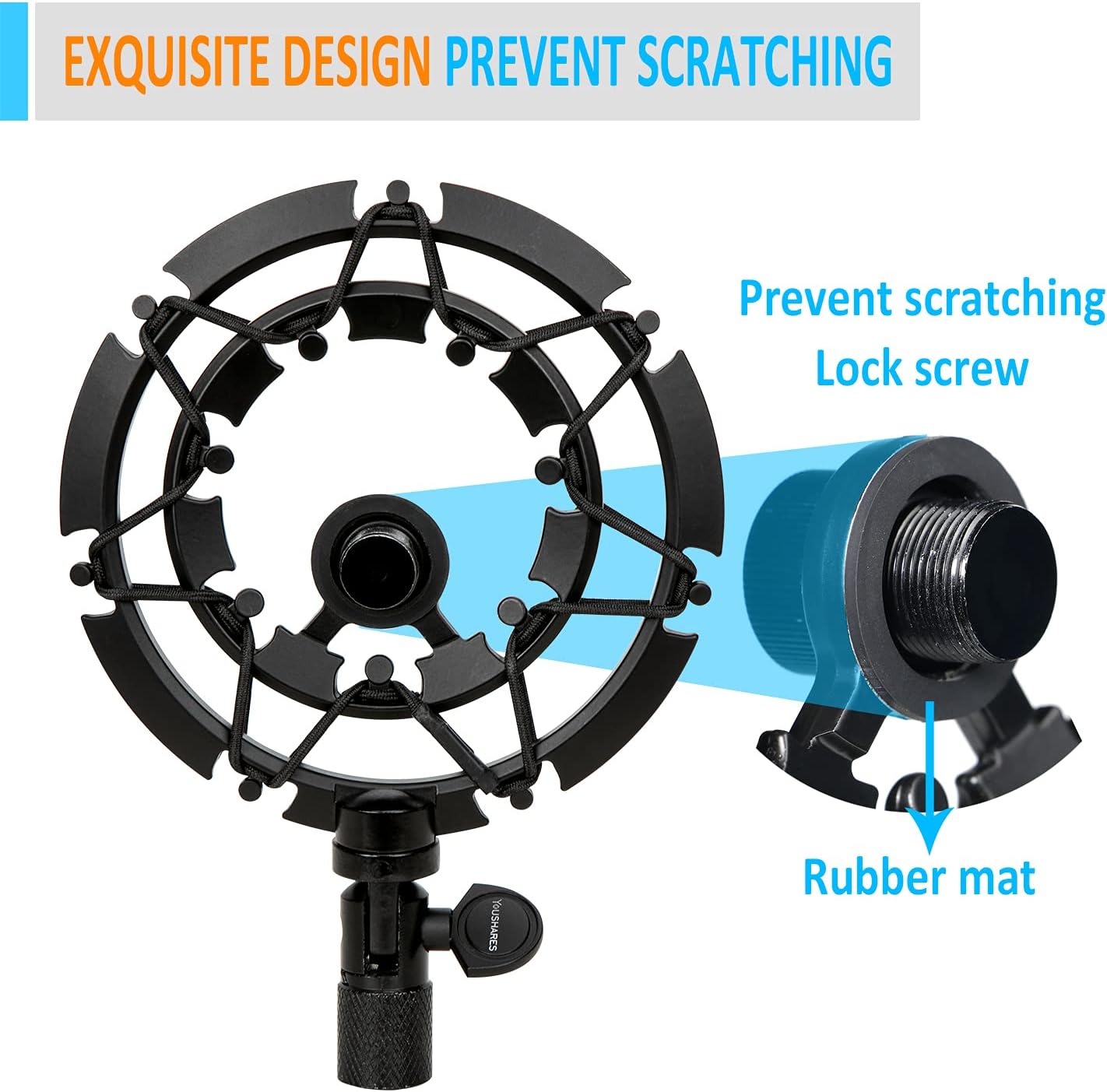
Image 5.1: Close-up of the shock mount's design, highlighting the rubber mat and elastic ropes for protection and vibration absorption.
6. Troubleshooting
| Problem | Possible Cause | Solution |
|---|---|---|
| Microphone still picks up vibrations/noise. | Elastic ropes are worn or loose. Microphone not securely fastened. Boom arm itself is unstable. | Inspect elastic ropes for wear and replace if necessary. Ensure the microphone is tightly screwed into the shock mount. Check the boom arm's stability and mounting to the desk. |
| Shock mount does not hold microphone angle. | Adjustment knob is not tightened sufficiently. | Tighten the adjustment knob more firmly. Ensure the microphone's weight is within the shock mount's capacity. |
| Difficulty attaching to boom arm. | Incorrect thread size or cross-threading. | Verify your boom arm uses 3/8” or 5/8” threads. Ensure the shock mount is aligned correctly before screwing to prevent cross-threading. |
7. Specifications
| Feature | Detail |
|---|---|
| Brand | YOUSHARES |
| Model Number | MPN_ShockM_YetiX_III_01 |
| Material | Metal |
| Item Weight | 200 Grams |
| Microphone Compatibility | Blue Yeti X |
| Boom Arm Thread Size | 3/8 inch, 5/8 Inch (double-sized) |
8. Warranty and Support
For information regarding warranty coverage, returns, or technical support, please refer to the retailer's policy where the product was purchased or visit the official YOUSHARES website. Keep your proof of purchase for any warranty claims.