
1. Introduction
This manual provides essential information for the safe and efficient use of your Deerma DX700S Vacuum Cleaner. Please read these instructions carefully before operating the appliance and retain them for future reference.

Image 1.1: The Deerma DX700S Vacuum Cleaner shown in its full stick configuration and as a handheld unit.
2. Product Overview and Components
The Deerma DX700S is a versatile 2-in-1 vacuum cleaner designed for both upright and handheld use. It features a powerful motor and a multi-stage filtration system.
Included Components:
- Main Vacuum Unit (motor and dust cup)
- Extension Tube (for stick mode)
- Floor Brush
- Crevice Nozzle
- Small Brush Attachment
- Power Cord

Image 2.1: Key features of the DX700S, including its convertible design and filtration system.
3. Setup and Assembly
The Deerma DX700S can be assembled into two primary configurations: a stick vacuum for floor cleaning or a handheld vacuum for upholstery and tight spaces.
3.1 Assembling as a Stick Vacuum:
- Attach the Floor Brush to the bottom of the Extension Tube. Ensure it clicks securely into place.
- Connect the other end of the Extension Tube to the main Vacuum Unit. Press firmly until it locks.
- Ensure all connections are secure before use.
3.2 Assembling as a Handheld Vacuum:
- Detach the Extension Tube from the main Vacuum Unit if it is already assembled.
- Attach your desired accessory (Crevice Nozzle or Small Brush Attachment) directly to the main Vacuum Unit. Ensure it clicks securely.

Image 3.1: The vacuum cleaner configured for both stick and handheld use.
4. Operation
The Deerma DX700S is a corded electric vacuum cleaner. Always ensure it is plugged into a suitable power outlet before operation.
4.1 Powering On/Off:
- Plug the power cord into a 220V electrical outlet.
- Locate the power button (push button/touch control) on the main Vacuum Unit.
- Press the power button to turn the vacuum cleaner ON.
- Press the power button again to turn the vacuum cleaner OFF.
4.2 Using Different Configurations:
- Stick Mode: Ideal for cleaning hard floors and carpets. The floor brush is designed for efficient debris collection.
- Handheld Mode: Use with the crevice nozzle for narrow gaps, corners, and edges. Use with the small brush attachment for upholstery, curtains, and delicate surfaces.
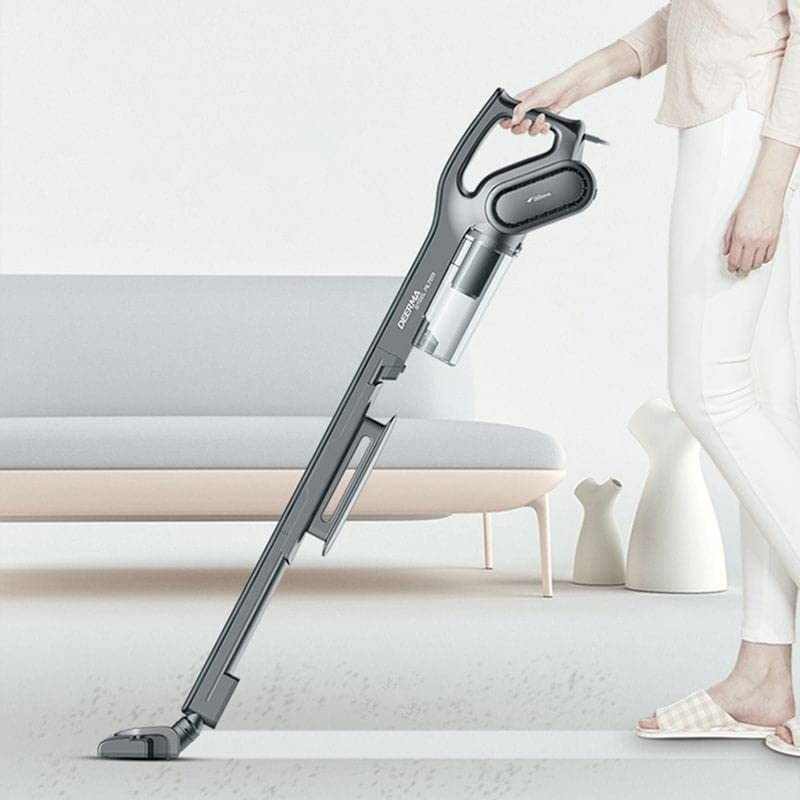
Image 4.1: Operating the DX700S in stick mode for floor cleaning.

Image 4.2: Operating the DX700S in handheld mode for cleaning upholstery.
4.3 Maneuverability:
The vacuum cleaner features a flexible floor brush that allows for 180-degree rotation, enabling easy cleaning around furniture and in tight spaces.

Image 4.3: The vacuum's design allows for easy navigation and cleaning of various areas.
5. Maintenance and Cleaning
Regular maintenance ensures optimal performance and extends the lifespan of your Deerma DX700S Vacuum Cleaner.
5.1 Emptying the Dust Cup:
- Ensure the vacuum cleaner is turned OFF and unplugged from the power outlet.
- Locate the dust cup release button on the main Vacuum Unit.
- Press the button to detach the dust cup.
- Empty the contents of the dust cup into a waste bin.
- Reattach the dust cup to the main unit, ensuring it clicks securely.
5.2 Cleaning the Filters:
The DX700S features a three-stage filtration system. The waste container and mesh filter can be rinsed with running water.
- After emptying the dust cup, remove the internal filters.
- Rinse the mesh filter and the interior of the dust cup under running water.
- Allow all components to air dry completely before reassembling. Do not use the vacuum with wet filters.
- Reinsert the dry filters and reattach the dust cup.
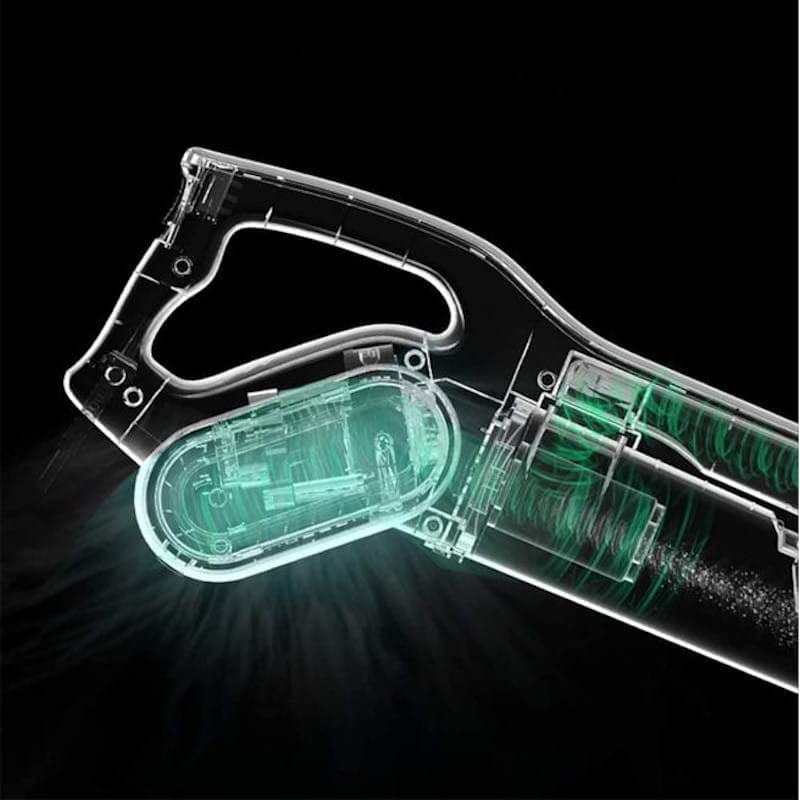
Image 5.1: Internal view illustrating the vacuum's airflow and filtration components.
6. Troubleshooting
If you encounter issues with your Deerma DX700S, please refer to the following common problems and solutions:
| Problem | Possible Cause | Solution |
|---|---|---|
| Vacuum does not turn on | Not plugged in; Power outlet fault; Power button not pressed correctly | Check power cord connection; Test outlet with another device; Press power button firmly |
| Low suction power | Dust cup full; Filters clogged; Obstruction in nozzle/tube | Empty dust cup; Clean/dry filters; Remove any obstructions |
| Unusual noise during operation | Obstruction in brush roll or air path; Loose component | Inspect and clear brush roll/air path; Ensure all components are securely attached |
7. Specifications
Technical details for the Deerma DX700S Vacuum Cleaner:
| Feature | Detail |
|---|---|
| Brand | Deerma |
| Model Name | DX700S |
| Special Feature | Lightweight, 2-in-1 Handheld/Stick |
| Filter Type | Cloth (Three-stage filtration) |
| Power Source | Corded Electric |
| Wattage | 600 Watts |
| Suction Power | 15000 Pa |
| Capacity (Dust Cup) | 800 Milliliters |
| Voltage | 220 Volts |
| Product Dimensions | 120L x 21W x 18H Centimeters |
| Item Weight | 1.6 kg (1600 Grams) |
| Noise Level | 75 Decibels |
| Recommended Use | Indoor, Hard Floor, Upholstery |

Image 7.1: Product dimensions of the Deerma DX700S.
8. Warranty and Support
For product support, warranty claims, or further assistance, please contact the manufacturer or importer directly.
Manufacturer:
Guangdong Deerma Technology Co., Ltd.
Importer (India):
ALLIN IMPEX SERVICES PRIVATE LIMITED
B-75, Sector-6, Noida, UP-201301
Mobile: 9313132789
Email: sales@allinexporters.com
Battery Life Information:
The stated battery life for this product is 2 years. Please refer to your purchase documentation for specific warranty terms and conditions.


