1. Introduction
Thank you for purchasing the SANGEAN WR-301 FM Radio and Bluetooth Speaker. This compact and stylish device combines classic aesthetics with modern functionality, offering both FM radio reception and seamless Bluetooth audio streaming. Its wooden cabinet design provides a rich audio experience, and the built-in rechargeable battery ensures portability with up to 36 hours of playback.
2. Safety Information
- Read all instructions carefully before use.
- Do not expose the unit to rain, moisture, or extreme temperatures.
- Avoid placing the unit near heat sources or in direct sunlight.
- Use only the specified charging cable and power adapter.
- Do not attempt to disassemble or modify the unit. Refer all servicing to qualified personnel.
- Keep out of reach of children.
3. Package Contents
Please check that all items are present:
- SANGEAN WR-301 FM Radio and Bluetooth Speaker Unit
- External Antenna Cable
- USB Charging Cable
4. Product Overview
Familiarize yourself with the various parts and controls of your SANGEAN WR-301.
Front View
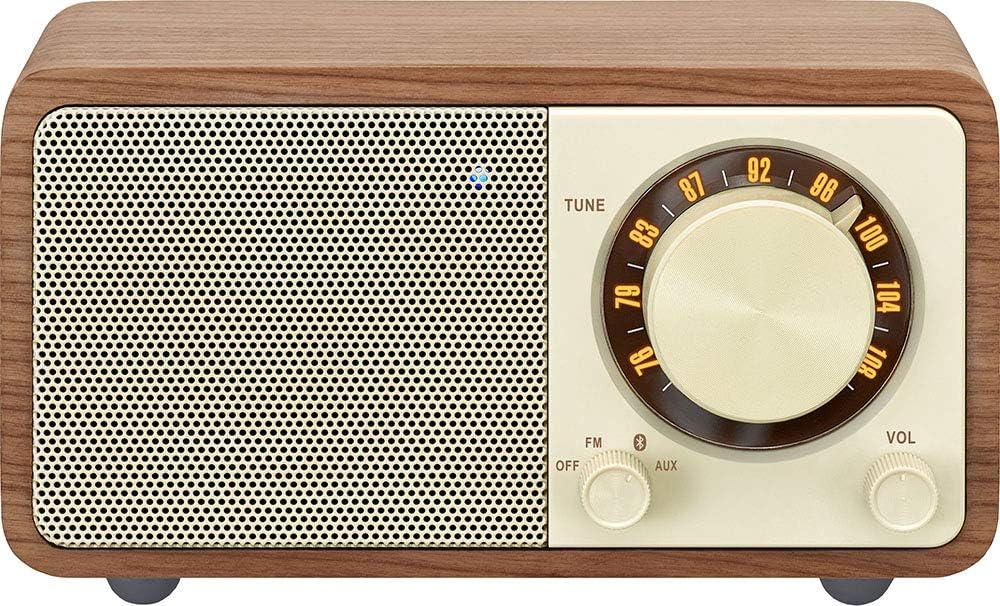
Image: Front view of the SANGEAN WR-301, showing the speaker grille, tuning dial, mode switch, and volume knob.
- Speaker Grille: Audio output.
- Tuning Dial: Used to select FM radio frequencies.
- Mode Switch (FM/OFF/AUX): Selects between FM radio, powers off the unit, or selects AUX input.
- Volume Knob: Adjusts the audio output level.
Rear View

Image: Rear view of the SANGEAN WR-301, showing the external antenna port, AUX IN port, and DC IN (USB) port.
- EXT-ANT Port: Connects the external FM antenna for improved reception.
- AUX IN Port: Connects external audio devices via a 3.5mm audio cable.
- DC IN (USB) Port: For charging the internal battery using the provided USB cable.
5. Setup
5.1 Charging the Battery
The SANGEAN WR-301 features a built-in rechargeable Lithium-ion battery. Before first use, or when the battery is low, charge the unit:
- Connect the supplied USB charging cable to the DC IN (USB) port on the back of the unit.
- Connect the other end of the USB cable to a compatible USB power adapter (not included) or a computer's USB port.
- The charging indicator light will illuminate during charging and turn off when fully charged.
5.2 Connecting the External Antenna
For optimal FM radio reception, connect the external antenna:
- Locate the EXT-ANT port on the back of the unit.
- Plug the external antenna cable into this port.
- Extend the antenna fully and position it for the best possible signal reception.
6. Operating Instructions
6.1 Power On/Off
To power the unit on or off, use the mode switch:
- To turn on, slide the mode switch to either 'FM' or 'AUX'.
- To turn off, slide the mode switch to 'OFF'.
6.2 FM Radio Operation
Enjoy your favorite FM radio stations:
- Slide the mode switch to 'FM'.
- Rotate the Tuning Dial to search for radio stations.
- Adjust the Volume Knob to your desired listening level.
6.3 Bluetooth Pairing
Connect your smartphone or other Bluetooth-enabled device to the WR-301 for wireless audio streaming.

Image: Bluetooth logo indicating wireless connectivity, shown with the rear panel of the SANGEAN WR-301.
- Slide the mode switch to 'AUX'. The unit will automatically enter Bluetooth pairing mode, indicated by a flashing Bluetooth indicator light (usually blue).
- On your Bluetooth device, enable Bluetooth and search for available devices.
- Select 'SANGEAN WR-301' from the list.
- Once paired, the Bluetooth indicator light will become solid, and you can play audio from your device through the WR-301.
6.4 AUX Input
Connect external audio sources using the AUX IN port:
- Slide the mode switch to 'AUX'.
- Connect one end of a 3.5mm audio cable (not included) to the AUX IN port on the back of the WR-301.
- Connect the other end of the audio cable to the headphone jack or audio output of your external device.
- Play audio from your external device. Adjust the volume on both the WR-301 and your external device as needed.
7. Maintenance
- Cleaning: Wipe the unit with a soft, dry cloth. Do not use abrasive cleaners or solvents.
- Storage: When not in use for extended periods, store the unit in a cool, dry place.
- Battery Care: To prolong battery life, avoid fully discharging the battery frequently. Charge the unit regularly, even if not in use.
8. Troubleshooting
| Problem | Possible Cause | Solution |
|---|---|---|
| No power | Battery is depleted; Unit is switched off. | Charge the battery; Slide the mode switch to 'FM' or 'AUX'. |
| Poor FM reception | Antenna not connected or poorly positioned; Weak signal. | Connect the external antenna and adjust its position; Try moving the unit to a different location. |
| Bluetooth not connecting | Unit not in pairing mode; Device too far; Already connected to another device. | Ensure mode switch is on 'AUX' and indicator is flashing; Move device closer; Disconnect from other devices. |
| No sound from AUX | Mode switch not on 'AUX'; Cable not fully inserted; Volume too low on unit or external device. | Slide mode switch to 'AUX'; Ensure cable is securely connected; Increase volume on both devices. |
9. Specifications

Image: Diagram showing the dimensions of the SANGEAN WR-301.
- Model Number: WR-301
- Brand: Sangean
- Dimensions (L x W x H): 11.6 cm x 7.4 cm x 6.5 cm
- Power Source: Battery Powered (Internal Rechargeable Lithium-ion)
- Connectivity Technology: Bluetooth
- Tuner Technology: FM
- Included Components: External Antenna Cable, USB Charging Cable
10. Warranty and Support
For warranty information and customer support, please refer to the warranty card included with your product or visit the official Sangean website. Keep your proof of purchase for any warranty claims.


