
Product Overview
This document provides instructions for the FreedConn Battery & Bluetooth Chip, designed for BM2-S and BM12 Motorcycle Bluetooth Helmets. This unit features an upgraded Bluetooth 5.0 version, which offers different operational characteristics compared to the Bluetooth 3.0 version. The new Bluetooth 5.0 version can proactively connect to older versions but cannot be passively connected by them.

Image: The FreedConn Bluetooth Chip and Battery unit, showing its compact design and connection pins.
Installation
The Battery & Bluetooth Chip is designed for integration into FreedConn BM2-S and BM12 Motorcycle Bluetooth Helmets. Ensure the helmet is powered off before beginning installation.
- Locate the designated compartment within your FreedConn BM2-S or BM12 helmet for the Bluetooth chip and battery unit.
- Carefully align the connection pins of the new chip with the corresponding port in the helmet.
- Gently press the chip into place until it is securely seated. Avoid excessive force.
- Once installed, ensure all connections are firm before reassembling any helmet components.
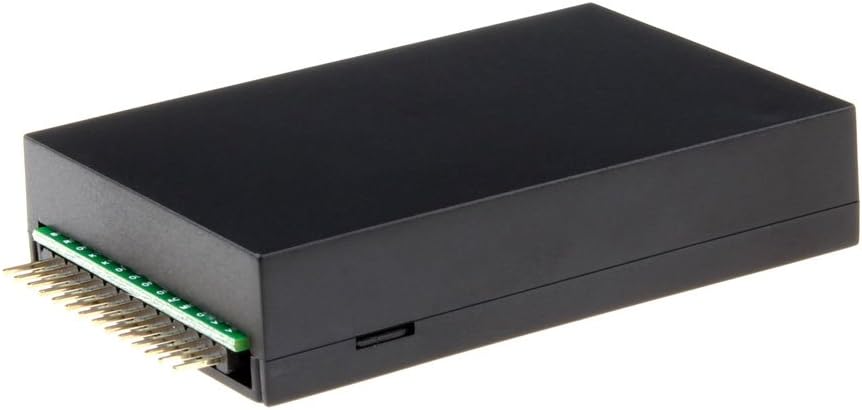
Image: Top view of the FreedConn Bluetooth Chip, highlighting the connection pins for helmet integration.
Operating Instructions (Bluetooth 5.0)
The Bluetooth 5.0 version of this chip operates differently from the older Bluetooth 3.0 version. Please familiarize yourself with these instructions for proper use.
Power On/Off
- To power on, press and hold the power button until the indicator light illuminates.
- To power off, press and hold the power button until the indicator light turns off.
Pairing with Devices
- Ensure the Bluetooth chip is powered on and in pairing mode (indicator light flashing rapidly).
- On your mobile device, navigate to Bluetooth settings and search for available devices.
- Select "FreedConn BM2-S/BM12" (or similar name) from the list to connect.
- Once paired, the indicator light will change to a slow flash or solid, depending on the device status.
Important Note: The Bluetooth 5.0 version can initiate connections with older Bluetooth 3.0 FreedConn devices. However, older Bluetooth 3.0 devices cannot initiate connections with this Bluetooth 5.0 chip.
Maintenance and Charging
Charging the Battery
The battery requires regular charging to maintain optimal performance and lifespan.
- Connect the charging cable to the micro-USB port on the Bluetooth chip and to a 5V charger.
- Charging Indicator: While charging and the helmet is "ON", the red light will flash every 2 seconds. There is no indicator light directly on the battery itself.
- Full Charge Indicator: When fully charged, the blue light of the helmet will flash every 2 seconds under the "ON" status. A full charge typically takes 2-3 hours.
- To confirm full charge, you can unplug and re-plug the charger; the red light will flash once quickly if already fully charged.

Image: The FreedConn Bluetooth Chip connected to a charging cable. Note: Do not press the cable completely in; leave a small gap as shown in the image.
Battery Care
- If the battery voltage drops below 3.5V, the red light will flash every 15 seconds, accompanied by a beep prompt. Charge the unit immediately.
- If the voltage continues to drop below 3.2V, the helmet will automatically power off to protect the battery.
- For long-term storage, charge the battery regularly, at least once a month, even if not in use, especially in cold conditions.
Troubleshooting (FAQ)
- Q: How do I know if the battery is charging?
- A: There is no direct indicator light on the battery itself. When plugged into a 5V charger and the helmet is "ON", the red light on the helmet's Bluetooth unit will flash every 2 seconds.
- Q: When should I charge the battery?
- A: When the battery voltage falls below 3.5V, the red light will flash every 15 seconds, and you will hear a beep. Charge the unit at this point. If the voltage drops below 3.2V, the helmet will automatically shut down.
- Q: How long does it take to fully charge?
- A: A full charge typically takes 2-3 hours. Once fully charged, the blue light on the helmet's Bluetooth unit will flash every 2 seconds when the helmet is "ON".
- Q: My new Bluetooth 5.0 chip won't connect to my old Bluetooth 3.0 helmet.
- A: The Bluetooth 5.0 version can proactively connect to older versions, but older versions cannot passively connect to the new Bluetooth 5.0 chip. Ensure the Bluetooth 5.0 chip is initiating the connection.
Specifications
| Feature | Detail |
|---|---|
| Product Type | Battery & Bluetooth Chip |
| Compatibility | FreedConn BM2-S, BM12 Motorcycle Bluetooth Helmets |
| Bluetooth Version | 5.0 (Upgraded since April 2023) |
| Battery Type | Lithium Polymer |
| Battery Capacity | 600 Milliamp Hours |
| Item Weight | 1.13 ounces |
| Manufacturer | FreedConn |
Support Information
For further assistance, technical support, or warranty inquiries, please contact FreedConn customer service. Refer to your product packaging or the official FreedConn website for the most current contact details.
Manufacturer: FreedConn
ASIN: B089CX2566


