
1. Introduction
The Ashcroft 2074 industrial digital pressure gauge is a battery-powered, multifunctional instrument designed for precise pressure measurement. Utilizing polysilicon thin film technology, it offers exceptional reliability and performance, being virtually unaffected by shock and vibration. This gauge is an ideal solution for a wide range of applications including industrial test and measurement, calibration laboratories, and automotive industries.
2. Safety Information
Please read and understand all safety instructions before operating the Ashcroft 2074 Digital Pressure Gauge. Failure to follow these instructions may result in injury or damage to the equipment.
- Pressure Safety: Always ensure the pressure system is fully depressurized before installing, removing, or servicing the gauge.
- Operating Limits: Do not exceed the maximum rated pressure of 400 Bar. Operating beyond specified limits can cause damage to the gauge and pose a safety risk.
- Environmental Conditions: Protect the gauge from extreme temperatures, corrosive chemicals, and excessive vibration. The gauge has an IP65 rating for weather resistance, but it is not submersible.
- Connection Integrity: Ensure all process connections are properly sealed using appropriate thread sealant to prevent leaks. Tighten connections securely but avoid overtightening.
- Handling: Handle the gauge with care. Avoid dropping or subjecting it to severe impacts.
3. Product Overview
3.1 Features
- Pressure Range: 0 to 400 Bar
- Accuracy: ±0.25% Full Scale (FS)
- Display: Large LCD display for clear readings
- Environmental Protection: Weatherproof IP65 rating
- Mounting: Stem mounting
- Case Material: 300 Stainless Steel with tumble polished finish
- Carrying Case: Weatherproof ABS gauge carrying case included
- Process Connection: 1 ¼ NPT Male
- Backlight: Programmable, with manual on/off function
- Bar Graph: 10-segment bar graph for visual pressure indication
- Power Source: AAA Batteries
3.2 Components
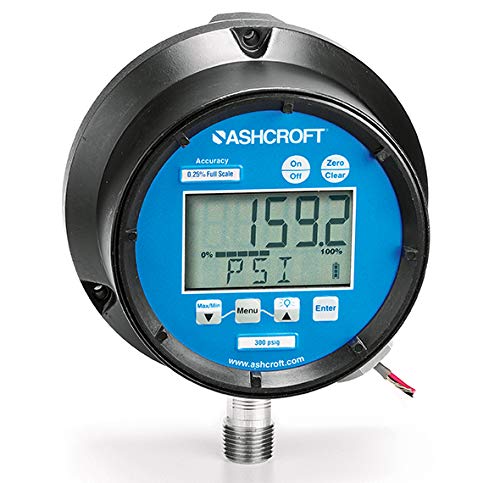
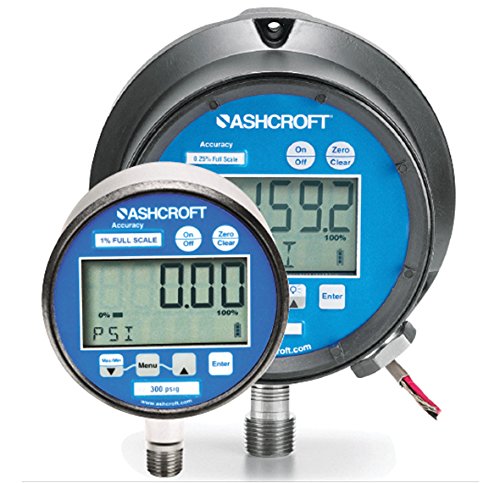
The Ashcroft 2074 Digital Pressure Gauge consists of the following main components:
- Digital LCD Display: Shows pressure readings, units, battery status, and other indicators.
- Control Buttons: Typically include 'On/Off', 'Zero Clear', 'Max/Min', 'Menu', and 'Enter' for navigation and function control.
- Process Connection: The threaded port (1 ¼ NPT Male) for connecting the gauge to the pressure source.
- Battery Compartment: Located at the rear or side for AAA battery installation.
- Gauge Casing: Durable 300 Stainless Steel housing providing protection.

4. Setup and Installation
4.1 Unpacking
Carefully remove the Ashcroft 2074 Digital Pressure Gauge from its packaging. Inspect the gauge for any visible damage that may have occurred during transit. Retain the packaging for future storage or transport.
4.2 Battery Installation
- Locate the battery compartment cover, typically on the rear or side of the gauge.
- Remove the cover by twisting or unlatching it.
- Insert the required AAA batteries, ensuring correct polarity as indicated inside the compartment.
- Replace the battery compartment cover securely to maintain the IP65 rating.
4.3 Mounting and Process Connection
The Ashcroft 2074 gauge is designed for stem mounting. Follow these steps for proper installation:
- Ensure the pressure system is depressurized and isolated before beginning installation.
- Apply an appropriate thread sealant (e.g., PTFE tape or pipe dope) to the 1 ¼ NPT Male process connection threads of the gauge.
- Carefully screw the gauge into the female NPT port on your pressure system.
- Tighten the gauge securely using a wrench on the flats provided on the process connection. Do not overtighten, as this can damage the gauge or the connection.
- Once installed, slowly re-pressurize the system and check for any leaks around the connection.
Note: A back plate for mounting may need to be purchased separately depending on your specific installation requirements.
5. Operation
5.1 Power On/Off
Press the On/Off button located on the front panel to power the gauge on or off. The LCD display will illuminate upon power-on.
5.2 Zero Clear Function
To set the current pressure reading to zero, press the Zero Clear button. This function is particularly useful for relative pressure measurements or to compensate for minor offsets before taking a reading.
5.3 Max/Min Reading
Press the Max/Min button to cycle through the maximum and minimum pressure values recorded since the last reset. This allows you to monitor pressure fluctuations over a period.
5.4 Menu Navigation and Settings
Use the Menu button to enter the gauge's settings menu. Navigate through the menu options using the arrow buttons (if present, or repeated presses of Menu/Max/Min). Press the Enter button to select an option or confirm a setting change. Common settings include:
- Unit Selection: Change pressure units (e.g., Bar, PSI, kPa).
- Backlight Control: The backlight is off by default. It can be programmed or manually toggled on/off through the menu to conserve battery life.
- Auto-Off Timer: Adjust the time after which the gauge automatically powers off due to inactivity.
5.5 Bar Graph Indicator
The 10-segment bar graph on the LCD provides a quick visual reference of the current pressure relative to the full scale of the gauge. This is useful for observing trends or approximate pressure levels at a glance.
6. Maintenance
6.1 Cleaning
To clean the gauge, wipe the display and casing with a soft, damp cloth. Do not use abrasive cleaners, solvents, or harsh chemicals, as these can damage the display or the gauge's finish. Ensure no liquid enters the gauge through openings.
6.2 Battery Replacement
When the low battery indicator appears on the display, replace the AAA batteries promptly to ensure continued accurate operation. Refer to Section 4.2 for battery installation instructions. Always dispose of used batteries according to local regulations.
6.3 Calibration
For optimal accuracy and compliance with industry standards, regular calibration of the Ashcroft 2074 Digital Pressure Gauge is recommended. The product is supplied with a calibration certificate detailing its accuracy at the time of manufacture. Consult a certified calibration laboratory for periodic recalibration services.
7. Troubleshooting
This section provides solutions to common issues you might encounter with your Ashcroft 2074 Digital Pressure Gauge.
| Problem | Possible Cause | Solution |
|---|---|---|
| Gauge does not power on. |
|
|
| Inaccurate or fluctuating readings. |
|
|
| Display is dim or flickering. |
|
|
8. Specifications
| Model | Ashcroft 2074 |
| Brand | Ace Instruments (Ashcroft) |
| Pressure Range | 0 to 400 Bar |
| Accuracy | ±0.25% Full Scale (FS) |
| Display Type | Large LCD with 10-segment Bar Graph |
| Process Connection | 1 ¼ NPT Male |
| Process Connection Location | Lower, left or right (depending on model variant) |
| Case Material | 300 Stainless Steel |
| Case Finish | Tumble polished |
| Environmental Rating | Weatherproof IP65 |
| Power Source | AAA Batteries |
| Backlight | Programmable, Manual On/Off |
| Manufacturer | Ace Instruments |
| Country of Origin | USA |
9. Warranty and Support
The Ashcroft 2074 Digital Pressure Gauge is supplied with an Instruction Manual and a Calibration Certificate. For specific warranty terms and conditions, please refer to the documentation provided with your purchase or contact Ace Instruments directly.
For technical assistance, troubleshooting beyond this manual, or to inquire about service and parts, please contact Ace Instruments customer support or your authorized distributor. Ensure you have your product model number and purchase details available when contacting support.
Manufacturer: Ace Instruments