
1. Introduction
Welcome to the SmartGyro e-Xplorer Electric Scooter user manual. This document provides essential information for the safe and efficient operation, maintenance, and troubleshooting of your new electric scooter. Please read this manual thoroughly before first use to ensure optimal performance and longevity of your device.
The SmartGyro e-Xplorer is a powerful electric scooter designed for both urban and off-road environments, featuring a robust motor, long-lasting battery, and advanced suspension system for a comfortable and stable ride.
2. Safety Information
Your safety is paramount. Always adhere to the following safety guidelines:
- Always wear a helmet and appropriate protective gear (knee pads, elbow pads, gloves) when riding.
- Familiarize yourself with local laws and regulations regarding electric scooter use.
- Do not ride under the influence of alcohol or drugs.
- Maintain a safe speed and distance from other vehicles and pedestrians.
- Avoid riding in adverse weather conditions (heavy rain, snow, ice).
- Perform a pre-ride check: ensure brakes are functional, tires are properly inflated, and all components are secure.
- The maximum weight limit for the rider is 120 kg.
- Do not allow children under the recommended age (Adult) to operate the scooter.
3. Product Overview
The SmartGyro e-Xplorer is equipped with features designed for performance and durability.

Figure 3.1: Overall view of the SmartGyro e-Xplorer Electric Scooter.

Figure 3.2: Detailed side view highlighting the robust frame and footrests.

Figure 3.3: Front wheel assembly with suspension and headlight.

Figure 3.4: Rear dual shock suspension system.
Key Components:
- Motor: Powerful 500W 48V Brushless motor (nominal power).
- Battery: Removable 13,000 mAh Lithium battery.
- Wheels: 10-inch pneumatic ALLROAD tires.
- Suspension: Dual front and rear reinforced suspension.
- Brakes: Front and rear disc brakes.
- Lighting: High-brightness front light and rear brake light.
- Display: Integrated display for mode selection (Eco, Comfort, Sport).
- Ignition: Key ignition system for security.
4. Setup and First Use
4.1 Unboxing and Assembly
Your SmartGyro e-Xplorer comes partially assembled. Follow these steps to complete the setup:
- Carefully remove all components from the packaging.
- Unfold the scooter frame and secure the handlebar stem in the upright position. Ensure the locking mechanism is fully engaged.
- Attach the handlebars if they are separate, ensuring all cables are properly connected and not pinched.
- Check that all screws and bolts are tightened.
4.2 Initial Battery Charge
Before first use, fully charge the battery.

Figure 4.1: Battery compartment location.
- Locate the charging port, typically near the battery compartment.
- Connect the charger to the scooter's charging port, then plug the charger into a power outlet.
- The charging indicator light on the charger will change (e.g., from red to green) when charging is complete.
- A full charge typically takes 5-6 hours.
- Always use the original charger provided with your scooter.
5. Operating Instructions
5.1 Turning On/Off

Figure 5.1: Key ignition system.
- To Turn On: Insert the key into the ignition and turn it to the 'ON' position. The display will light up.
- To Turn Off: Turn the key to the 'OFF' position and remove it.
5.2 Riding Modes
The e-Xplorer offers three riding modes selectable from the display:
- Eco Mode: For maximum battery efficiency and longer range (approx. 45 km). Ideal for casual rides and flat terrain.
- Comfort Mode: A balanced mode offering a good mix of speed and battery life.
- Sport Mode: Provides full power for higher speeds (up to 25 km/h) and climbing inclines. This mode consumes more battery.
5.3 Riding the Scooter
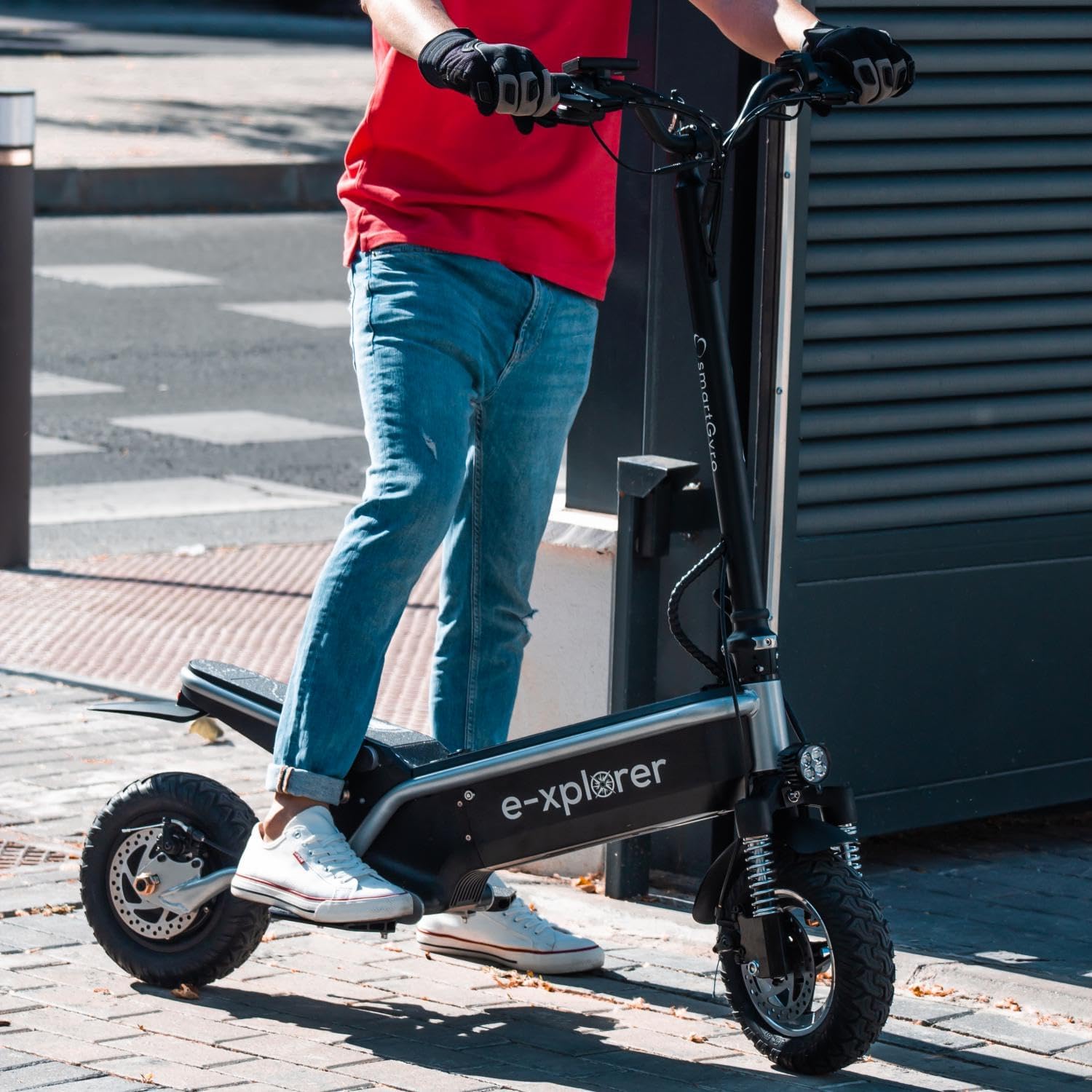
Figure 5.2: Rider demonstrating proper stance on the scooter.

Figure 5.3: Scooter in use on varied terrain, showcasing its ALLROAD capability.
- Place one foot firmly on the footrest.
- Push off with your other foot to gain initial momentum.
- Once moving, gently press the accelerator lever.
- Place your second foot on the footrest, maintaining balance.
- To slow down or stop, release the accelerator and gently apply the brake levers.
5.4 Braking System
The e-Xplorer is equipped with front and rear disc brakes for effective stopping power. Always apply both brakes simultaneously for balanced and safe deceleration.
5.5 Folding the Scooter
For storage or transport, the scooter can be folded. Locate the folding mechanism on the stem and follow the instructions to safely collapse the scooter. Ensure it is securely locked in the folded position before carrying.
6. Maintenance
Regular maintenance ensures the longevity and safe operation of your SmartGyro e-Xplorer.
6.1 Battery Care
- Charge the battery regularly, even if not in use, to maintain its health. Avoid complete discharge.
- Store the scooter in a cool, dry place, away from direct sunlight and extreme temperatures.
- If storing for extended periods, charge the battery to approximately 50-60% every 2-3 months.
6.2 Tire Maintenance
- Check tire pressure before each ride. Refer to the tire sidewall for recommended PSI.
- Inspect tires for wear, punctures, or damage. Replace worn tires promptly.
6.3 Brake System Check
- Regularly check the responsiveness of both front and rear disc brakes.
- Ensure brake levers are not loose and provide adequate stopping power. Adjust if necessary.
- Inspect brake pads for wear and replace them when they become thin.
6.4 General Cleaning
- Clean the scooter with a damp cloth. Avoid using high-pressure water jets or harsh chemicals.
- Do not immerse the scooter in water.
7. Troubleshooting
This section addresses common issues you might encounter with your SmartGyro e-Xplorer.
| Problem | Possible Cause | Solution |
|---|---|---|
| Scooter does not turn on. | Battery is low or depleted; Key not in 'ON' position; Loose connections. | Charge the battery; Ensure key is fully turned; Check all visible cable connections. |
| Reduced range or power. | Low battery charge; Riding in Sport mode excessively; Overweight load; Low tire pressure. | Fully charge battery; Use Eco or Comfort mode; Ensure rider weight is within limits; Inflate tires to recommended pressure. |
| Brakes feel weak. | Worn brake pads; Loose brake cables; Disc brake misalignment. | Inspect and replace brake pads; Adjust brake cable tension; Consult a service center for disc alignment. |
| Unusual noises during operation. | Loose components; Debris in wheels/brakes; Worn bearings. | Check all bolts and screws; Clean wheels and brakes; If noise persists, contact support. |
If you encounter issues not listed here or if solutions do not resolve the problem, please contact SmartGyro customer support or an authorized service center.
8. Specifications
| Feature | Detail |
|---|---|
| Model Name | E-xplorer |
| Motor Power (Nominal) | 500W (Brushless) |
| Battery Capacity | 13,000 mAh (48V Lithium) |
| Max Speed | Up to 25 Km/h |
| Approximate Range | 45 Km |
| Charging Time | 5-6 hours |
| Wheel Size | 10 inches (Pneumatic ALLROAD) |
| Suspension | Dual front and rear reinforced |
| Brakes | Front and rear disc brakes |
| Max Load Capacity | 120 Kilograms |
| Product Dimensions (L x W x H) | 113 x 59 x 119 cm |
| Product Weight | 26 kg |
| Frame Material | Metal |
| Special Feature | Foldable |
9. Warranty and Support
SMARTGYRO offers a comprehensive after-sales service and maintenance program for its devices. This includes a wide range of 100% original spare parts to keep your scooter in optimal condition.
SMARTGYRO provides a commitment of up to 5 years on motors (or up to 100,000 km) and has a network of over 100 workshops nationwide in Spain, ensuring quality and trust.
For warranty claims, technical support, or to locate an authorized service center, please visit the official SMARTGYRO website or contact their customer service directly.
Note: The product includes a circulation certificate redeemable online.
10. Video Resources
No official product videos from the seller were found in the provided data. Please refer to the written instructions and diagrams for guidance.
