
Introduction
Thank you for choosing the Multilaser Powertek EN035 Uninterruptible Power Supply (UPS). This manual provides essential information for the safe and efficient operation of your UPS. Please read these instructions carefully before installation and use, and retain them for future reference. The EN035 UPS is designed to protect your electronic devices from power outages and fluctuations, ensuring continuous operation and data integrity.
Important Safety Instructions
Please observe the following safety precautions to prevent injury and damage to the UPS or connected equipment:
- Electrical Shock Hazard: The UPS contains hazardous voltages. Do not attempt to disassemble the unit. Servicing should only be performed by qualified personnel.
- Indoor Use Only: This UPS is intended for indoor use in a controlled environment. Do not expose it to rain, snow, liquids, or direct sunlight.
- Ventilation: Ensure adequate ventilation around the UPS. Do not block ventilation openings. Maintain a minimum clearance of 10 cm (4 inches) around the unit.
- Placement: Place the UPS on a stable, flat surface. Avoid placing it near heat sources or in areas with excessive dust or humidity.
- Grounding: The UPS must be connected to a grounded AC power outlet. Do not remove the grounding prong from the power cord.
- Battery Safety: The UPS contains sealed lead-acid batteries. Do not dispose of batteries in a fire, as they may explode. Do not open or mutilate batteries. Refer to local regulations for proper battery disposal.
- Overload: Do not connect appliances that exceed the UPS's rated capacity (1440VA / 864W).
Product Overview
The Multilaser Powertek EN035 UPS provides reliable power backup and surge protection. Familiarize yourself with its components:
Front Panel
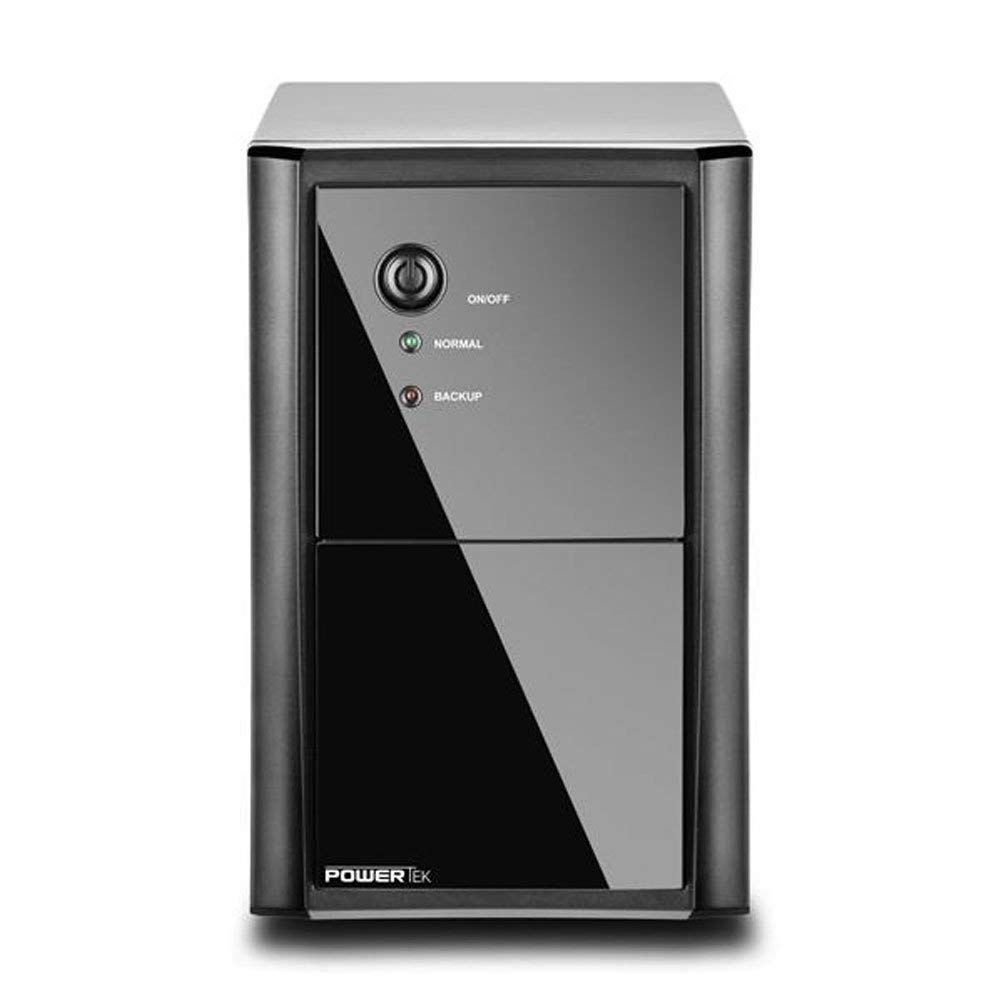
Figure 1: Front view of the Multilaser Powertek EN035 UPS. This image shows the front panel of the UPS, featuring the power button and LED indicators for 'Normal' and 'Backup' status. The unit is black with a glossy front panel section.
- Power Button: Used to turn the UPS ON or OFF.
- Normal Indicator (Green LED): Illuminates when the UPS is operating on utility power.
- Backup Indicator (Yellow LED): Illuminates when the UPS is operating on battery power.
Rear Panel

Figure 2: Rear view of the Multilaser Powertek EN035 UPS. This image displays the back of the UPS, featuring eight standard output sockets for connecting devices, an AC input power cord, and a circuit breaker button.
- Output Sockets: Eight (8) sockets for connecting your electronic devices. These provide battery backup and surge protection.
- AC Input: Power cord for connecting the UPS to a wall outlet.
- Breaker (125V~12A): Resettable circuit breaker to protect against overcurrent.
Setup Instructions
- Unpacking: Carefully remove the UPS from its packaging. Inspect for any shipping damage.
- Placement: Position the UPS in a cool, dry, and well-ventilated indoor area. Avoid direct sunlight, heat sources, and excessive dust or humidity. Ensure there is at least 10 cm (4 inches) of clear space around all ventilation openings.
- Initial Charging: Before initial use, connect the UPS to a standard 110V AC wall outlet and allow it to charge for at least 8 hours. This ensures the internal batteries are fully charged and ready to provide optimal backup time. The UPS will charge whether it is turned ON or OFF.
- Connecting Devices: Plug your electronic devices (e.g., computer, monitor, modem) into the output sockets on the rear panel of the UPS. Do not connect laser printers, shredders, or other high-power inductive loads to the UPS, as this may overload the unit.
- Power On: After charging and connecting devices, press the Power Button on the front panel to turn on the UPS. The 'Normal' (Green) LED should illuminate.
Operating the UPS
- Normal Operation: When the UPS is connected to utility power and turned ON, the 'Normal' (Green) LED will be lit. The UPS will provide conditioned power to your connected devices and keep its batteries charged.
- Battery Backup Mode: In the event of a power outage or significant voltage fluctuation, the UPS will automatically switch to battery power. The 'Backup' (Yellow) LED will illuminate, and the UPS will emit an audible alarm (beeping) to indicate it is operating on battery.
- Low Battery Warning: As the battery charge depletes, the audible alarm will become more frequent. This indicates that you should save your work and safely shut down your connected equipment.
- Overload Protection: If the total power draw of connected devices exceeds the UPS's capacity (864W), the UPS may emit a continuous alarm and shut down to prevent damage. Disconnect non-essential devices and press the circuit breaker button on the rear panel if it has tripped, then restart the UPS.
- Turning Off: To turn off the UPS, press and hold the Power Button until the indicators turn off.
Maintenance
- Battery Care: To maximize battery life, ensure the UPS is always connected to an AC outlet to keep the batteries charged. If the UPS is stored for an extended period, recharge it every three months for at least 8 hours.
- Battery Replacement: The internal batteries are not user-replaceable. Battery replacement should only be performed by qualified service personnel. Contact Multilaser support for assistance.
- Cleaning: Disconnect the UPS from the AC outlet and all connected devices before cleaning. Use a soft, dry cloth to wipe the exterior. Do not use liquid or aerosol cleaners.
Troubleshooting
| Problem | Possible Cause | Solution |
|---|---|---|
| UPS does not turn on. | No AC input power. Battery deeply discharged. Circuit breaker tripped. | Ensure the UPS is plugged into a live AC outlet. Allow the UPS to charge for several hours. Press the circuit breaker button on the rear panel to reset. |
| Short backup time. | Batteries not fully charged. Batteries nearing end of life. Overload. | Charge the UPS for at least 8 hours. Contact Multilaser support for battery service. Reduce the number of connected devices. |
| UPS emits continuous alarm. | Overload condition. | Disconnect non-essential devices. If the UPS shut down, reset the circuit breaker and restart. |
| 'Backup' LED is lit and beeping frequently. | Low battery charge. | Save your work and safely shut down connected equipment. The UPS will eventually shut down. |
Specifications
| Feature | Detail |
|---|---|
| Model | EN035 |
| Brand | Multilaser |
| Capacity | 1440 VA / 864 W |
| Input Voltage | 110 Volts AC |
| Output Voltage | 110 Volts AC (simulated sine wave on battery) |
| Number of Outlets | 8 |
| Typical Autonomy | Up to 30 minutes (depending on load) |
| Dimensions (L x W x H) | 41.5 x 20 x 28 cm |
| Weight | 9.45 kg (9450 Grams) |
| Batteries | Internal, pre-installed (not user-replaceable) |
Warranty and Support
Multilaser products are manufactured to high-quality standards. This product is covered by a limited warranty. For specific warranty terms and conditions, please refer to the warranty card included with your product or visit the official Multilaser website. For technical support, service, or parts inquiries, please contact Multilaser customer service.
Please note: Contact information is not provided in this manual. Refer to your product packaging or the official Multilaser website for current support details.