
1. Introduction
Thank you for purchasing the SAMI Digital Radio with Speaker. This device offers a portable audio experience with FM radio, USB, and Micro SD card playback capabilities. Please read this manual carefully to ensure proper use and to maximize the performance of your radio.
2. Safety Information
- Do not expose the device to extreme temperatures, direct sunlight, or high humidity.
- Avoid dropping or subjecting the device to strong impacts.
- Do not attempt to disassemble or modify the device. This will void the warranty and may cause damage.
- Keep the device away from water and other liquids.
- Use only the specified charging voltage (DC 5V) to prevent damage to the battery and device.
3. Product Overview
Familiarize yourself with the components and controls of your SAMI Digital Radio.

Figure 3.1: Front view of the SAMI Digital Radio, showing the speaker grille, display, and control buttons.
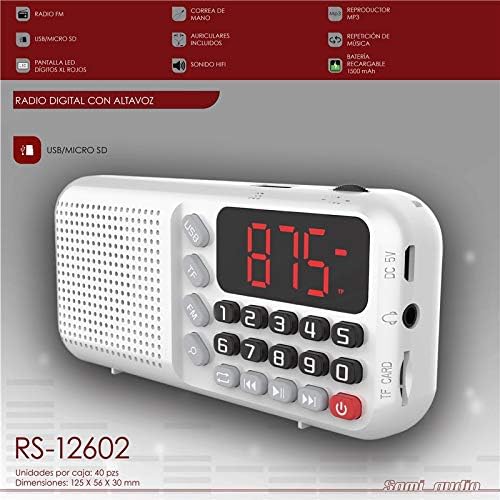
Figure 3.2: Labeled diagram of the SAMI Digital Radio, highlighting key features such as FM Radio, USB/Micro SD slots, LED display, hand strap, included earphones, HIFI sound, MP3 player, and 1500 mAh rechargeable battery.
Key Components:
- Speaker Grille: Located on the left side, provides audio output.
- LED Display: Shows frequency, track number, or mode.
- Control Buttons: Including power, mode (FM, TF, USB), volume, track navigation, and numeric keys.
- USB Port: For playing audio from USB flash drives.
- TF Card Slot (Micro SD): For playing audio from Micro SD cards.
- DC 5V Input: For charging the internal battery.
- Headphone Jack: For private listening.
- Hand Strap: For easy portability.
4. Setup
4.1. Charging the Battery
- Connect a standard USB charging cable (not always included) to the DC 5V input port on the side of the radio.
- Connect the other end of the USB cable to a compatible USB power adapter (e.g., smartphone charger, computer USB port) with a 5V output.
- The LED display or an indicator light (if present) will show the charging status. Charge the device fully before first use.
The radio features a 1500 mAh rechargeable battery.
4.2. Inserting Storage Media
- Micro SD Card: Gently insert a Micro SD card (TF card) into the TF CARD slot until it clicks into place. Ensure the card is inserted in the correct orientation.
- USB Flash Drive: Insert a USB flash drive into the USB port.
The radio supports MP3 audio playback from both Micro SD cards and USB flash drives.
5. Operating Instructions
5.1. Power On/Off
Press and hold the red power button (U) located at the bottom right of the control panel to turn the radio on or off.
5.2. Mode Selection
Press the MODE button (often labeled FM, TF, USB, or a dedicated mode button) to cycle through available modes: FM Radio, USB playback, and Micro SD (TF) card playback.
5.3. FM Radio Operation
- Switch to FM mode using the MODE button.
- Automatic Scan: Press and hold the PLAY/PAUSE button (often indicated by ►▮) to automatically scan and save available FM stations.
- Manual Tuning: Use the PREVIOUS (◀◀) and NEXT (►►) buttons to fine-tune the frequency or navigate through saved stations.
- Direct Frequency Input: Use the numeric keypad (0-9) to directly enter an FM frequency (e.g., 87.5 for 87.5 MHz).
5.4. USB/Micro SD Playback
- Insert your USB flash drive or Micro SD card with MP3 audio files.
- Switch to USB or TF mode using the MODE button. The radio should automatically start playing the first track.
- Use the PREVIOUS (◀◀) and NEXT (►►) buttons to skip tracks.
- Press the PLAY/PAUSE button (►▮) to pause or resume playback.
- Use the numeric keypad (0-9) to directly select a track number.
5.5. Volume Control
Press the VOL- button to decrease the volume and the VOL+ button to increase the volume.
6. Maintenance
- Cleaning: Use a soft, dry cloth to clean the exterior of the radio. Do not use abrasive cleaners or solvents.
- Battery Care: To prolong battery life, avoid fully discharging the battery frequently. If the device will not be used for an extended period, charge it periodically.
- Storage: Store the radio in a cool, dry place away from direct sunlight and extreme temperatures.
7. Troubleshooting
| Problem | Possible Cause | Solution |
|---|---|---|
| Radio does not turn on. | Battery is discharged. | Charge the radio using a DC 5V power source. |
| No sound from speaker. | Volume is too low or muted. Headphones are connected. | Increase the volume. Disconnect headphones if not needed. |
| Poor FM reception. | Weak signal or interference. | Relocate the radio to an area with better reception. Extend the antenna if available (not explicitly shown but common for radios). |
| USB/Micro SD playback not working. | Incorrect file format. Media not inserted correctly. Corrupted media. | Ensure files are MP3 format. Reinsert media. Try different media. |
8. Specifications
- Brand: Sami
- Model: RS-12602
- Connectivity: USB, Micro SD (TF Card)
- Radio Bands: FM
- Power Source: Rechargeable Battery (1500 mAh)
- Charging Input: DC 5V (via USB)
- Audio Output: Integrated Speaker, 3.5mm Headphone Jack
- Dimensions: 125 mm x 56 mm x 30 mm (approximate)
- Special Features: MP3 Player, LED Digital Display, HIFI Sound
9. Warranty and Support
This product is covered by a standard manufacturer's warranty. Please refer to the warranty card included with your purchase for specific terms and conditions. For technical support or service inquiries, please contact your retailer or the official Sami customer service channels.