1. Product Overview
The LEXIBOOK Super Mario Projector Alarm Clock RL977NI is a digital alarm clock designed with a Super Mario theme. It features a backlit LCD screen, a projection function that displays Super Mario symbols onto the ceiling in three different colors, and a night light with integrated timers. This device includes an alarm with a snooze function and operates on batteries.
Key Features:
- Round shaped alarm clock with backlit LCD screen.
- 3 integrated night light timers (5, 10, or 15 minutes).
- Super Mario symbol projection in 3 colors.
- Time display in 12/24 hour format.
- Alarm with snooze function.
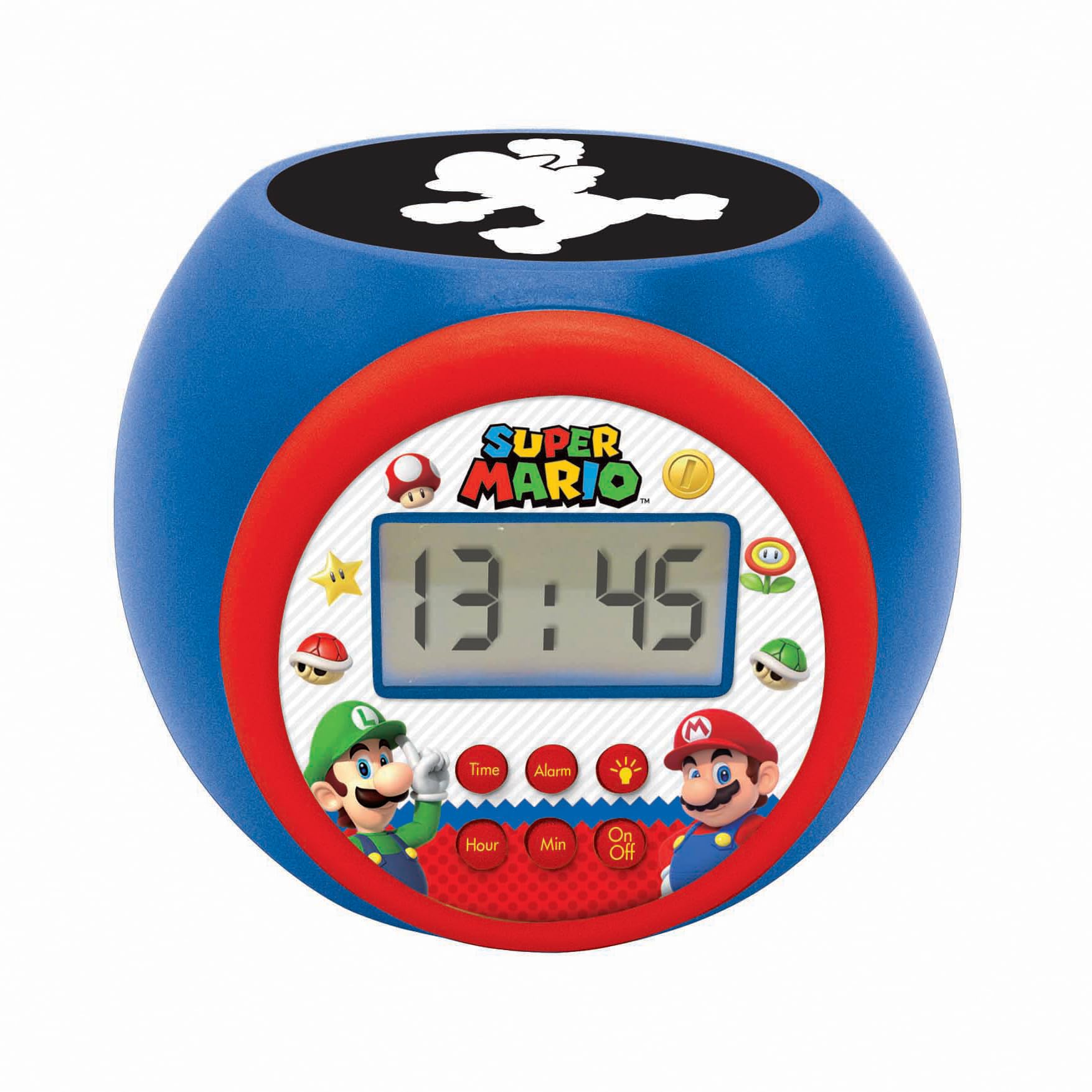
2. Setup
2.1 Battery Installation
The alarm clock requires 3 AAA batteries (not included) for operation. Follow these steps to install the batteries:
- Locate the battery compartment on the underside of the alarm clock.
- Using a small screwdriver, carefully open the battery compartment cover.
- Insert 3 new AAA batteries, ensuring the correct polarity (+ and -) as indicated inside the compartment.
- Replace the battery compartment cover and secure it with the screw.
Note: Always use fresh batteries and dispose of old batteries responsibly. Do not mix old and new batteries or different types of batteries.

3. Operating Instructions
3.1 Button Functions
The alarm clock features several buttons for control:
- Time Button: Used to enter time setting mode.
- Alarm Button: Used to enter alarm setting mode.
- Hour Button: Adjusts the hour during time or alarm setting.
- Min Button: Adjusts the minute during time or alarm setting.
- On/Off Button: Activates or deactivates the night light/projector.
3.2 Setting the Time
- Press and hold the Time button until the hour display starts flashing.
- Use the Hour button to adjust the hour.
- Press the Time button again, and the minute display will flash.
- Use the Min button to adjust the minutes.
- Press the Time button one more time to confirm and exit time setting mode.
- To switch between 12-hour and 24-hour format, press the Hour button while the time is displayed normally (not in setting mode).
3.3 Setting the Alarm
- Press and hold the Alarm button until the alarm hour display starts flashing.
- Use the Hour button to set the desired alarm hour.
- Press the Alarm button again, and the alarm minute display will flash.
- Use the Min button to set the desired alarm minutes.
- Press the Alarm button one more time to confirm and activate the alarm. An alarm icon will appear on the LCD screen.
- To deactivate the alarm, press the Alarm button once when the time is displayed normally. The alarm icon will disappear.
3.4 Snooze Function
When the alarm sounds, press any button (except the Alarm button to turn it off completely) to activate the snooze function. The alarm will temporarily stop and sound again after a few minutes.
3.5 Using the Projector and Night Light
The alarm clock features a projector that displays Super Mario symbols and also functions as a night light with a timer.
- Press the On/Off button to activate the projector and night light.
- The projector will display Super Mario symbols onto the ceiling in one of three colors.
- To cycle through the projection colors or turn off the projection, press the On/Off button repeatedly.
- The night light has integrated timers of 5, 10, or 15 minutes. The timer setting is usually cycled by pressing the On/Off button or a dedicated light button (if present, not explicitly mentioned but implied by "3 integrated timers"). Refer to the icons on the clock face for specific light control.


4. Maintenance
4.1 Cleaning
To clean the alarm clock, use a soft, dry cloth. Do not use abrasive cleaners, solvents, or chemical sprays, as these can damage the surface and internal components. Avoid getting moisture into any openings.
4.2 Battery Replacement
When the display dims or the functions become unreliable, it is time to replace the batteries. Follow the battery installation steps outlined in Section 2.1. Ensure the device is turned off before replacing batteries.
5. Troubleshooting
| Problem | Possible Cause | Solution |
|---|---|---|
| Clock display is dim or blank. | Low or depleted batteries. | Replace with new AAA batteries. Ensure correct polarity. |
| Projection light is not working. | Projector is off or batteries are low. | Press the On/Off button to activate. Check and replace batteries if necessary. |
| Alarm does not sound. | Alarm is not set or is deactivated. | Ensure the alarm is set correctly and the alarm icon is visible on the display. Check battery level. |
| Buttons are unresponsive. | Low batteries or temporary software glitch. | Replace batteries. If issue persists, remove batteries for a few minutes and reinsert to reset the device. |
| Time or alarm settings reset unexpectedly. | Batteries removed or completely depleted. | Replace batteries and reset the time and alarm. |
6. Specifications
- Model Number: RL977NI
- Brand: LEXiBOOK
- Display Type: Digital LCD
- Power Source: Battery Powered (3 x AAA batteries, not included)
- Product Dimensions: Approximately 4.65" W x 3.58" H (11.8 cm x 9.1 cm)
- Item Weight: Approximately 7.4 ounces (210 grams)
- Material: Plastic
- Special Features: Alarm, Snooze, Night Light Timer, Projector
- Recommended Age: 3 years and up
- Release Date: May 27, 2020
7. Warranty Information
This LEXIBOOK product is covered by a 2-year warranty from the date of purchase. This warranty covers manufacturing defects and material faults under normal use. Please retain your proof of purchase for warranty claims.
The warranty does not cover damage caused by misuse, accidents, unauthorized modifications, or normal wear and tear. For detailed warranty terms and conditions, please refer to the official LEXiBOOK website or contact customer support.
8. Support
For further assistance, technical support, or inquiries regarding your LEXIBOOK Super Mario Projector Alarm Clock RL977NI, please visit the official LEXiBOOK website or contact their customer service department.
You can find more information and support resources by visiting the LEXiBOOK Store on Amazon.


