
Introduction
The AIOMEST AI-870K is an auto-ranging digital clamp meter designed for precise measurement of AC/DC voltage, AC/DC current, resistance, capacitance, frequency, duty cycle, and temperature. It also includes diode and audible continuity test functions. This manual provides essential information for safe and effective operation of the device.
Safety Information
Always adhere to safety precautions when using electrical testing equipment. Failure to follow these guidelines may result in injury or damage to the device.
- Ensure the correct function and range are selected before making measurements.
- Do not exceed the maximum input values for any range.
- Inspect test leads for damage before use. Replace damaged leads immediately.
- Avoid using the meter if it appears damaged or is not operating correctly.
- The device meets safety standard IEC 1010, Pollution Degree 2, Over-voltage Category III.
- Do not attempt to measure current on circuits with voltage exceeding the meter's rating.
Package Contents
The AIOMEST AI-870K package includes the following items:
- 1x AI-870K Clamp Volts Tester
- 1x Test Leads (Red and Black)
- 1x Temperature Probe
- 1x 9V Battery
- 1x Instruction Manual
Product Overview
Familiarize yourself with the components and layout of the AIOMEST AI-870K clamp multimeter for optimal use.

Image: The AIOMEST AI-870K clamp multimeter, shown with its clamp jaw open around a yellow electrical wire, indicating its use for current measurement. The display shows a reading of 132.6.
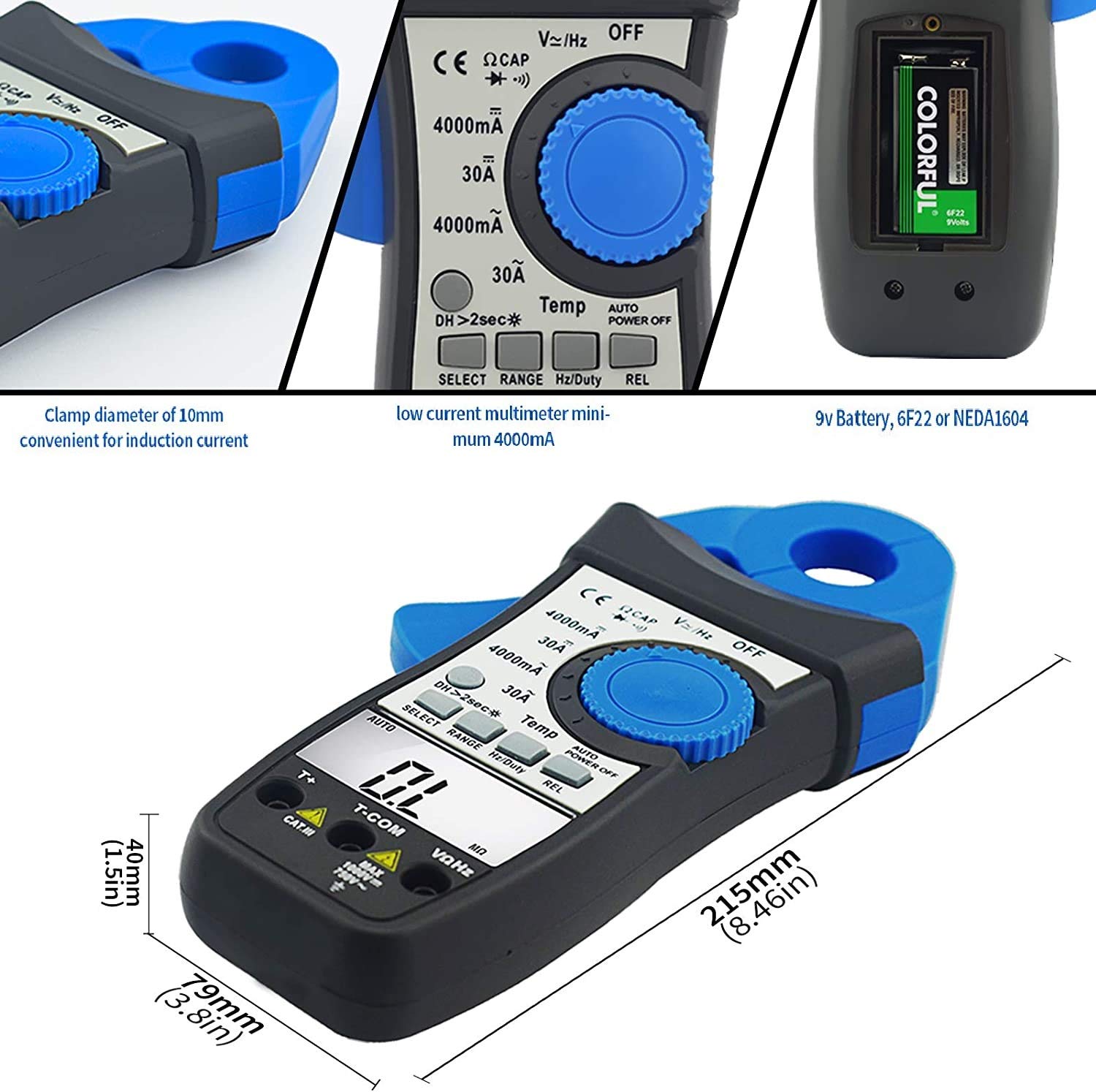
Image: Close-up views of the AI-870K. One image highlights the 10mm clamp diameter for induction current. Another shows the low current multimeter's minimum 4000mA range. A third image displays the 9V battery compartment, specifying 6F22 or NEDA1604 battery types.

Image: The AIOMEST AI-870K clamp multimeter with its jaw open, illustrating the 21mm (0.8 inch) jaw caliber, suitable for various wire sizes.

Image: A diagram detailing the panel layout of the AIOMEST AI-870K. Key components are numbered: 1. Rotary Switch (selects functions and ranges), 2. D.HOLD/Back Light key (press for >2 seconds to toggle backlight), 3. SELECT key (for CAP and Ω ranges), 4. RANGE key (manual mode), 5. Hz/Duty key (measures duty cycle, returns to Hz), 6. REL key (stores display value), 7. LCD Display (3999 counts), 8. Input Jacks (VΩ, T-COM, VΩHz, T+).

Image: Icons representing the various functions of the AIOMEST AI-870K: DC/AC Voltage Test, DC/AC Current Test, Backlight, Test Diode, Auto Power Off, Relative Value, Temperature, Continuity Buzzer, Data Hold, and Frequency Test.
Setup
Battery Installation
- Ensure the device is powered off by rotating the Rotary Switch to the OFF position.
- Locate the battery compartment on the back of the device.
- Open the compartment cover.
- Insert the provided 9V battery (type 6F22 or NEDA1604), observing correct polarity.
- Close the battery compartment cover securely.
Operating Instructions
This section details how to perform various measurements with your AIOMEST AI-870K.
General Operation
- Power On/Off: Rotate the Rotary Switch to the desired function to power on. Rotate to "OFF" to power off. The device features auto power off after a period of inactivity.
- Backlight: Press and hold the D.HOLD/Back Light key for more than 2 seconds to turn the backlight on or off.
- Data Hold: Press the D.HOLD/Back Light key briefly to hold the current display reading. Press again to release.
- Relative Measurement (REL): Press the REL key to store the current display value as a reference for subsequent measurements.
- Manual Ranging: Press the RANGE key to switch from auto-ranging to manual ranging mode.
Measuring AC/DC Voltage
- Rotate the Rotary Switch to the V~ (AC Voltage) or V- (DC Voltage) position.
- Insert the red test lead into the VΩHz input jack and the black test lead into the T-COM input jack.
- Connect the test leads in parallel to the circuit or component under test.
- Read the voltage value on the LCD display.
Measuring AC/DC Current (Clamp Method)
- Rotate the Rotary Switch to the 4000mA or 30A AC/DC current position.
- Open the clamp jaw by pressing the lever.
- Enclose only one conductor of the circuit within the clamp jaw. Ensure the jaw is fully closed.
- Read the current value on the LCD display.
Measuring Resistance
Video: This video demonstrates how to perform a resistance test using the AIOMEST AI-870K clamp multimeter. It shows the user rotating the dial to the "Resistance" position and connecting test leads to a circuit board to measure resistance.
- Rotate the Rotary Switch to the Ω (Resistance) position.
- Insert the red test lead into the VΩHz input jack and the black test lead into the T-COM input jack.
- Connect the test leads across the component where resistance is to be measured. Ensure the circuit is de-energized before testing.
- Read the resistance value on the LCD display.
Measuring Capacitance
- Rotate the Rotary Switch to the CAP position.
- Press the SELECT key if necessary to cycle to capacitance measurement.
- Insert the red test lead into the VΩHz input jack and the black test lead into the T-COM input jack.
- Connect the test leads across the capacitor. Ensure the capacitor is discharged before testing.
- Read the capacitance value on the LCD display.
Diode Test and Continuity
- Rotate the Rotary Switch to the Diode/Continuity position.
- Press the SELECT key to toggle between diode test and continuity test.
- For Diode Test: Connect the red test lead to the anode and the black test lead to the cathode of the diode. Read the forward voltage drop. Reverse the leads to check for open circuit.
- For Continuity Test: Connect the test leads across the circuit. An audible beep indicates continuity (low resistance).
Measuring Temperature

Image: The AIOMEST AI-870K clamp multimeter connected with a temperature probe inserted into a glass of water, demonstrating temperature measurement. Also shown are test leads connected to a 9V battery for voltage measurement.
- Rotate the Rotary Switch to the Temp position.
- Insert the temperature probe into the T+ and T-COM input jacks.
- Place the tip of the temperature probe on or in the object to be measured.
- Read the temperature value in Celsius on the LCD display.
Maintenance
Cleaning
Wipe the meter casing with a damp cloth and mild detergent. Do not use abrasive cleaners or solvents, as these can damage the casing or display.
Battery Replacement
When the battery indicator appears on the display, replace the 9V battery as described in the Setup section. Always use a fresh 9V battery (6F22 or NEDA1604).
Storage
If the meter is not used for an extended period, remove the battery to prevent leakage and potential damage to the device. Store the meter in a cool, dry place, away from direct sunlight and extreme temperatures.
Troubleshooting
| Problem | Possible Cause | Solution |
|---|---|---|
| Meter does not power on | Dead or incorrectly installed battery | Replace or correctly install the 9V battery. |
| Incorrect readings | Incorrect function/range selected; damaged test leads; poor connection | Verify function/range. Check test leads for damage and ensure secure connections. |
| No continuity beep | Open circuit; high resistance | Check the circuit for breaks. The resistance may be too high for continuity detection. |
| Clamp current reading is zero or unstable | Multiple conductors in clamp; clamp jaw not fully closed; low current | Ensure only one conductor is clamped. Close the jaw completely. Use the 4000mA range for low currents. |
Specifications
- Model: AI-870K
- Max LCD Display: 3999 counts
- Clamp Opening Size: 0.82 inches (21mm)
- Dimensions: 8.46 x 3.11 x 1.57 inches (215 x 79 x 40 mm)
- Weight: 0.72 lbs (including battery)
- Power Source: 9V Battery
- Safety Standard: IEC 1010, Pollution Degree 2, Over-voltage Category III
- DC Voltage Test: 400mV~1000V (Accuracy: ±0.8% of rdg + 5 digits)
- AC Voltage Test: 400mV~750V (Accuracy: ±1.2% of rdg + 15 digits)
- DC Current Test: 4000mA ~30A (Accuracy: ±3.5% of rdg + 10 digits)
- AC Current Test: 4000mA ~30A (Accuracy: ±3.5% of rdg + 10 digits)
- Resistance: 400Ω~40MΩ (Accuracy: ±1.2% of rdg + 10 digits)
- Capacitance: 51.2nF~100µF (Accuracy: ±2.5% of rdg + 10 digits)
- Frequency: 51.2KHz (Accuracy: ±5% of rdg + 5 digits)
- Temperature: -20~1000℃ (Celsius Only)
Warranty and Support
AIOMEST provides a 12-month guarantee for the AI-870K clamp multimeter from the date of purchase. Life-long technical support is also available to assist with any product-related inquiries or issues.
For assistance, please contact AIOMEST customer service through the platform where the product was purchased or visit the official AIOMEST store for contact information.
Official AIOMEST Store: AIOMEST Store on Amazon
