
1. Introduction
This manual provides instructions for the Easytry123 Replacement Remote Control, designed for use with various Fujitsu air conditioner models. This remote offers essential functions for controlling your air conditioning unit. Please note that as a replacement unit, some advanced or specific functions of your original remote may not be available or may operate differently. Refer to your air conditioner's original manual for detailed information on its specific features.
Important Compatibility Note:
This replacement remote is compatible with Fujitsu air conditioner models including ASTG07LVCA, ASYG18LFCA, ASYG24LFCA, ASTG09LVCA, ASHG9LEC, ASHG12LEC, ABYA18GATH, ABYA24GATH, ARYF24LBTU, AJYA40LALH, AJYA45LALH, and ASTG12LVCA. Ensure your air conditioner model is listed for proper functionality.
2. Safety Information
- Keep the remote control out of reach of children.
- Do not expose the remote control to direct sunlight, high temperatures, or moisture.
- Avoid dropping or subjecting the remote to strong impacts.
- If the remote control will not be used for an extended period, remove the batteries to prevent leakage.
- Dispose of used batteries according to local regulations.
3. Setup: Battery Installation
The remote control requires two AAA batteries (not included) for operation.
- Locate the battery compartment cover on the back of the remote control.
- Slide the cover downwards or press the latch and lift to open.
- Insert two AAA batteries, ensuring the positive (+) and negative (-) terminals align correctly with the markings inside the compartment.
- Replace the battery compartment cover, sliding it back into place until it clicks securely.

Figure 3.1: Front view of the Easytry123 Replacement Remote Control. The battery compartment is located on the reverse side.
4. Operating Instructions
Point the remote control directly at the air conditioner's receiver when operating. Ensure there are no obstructions between the remote and the unit.

Figure 4.1: Close-up view of the primary control buttons on the remote.
Button Functions:
- MASTER CONTROL: Selects the operating mode (e.g., Auto, Cool, Dry, Fan, Heat). Press repeatedly to cycle through modes.
- START/STOP (Yellow Button): Turns the air conditioner unit ON or OFF.
- FAN CONTROL: Adjusts the fan speed (e.g., Auto, Low, Medium, High). Press repeatedly to cycle through speeds.
- AIR CLEAN: Activates or deactivates the air purification function, if available on your AC unit.
- COIL DRY: Initiates the coil dry function to prevent mold growth, if available on your AC unit.
- SLEEP: Activates the sleep mode, which typically adjusts temperature and fan speed for comfortable sleep.
- SET TEMP. (Up/Down Arrows): Adjusts the desired temperature setting.
- SET: Confirms a setting, often used in conjunction with timer or clock adjustments.
- SWING: Controls the louver swing function, directing airflow. Press to start/stop or change swing pattern.
- TIMER: Accesses timer settings for scheduled ON/OFF operations.
- TIMER MODE: Selects between different timer modes (e.g., ON Timer, OFF Timer).
- CLOCK ADJUST: Used to set the current time on the remote's display.
- TEST RUN: For service or diagnostic purposes. Avoid pressing during normal operation.
- RESET: Resets the remote control to its factory default settings.
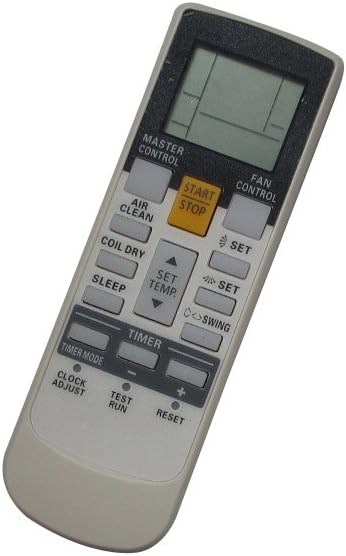
Figure 4.2: Angled view illustrating the overall layout and ergonomic design of the remote control.
5. Maintenance
Cleaning:
Wipe the remote control with a soft, dry cloth. Do not use liquid cleaners, abrasive materials, or chemical solvents, as these can damage the remote's surface or internal components.
Battery Replacement:
Replace batteries when the remote's display becomes dim or the remote fails to operate the air conditioner consistently. Always replace both batteries simultaneously with new AAA batteries.
6. Troubleshooting
- Remote not responding:
- Check if the batteries are inserted correctly with the correct polarity.
- Replace old batteries with new ones.
- Ensure there are no obstructions between the remote control and the air conditioner's receiver.
- Make sure you are within the effective operating range of the air conditioner.
- Some functions do not work:
- As a replacement remote, some specific or advanced functions of your original air conditioner remote may not be supported. This is normal for universal or replacement remotes.
- Refer to your air conditioner's original manual to confirm if the function is unit-specific.
7. Specifications
| Brand: | Easytry123 |
| Compatible Devices: | Fujitsu Air Conditioners (various models) |
| Connectivity Technology: | Infrared |
| Controller Type: | Button Control |
| Special Feature: | Ergonomic Design |
| Batteries Required: | 2 x AAA (not included) |
8. Warranty and Support
For any issues or inquiries regarding your Easytry123 Replacement Remote Control, please contact the retailer or manufacturer directly. Specific warranty information may vary depending on your purchase location and retailer policies. Please retain your proof of purchase for warranty claims.