
RYOBI P21010BTLVNM
RYOBI P21010BTLVNM 18-Volt ONE+ Brushless Cordless Jet Fan Blower
Model: P21010BTLVNM | Brand: RYOBI
1. Introduction
This manual provides essential information for the safe and efficient operation, maintenance, and troubleshooting of your RYOBI P21010BTLVNM 18-Volt ONE+ Brushless Cordless Variable-Speed Lithium-Ion Jet Fan Blower. Please read and understand all instructions before use.
The RYOBI P21010BTLVNM is designed for clearing leaves and debris from various surfaces. It features a brushless motor for efficient performance, a variable speed trigger for controlled airflow, and a turbo button for maximum power. This tool is part of the RYOBI ONE+ 18V system, utilizing compatible 18-Volt batteries (sold separately).
2. Safety Information
Always follow basic safety precautions to reduce the risk of fire, electric shock, and personal injury.
- Read all instructions before operating the blower.
- Wear appropriate personal protective equipment (PPE), including eye protection, hearing protection, and sturdy footwear.
- Keep children, bystanders, and pets at a safe distance (at least 50 ft / 15 m) from the operating area.
- Do not operate the blower in wet conditions or rain.
- Ensure the battery pack is securely installed before operation and removed before performing any maintenance.
- Never point the blower nozzle at people or animals.
- Inspect the blower for damaged parts before each use. Do not use if any part is damaged.
- Use only RYOBI ONE+ 18V batteries and chargers with this tool.
3. Package Contents
Your RYOBI P21010BTLVNM Blower (Tool-Only) package typically includes the following:
- RYOBI P21010BTLVNM 18-Volt ONE+ Brushless Cordless Jet Fan Blower (Tool-Only)
- Blower Nozzle
- Operator's Manual
Note: Battery pack and charger are sold separately.

Image: RYOBI P21010BTLVNM Blower with detachable nozzle. The main unit is bright green and black, with the nozzle being entirely black. The battery slot is visible at the top of the handle.
4. Setup
4.1 Attaching the Blower Nozzle
- Align the tabs on the blower nozzle with the slots on the blower housing.
- Push the nozzle onto the housing until it clicks securely into place.
- Ensure the nozzle is firmly attached before operation.
4.2 Installing the Battery Pack
- Ensure the blower is turned off.
- Align the ribs on the battery pack with the grooves in the blower's battery port.
- Slide the battery pack into the blower until it latches securely.
- To remove, press the latch button on the battery pack and slide it out.
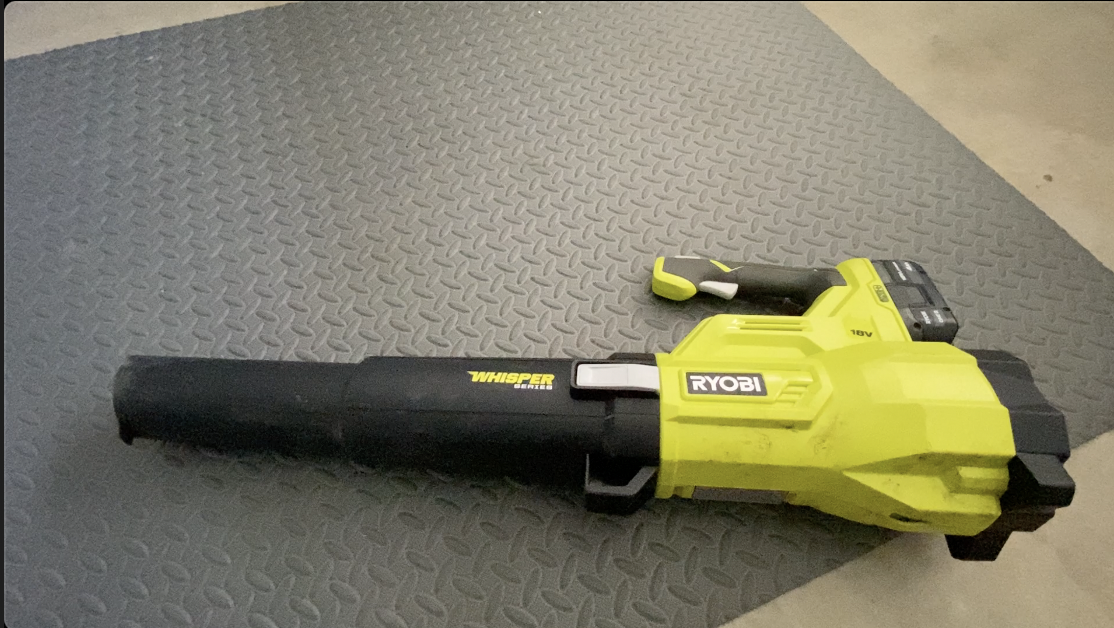
Image: RYOBI P21010BTLVNM Blower with an 18V battery pack inserted into the top slot. The battery has a charge indicator visible.
5. Operating Instructions
5.1 Starting and Stopping
- To start the blower, depress the variable speed trigger.
- To stop the blower, release the variable speed trigger.
5.2 Variable Speed Control
The blower features a variable speed trigger, allowing you to control the airflow intensity. Press the trigger lightly for lower speeds and more pressure for higher speeds. This is useful for delicate areas or when less power is required.
5.3 Turbo Mode
For maximum clearing power, press the turbo button located on the top of the handle while operating the blower. This will provide a burst of high-velocity air (up to 110 MPH / 410 CFM) for stubborn debris.
Video: This video provides an overview of the RYOBI ONE+ 18-Volt Lithium-Ion Cordless Leaf Blower, highlighting its features and components, including the variable speed trigger and turbo mode.
Video: This video demonstrates the power and features of the Ryobi Brushless Cordless Jet Fan Blower, including its battery compatibility and ease of use in various outdoor cleaning tasks.
6. Maintenance
Regular maintenance ensures optimal performance and extends the life of your blower.
- Cleaning: Keep the air vents clear of debris to prevent overheating. Use a soft brush or cloth to clean the exterior. Do not use water or chemical cleaners.
- Battery Care: Store battery packs in a cool, dry place away from direct sunlight and extreme temperatures. Do not store battery packs in a discharged state for extended periods.
- Storage: When not in use, store the blower in a dry, secure location out of reach of children. Remove the battery pack before storing.
7. Troubleshooting
| Problem | Possible Cause | Solution |
|---|---|---|
| Blower does not start | Battery not installed correctly; Battery discharged; Blower switch off. | Ensure battery is fully seated; Charge battery pack; Depress variable speed trigger. |
| Reduced airflow | Air vents blocked; Nozzle not fully attached. | Clear air vents; Reattach nozzle securely. |
| Blower stops during operation | Battery overheated; Battery discharged. | Allow battery to cool; Charge battery pack. |
8. Specifications
| Feature | Detail |
|---|---|
| Model Number | P21010BTLVNM |
| Brand | RYOBI |
| Power Source | Battery Powered |
| Voltage | 18 Volts |
| Air Flow Capacity | 410 Cubic Feet Per Minute (CFM) |
| Speed | Up to 110 Miles per Hour (MPH) |
| Noise Level | 54 Decibels (dB) |
| Item Weight | 7.25 Pounds |
| Special Features | Adjustable Speed, Lightweight, Turbo Button |
9. Warranty and Support
For warranty information, technical support, or to purchase replacement parts, please refer to the official RYOBI website or contact their customer service. Keep your purchase receipt as proof of purchase for warranty claims.
Online resources and contact information can typically be found at www.ryobitools.com.
Related documentsP21010BTLVNM


Ask a question about this manual
Ask about setup, troubleshooting, compatibility, parts, safety, or missing instructions. Manuals+ will review the question and use this page’s manual context to help answer it.