1. Introduction
This manual provides essential information for the safe and efficient operation of the AUTONICS CX6M-2P4 Counter/Timer. The CX6M-2P4 is a versatile 6-digit LCD counter/timer unit, designed for industrial applications requiring precise counting and timing functions. It features 2 preset outputs, supports both PNP and NPN input types, and includes prescale value setting capabilities. The unit offers 2 SPDT (2c) relay outputs and 2 NPN open collector outputs, operating on a 100-240 VAC power supply.
2. Safety Information
Read and understand all safety precautions before installing or operating the device. Failure to follow these instructions may result in injury or product damage.
- Electrical Safety: Ensure power is disconnected before wiring or performing maintenance. Only qualified personnel should perform electrical work.
- Environmental Conditions: Do not install the unit in locations subject to direct sunlight, high humidity, excessive dust, or corrosive gases.
- Handling: Avoid dropping or subjecting the unit to strong impacts. Do not disassemble or modify the unit.
- Power Supply: Use the specified power supply voltage (100-240 VAC). Incorrect voltage can cause damage.
3. Product Overview
The AUTONICS CX6M-2P4 is a compact and robust counter/timer designed for precise control in various industrial settings.
3.1. Features
- W72xH72mm standard panel size.
- 6-digit LCD display for clear readings.
- Two independent preset values for flexible control.
- Supports both PNP and NPN input types.
- Adjustable prescale value setting.
- Two SPDT (2c) relay outputs (250VAC 3A).
- Two NPN open collector outputs.
- Wide power supply range: 100-240 VAC.
3.2. Components
The unit consists of a front panel with an LCD display and control buttons, and a rear panel with terminal blocks for power, input, and output connections.
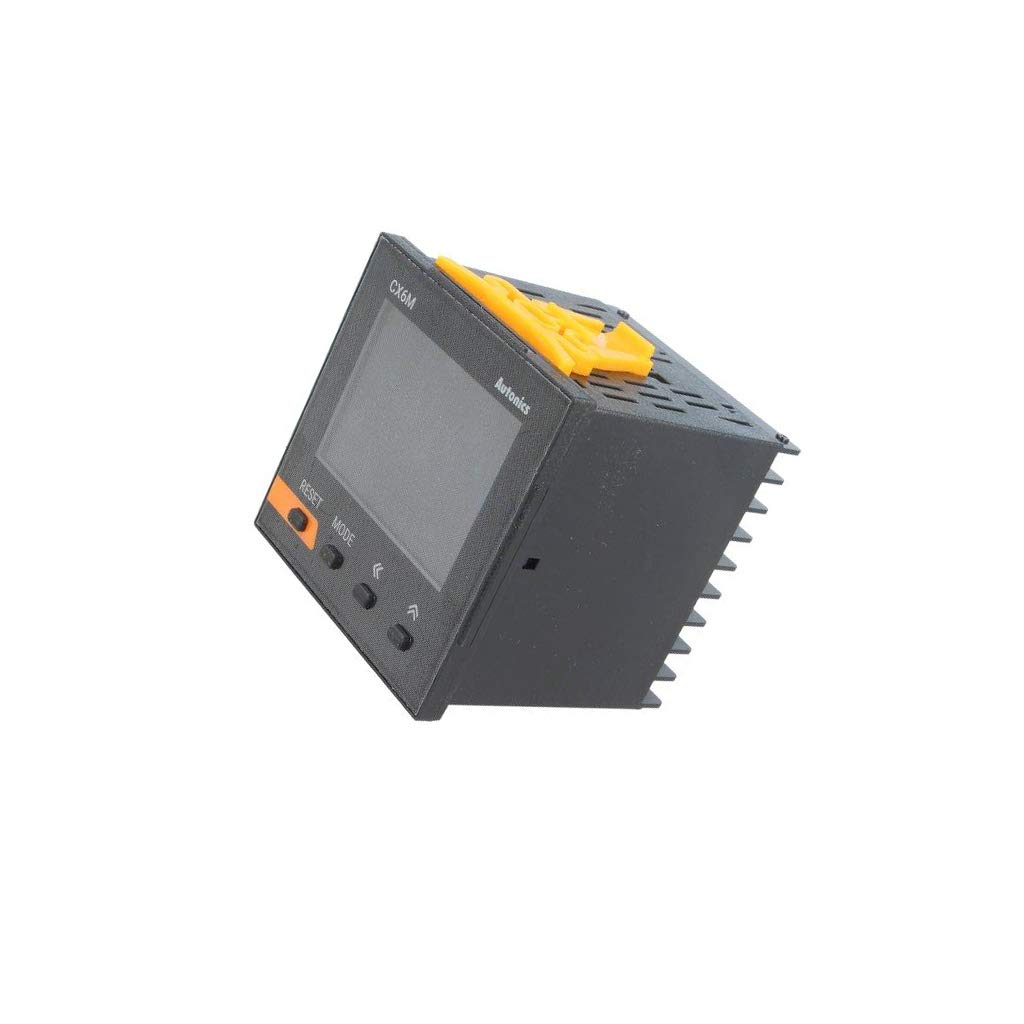
Image showing the front panel of the AUTONICS CX6M-2P4 Counter/Timer, displaying the 6-digit LCD, control buttons, and overall dimensions.
4. Setup
4.1. Mounting
The CX6M-2P4 is designed for panel mounting. Cut a rectangular opening of 68x68mm (W x H) in the panel. Insert the unit from the front and secure it using the provided mounting brackets from the rear. Ensure a tight fit to prevent dust and moisture ingress.
4.2. Wiring
Before wiring, ensure that the power supply is completely disconnected. Refer to the wiring diagram on the side of the unit or in the full product manual for detailed connections. Below are general guidelines:
- Power Supply: Connect the 100-240 VAC power to the designated power terminals.
- Input Connections: Connect the PNP or NPN sensor inputs to the appropriate input terminals. Ensure correct polarity for NPN/PNP sensors.
- Output Connections: Connect the load to the relay output terminals (SPDT) and/or the NPN open collector output terminals as required by your application.
5. Operating Instructions
5.1. Basic Operation
Once powered on, the unit will display the current count or time value. The front panel buttons allow for resetting the count, switching display modes, and accessing parameter settings.
- RESET Button: Press to reset the current count or timer value to zero.
- MODE Button: Press to cycle through different display modes or enter parameter setting mode.
- UP/DOWN Buttons: Used to adjust values when in parameter setting mode.
5.2. Parameter Setting
To configure the counter/timer, enter the parameter setting mode:
- Press and hold the MODE button for a few seconds until the display changes to the parameter setting menu.
- Use the UP/DOWN buttons to navigate through the parameters (e.g., preset values, input mode, prescale value, output mode).
- Press the MODE button briefly to select a parameter for editing.
- Use the UP/DOWN buttons to change the parameter value.
- Press the MODE button again to confirm the new value and move to the next parameter or exit the editing mode.
- To exit the parameter setting mode, navigate to the end of the menu or hold the MODE button again.
6. Maintenance
The AUTONICS CX6M-2P4 is designed for long-term, reliable operation with minimal maintenance. Follow these guidelines to ensure optimal performance:
- Cleaning: Gently wipe the unit's surface with a soft, dry cloth. Do not use abrasive cleaners, solvents, or water directly on the unit.
- Inspection: Periodically check wiring connections for looseness or damage. Ensure the unit is free from dust accumulation, especially around ventilation areas.
- Storage: If storing the unit, keep it in a dry, cool place away from direct sunlight and extreme temperatures.
7. Troubleshooting
Refer to the table below for common issues and their potential solutions.
| Problem | Possible Cause | Solution |
|---|---|---|
| Unit does not power on. | No power supply or incorrect wiring. | Check power connections and ensure correct voltage (100-240 VAC). |
| Count/Time does not increment. | Input sensor not connected, faulty, or incorrect input mode setting. | Verify sensor wiring, check sensor functionality, and confirm input mode (PNP/NPN) in settings. |
| Output does not activate. | Preset value not reached, output mode incorrect, or load wiring issue. | Check preset values, verify output mode settings, and inspect load wiring. |
| Display shows error code. | Internal error or specific fault condition. | Refer to the full product manual for specific error code meanings. Power cycle the unit. If the error persists, contact support. |
8. Specifications
Technical specifications for the AUTONICS CX6M-2P4 Counter/Timer.
| Parameter | Value |
|---|---|
| Model | CX6M-2P4 |
| Display | 6-Digit LCD |
| Dimensions (W x H) | 72mm x 72mm |
| Input Type | PNP or NPN selectable |
| Preset Outputs | 2 (Relay SPDT (2c) 250VAC 3A, NPN Open Collector) |
| Power Supply | 100-240 VAC |
| Weight | 1.1 pounds (approx. 0.5 kg) |
9. Warranty and Support
AUTONICS products are manufactured under strict quality control. For warranty information, please refer to the warranty card included with your product or visit the official AUTONICS website. For technical support, service, or inquiries, please contact your local AUTONICS distributor or customer service center. Provide the model number (CX6M-2P4) when seeking assistance.