
1. Introduction
This manual provides essential information for the safe and efficient installation, operation, and maintenance of the Crouzet OU1R10MV1 Multifunction Time Delay Relay. Please read this manual thoroughly before attempting to install or operate the device.
1.1. Safety Information
- Always disconnect power before installing, wiring, or servicing the relay.
- Installation and wiring should only be performed by qualified personnel.
- Ensure the relay's voltage and current ratings match the application requirements.
- Do not expose the device to excessive moisture, dust, or extreme temperatures outside its specified operating range.
- Verify all connections are secure before applying power.
2. Product Features
The Crouzet OU1R10MV1 is a versatile multifunction time delay relay designed for various industrial and automotive applications. Key features include:
- Multifunctionality: Offers multiple timing functions (e.g., On-delay, Off-delay, Interval, Flasher) selectable via a rotary switch.
- Wide Voltage Range: Operates on 12-240 VAC/DC, providing flexibility for diverse power supplies.
- Output: Equipped with 1 x 10A output contact for controlling external loads.
- Plug-in Design: Features an 8-pin plug-in base for easy installation and replacement.
- Compact Size: Designed for space-efficient integration into control panels.
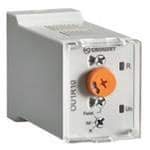
Figure 1: Overview of the Crouzet OU1R10MV1 Multifunction Time Delay Relay. This image shows the general appearance of the relay, including its housing and pin configuration.
3. Setup and Installation
3.1. Mounting
The OU1R10MV1 relay is designed for plug-in mounting into a compatible 8-pin relay socket (not included). Ensure the socket is securely mounted in a suitable enclosure, away from excessive vibration or heat sources.
- Align the 8 pins of the relay with the corresponding holes in the relay socket.
- Gently push the relay into the socket until it is fully seated. Do not force the relay.
- Ensure the retaining clip (if present on the socket) is engaged to secure the relay.
3.2. Wiring
Refer to the wiring diagram provided with your relay socket or application for specific connections. Below is a general guide for an 8-pin plug-in relay. Always ensure power is disconnected before wiring.
- Power Supply (A1, A2): Connect the control voltage (12-240 VAC/DC) to terminals A1 and A2. Observe polarity if using DC voltage.
- Common Contact (15): This is the common terminal for the output relay.
- Normally Open (NO) Contact (18): Connect the load to this terminal for operation when the relay is energized.
- Normally Closed (NC) Contact (16): Connect the load to this terminal for operation when the relay is de-energized.
- Control Input (B1): Depending on the selected function, this terminal may be used for a trigger signal.
Consult the specific function diagram for precise wiring configurations related to the chosen timing mode.
4. Operating Instructions
The OU1R10MV1 features rotary switches for function selection and time range adjustment.
4.1. Function Selection
A rotary switch on the front of the relay allows selection of various timing functions. Each position corresponds to a specific operating mode (e.g., On-delay, Off-delay, Interval). Refer to the markings on the relay for the available functions and their symbols.
- Ensure power is off before changing the function.
- Rotate the function selector switch to the desired timing mode.
4.2. Time Setting
The time delay is set using two rotary switches: one for the time range and one for the time multiplier.
- Time Range Selection: Use the upper rotary switch to select the desired time range (e.g., 0.1s-1s, 1s-10s, 1m-10m, 1h-10h).
- Time Multiplier Setting: Use the lower rotary switch to set the specific time value within the selected range (e.g., if range is 1s-10s, setting to '5' would result in 5 seconds).
4.3. Indicator Lights
- Power LED: Illuminates when control voltage is applied to the relay.
- Output Status LED: Illuminates when the output relay contacts are energized.
5. Maintenance
The Crouzet OU1R10MV1 relay is designed for long-term, maintenance-free operation. However, periodic inspection is recommended to ensure optimal performance.
- Cleaning: Keep the relay and its surroundings clean and free of dust and debris. Use a soft, dry cloth for cleaning. Do not use abrasive cleaners or solvents.
- Connections: Periodically check all wiring connections for tightness and signs of corrosion. Loose connections can lead to intermittent operation or overheating.
- Environmental Conditions: Ensure the operating environment remains within the specified temperature and humidity limits.
6. Troubleshooting
If the relay is not functioning as expected, perform the following checks:
| Problem | Possible Cause | Solution |
|---|---|---|
| Relay not powering on (Power LED off) | No control voltage; Incorrect wiring (A1, A2); Blown fuse in circuit. | Check power supply; Verify A1/A2 wiring; Check and replace fuse if necessary. |
| Relay not timing or incorrect timing | Incorrect function selected; Incorrect time range/multiplier setting; Faulty trigger input (if applicable). | Verify function switch position; Adjust time range and multiplier; Check trigger signal. |
| Output relay not activating (Output LED off) | Timing not complete; No power to relay; Overload on output contacts; Faulty load. | Wait for timing cycle to complete; Check power supply; Verify load current is within 10A rating; Test load independently. |
| Intermittent operation | Loose wiring connections; Unstable power supply; Environmental interference. | Tighten all connections; Ensure stable power; Check for sources of electrical noise. |
If the problem persists after performing these checks, contact Crouzet technical support.
7. Specifications
| Parameter | Value |
|---|---|
| Model | OU1R10MV1 |
| Brand | Crouzet |
| Connector Type | Plug-In |
| Mounting Type | Plug In Mount |
| Control Voltage | 12-240 VAC/DC |
| Output Configuration | 1 x 10A (SPDT) |
| Maximum Switching Current | 10 Amps |
| Number of Pins | 8 Pins |
| Upper Temperature Rating | 60 Degrees Celsius |
| Compliance | RoHS, IP (Ingress Protection) |
| Item Weight | 6.99 pounds |
| Package Dimensions | 3 x 2 x 1 inches |
8. Warranty and Support
Crouzet products are manufactured to high-quality standards. For specific warranty terms and conditions, please refer to the documentation provided with your purchase or visit the official Crouzet website. In case of technical issues or questions not covered in this manual, please contact Crouzet customer support or your authorized distributor.
Contact Information: Please refer to the official Crouzet website for the most up-to-date contact details for technical support and service centers in your region.


