
AIPER HJ1103J
AIPER Cordless Robotic Pool Cleaner User Manual
Model: HJ1103J
Introduction
This user manual provides essential information for the safe and efficient operation, maintenance, and troubleshooting of your AIPER Cordless Robotic Pool Cleaner, model HJ1103J. Designed for both above-ground and in-ground pools with flat floors, this cleaner offers a hassle-free solution for maintaining pool cleanliness.
Safety Information
- Read all instructions carefully before operating the device.
- Do not operate the cleaner when people or pets are in the pool.
- Use only the original charger provided with the unit.
- Ensure the charging port is dry before connecting the charger.
- Keep the cleaner out of reach of children.
- Do not attempt to disassemble or repair the unit yourself. Contact customer service for assistance.
- Store the cleaner in a cool, dry place when not in use.
Setup
1. Unpacking and Initial Inspection
Carefully remove all components from the packaging. Verify that all parts are present and undamaged. The package should include the robotic pool cleaner, charger, floating rope, and user manual.

Figure 1: AIPER Cordless Robotic Pool Cleaner.
2. Charging the Cleaner
Before first use, fully charge the robotic pool cleaner. The charging time is approximately 6 hours. Ensure the charging port is completely dry before connecting the charger. The indicator light on the charger will show the charging status (e.g., red for charging, green for complete).

Figure 2: Charging the robotic pool cleaner. The charger indicator light changes from red (charging) to green (complete).
3. Adjusting Cleaning Pattern (Optional)
The cleaner features adjustable front and rear dials to set the desired cleaning pattern. For symmetrical pool shapes, set the dials to 0°-20°. For asymmetrical pool shapes, set them to 0°-40° to ensure comprehensive coverage.

Figure 3: Adjusting the cleaning pattern dials for optimal pool coverage.
Operating Instructions
1. Placing the Cleaner in the Pool
Once fully charged, place the cleaner into the pool. Ensure it sinks to the bottom. The cleaner is designed for cordless operation, eliminating the need for hoses or external power connections during cleaning cycles.

Figure 4: The cordless design allows for hassle-free operation.
2. Automatic Cleaning Cycle
The AIPER Seagull 1000 will automatically begin its cleaning cycle once submerged. It features powerful dual-drive motors and a precise brush to effectively clean the pool floor, collecting debris such as sand, insects, small stones, and leaves.

Figure 5: Advanced cleaning system with dual suction vents and a roller brush for thorough cleaning.
3. Self-Parking Technology
Upon completion of its cleaning cycle or when the battery is low, the cleaner will automatically park itself near the pool wall. This self-parking feature simplifies retrieval, as you won't need to enter the water.

Figure 6: The cleaner utilizes self-parking technology to position itself conveniently for retrieval.
Maintenance
1. Retrieving the Cleaner
Use the included floating rope to easily pull the cleaner out of the pool. Avoid lifting the cleaner by its wheels or other components to prevent damage.

Figure 7: Easy retrieval of the lightweight cleaner from the pool.
2. Cleaning the Filter
After each use, it is crucial to clean the filter to maintain optimal performance. Open the cleaner's cover and remove the filter basket. Rinse the filter thoroughly with a garden hose to remove all collected debris. Ensure the filter is clean and dry before reinserting it and storing the cleaner.
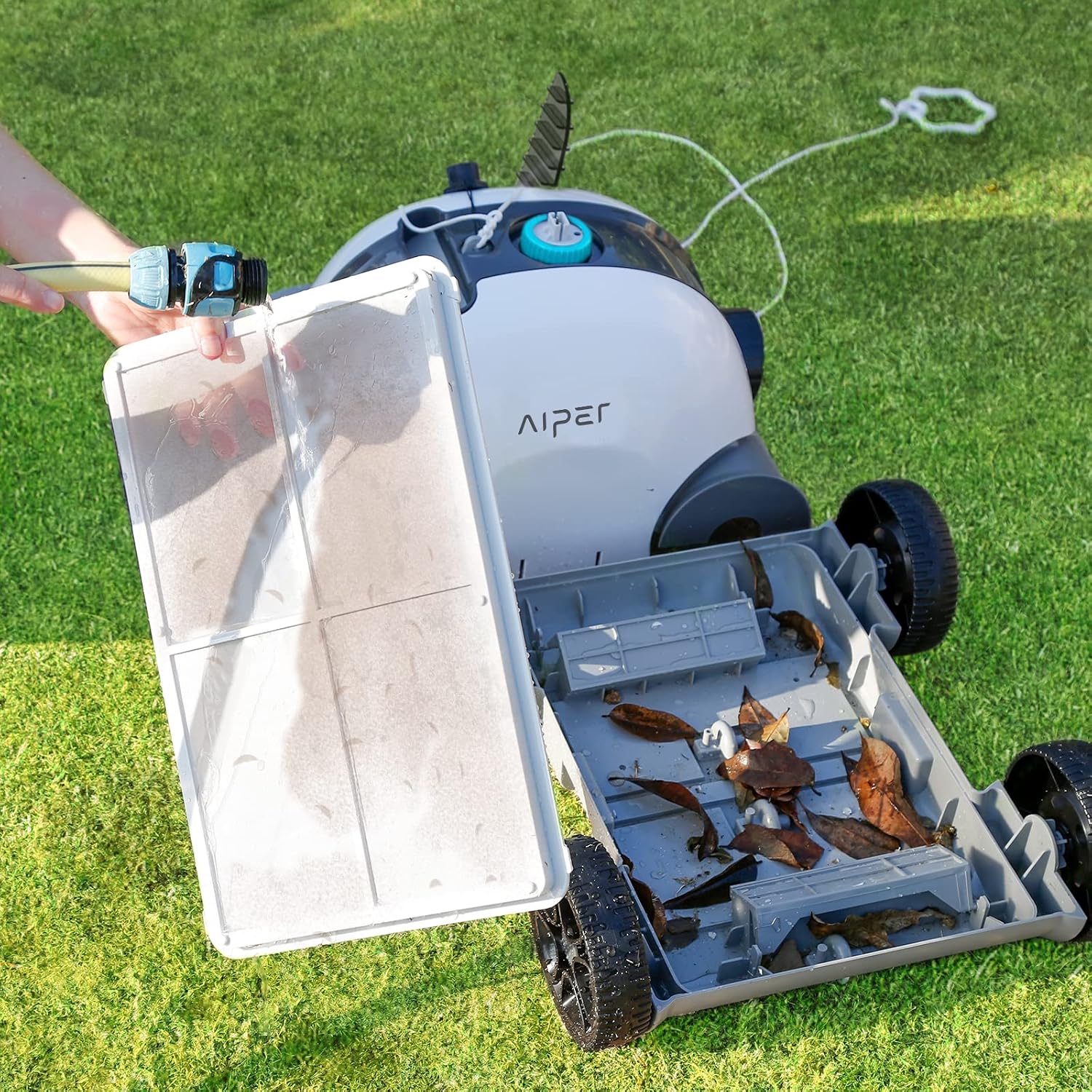
Figure 8: Cleaning the filter basket after use.
Troubleshooting
| Problem | Possible Cause | Solution |
|---|---|---|
| Cleaner does not start. | Battery is not charged or low. | Fully charge the cleaner before use. Ensure the charger is properly connected. |
| Cleaner moves slowly or inefficiently. | Filter is clogged with debris. | Remove and thoroughly clean the filter basket. |
| Cleaner does not cover the entire pool. | Incorrect jet nozzle adjustment for pool shape. | Adjust the front and rear dials to optimize the cleaning pattern for your pool's shape (0°-20° for symmetrical, 0°-40° for asymmetrical). |
| Cleaner gets stuck or has difficulty with inclines. | Low battery or steep incline. | Ensure the cleaner is fully charged. The cleaner is designed for flat floors and can climb inclines up to 15 degrees. For steeper inclines, manual cleaning may be required. |
| Cleaner does not self-park. | Obstruction or malfunction. | Check for any obstructions near the pool wall. If the issue persists, contact customer support. |
Specifications
- Model: HJ1103J
- Power Source: Battery Powered
- Battery Type: Lithium-Ion
- Battery Capacity: 5000 mAh
- Run Time: Up to 90 minutes
- Charging Time: Approximately 6 hours (based on review, not 8000 Amps from spec)
- Cleaning Area: Up to 861 sq.ft (for flat floors)
- Filter Volume: 3.9 Liters
- Item Weight: 11.44 pounds (5.2 Kilograms)
- Product Dimensions: 15.7 x 16.4 x 10.6 inches
- Max Incline: 15 degrees
- Special Feature: Cordless, Self-Parking Technology
Warranty and Support
The AIPER Cordless Robotic Pool Cleaner comes with a 1-year limited warranty from the date of purchase. This warranty covers manufacturing defects under normal use.
For product support, troubleshooting assistance, or warranty claims, please contact AIPER customer service. You can typically find contact information on the official AIPER website or through your purchase platform. For Amazon purchases, you can access product support via your order details.
For a detailed user manual in PDF format, please refer to the official document: AIPER User Manual (PDF).
Related documentsHJ1103J


Ask a question about this manual
Ask about setup, troubleshooting, compatibility, parts, safety, or missing instructions. Manuals+ will review the question and use this page’s manual context to help answer it.