TECKNET Wireless Battery Doorbell User Manual
Model: HWD01990
Brand: TECKNET
1. Introduction
Thank you for choosing the TECKNET Wireless Battery Doorbell. This manual provides detailed instructions for setting up, operating, and maintaining your new doorbell system. Please read it carefully to ensure proper use and to maximize the product's lifespan.
This doorbell system is designed for convenience and reliability, featuring a robust IP67 waterproof rating for outdoor use, an extended wireless range, and customizable chime options.

Image: The TECKNET Wireless Battery Doorbell set, showing the larger receiver unit and the smaller transmitter button.
2. Product Features
- 60 Chimes & 5 Volume Levels: Offers a wide selection of melodies and adjustable volume from 0 dB (silent mode) to 110 dB.
- 400m Wireless Range: Provides extensive coverage, ensuring reliable signal transmission even through walls.
- IP67 Waterproof Transmitter: Designed to withstand various weather conditions, from -20°C to 60°C.
- Long Battery Life: The transmitter battery lasts up to 4.5 years, minimizing maintenance.
- Memory Function: Automatically saves your preferred chime and volume settings, even after power interruptions.
- Easy Installation: Drill-free installation with included adhesive, suitable for various surfaces.
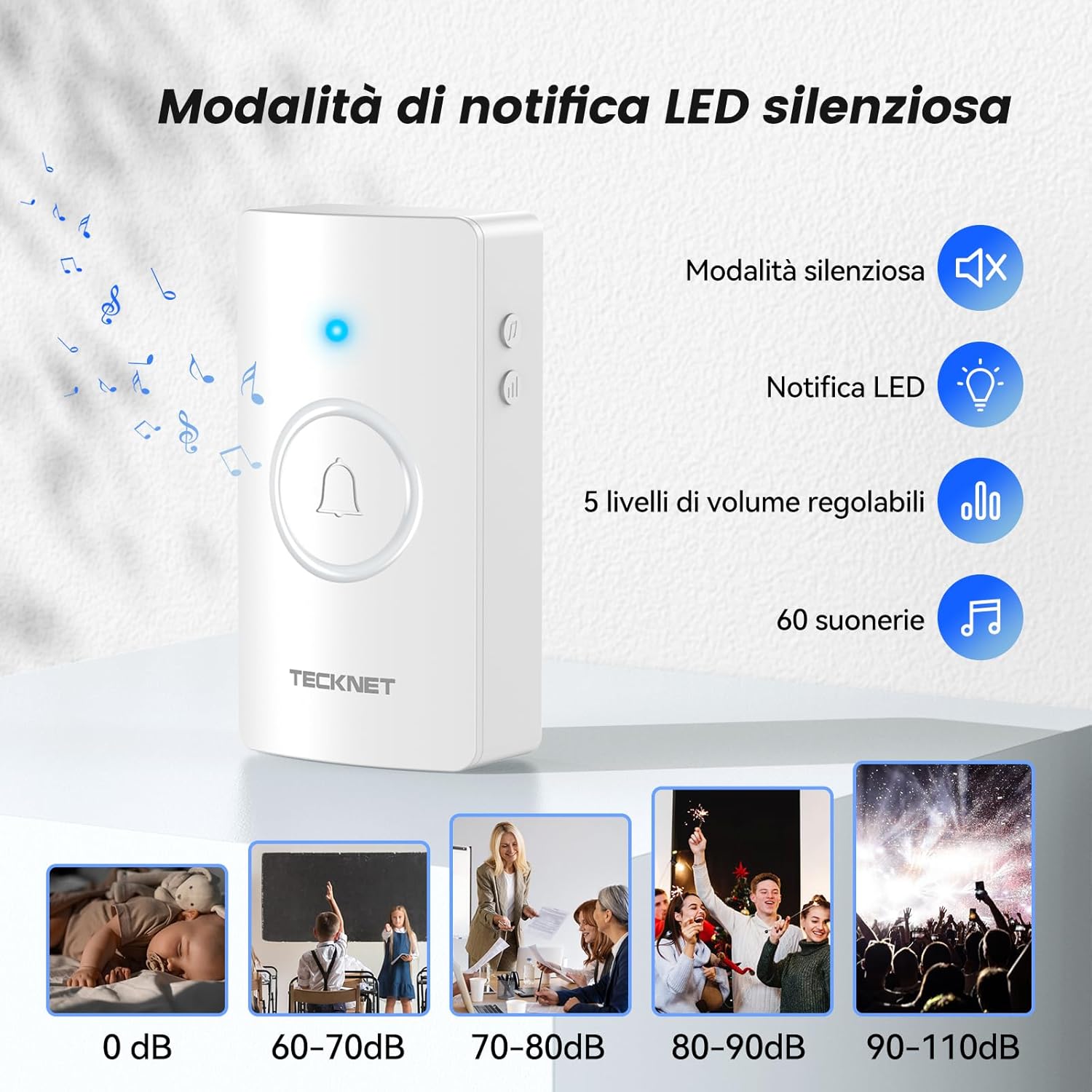
Image: Illustration of the doorbell receiver's features, including silent mode, LED notification, 5 adjustable volume levels (0-110dB), and 60 available chimes.

Image: Close-up of the doorbell transmitter highlighting its IP67 dustproof and waterproof rating, operational temperature range of -20°C to 60°C, and a maximum battery life of 4.5 years.
3. Setup and Installation
The TECKNET Wireless Doorbell is designed for quick and easy installation without the need for drilling.
Transmitter (Push Button) Installation:
- Step 1: Remove the insulating strip. Locate the insulating strip on the transmitter's battery compartment and pull it out to activate the battery.
- Step 2: Install the transmitter. Use the provided double-sided adhesive tape to attach the transmitter to your desired outdoor location, such as near your front door. Ensure the surface is clean and dry before application.
Receiver Installation:
- Step 3: Insert batteries (if applicable). For battery-powered receivers, insert 3 AA batteries (not included) into the receiver's battery compartment and close the cover.
- Step 4: Position the receiver. Hang the receiver on a wall or place it on a table in a central location within your home where the chime can be easily heard.

Image: A visual guide illustrating the four steps for installing the doorbell: removing the insulating strip, attaching the transmitter with adhesive, inserting batteries into the receiver, and positioning the receiver.
The wireless design allows for flexible placement of both the transmitter and receiver, adapting to various home layouts and environments.

Image: An illustration demonstrating the doorbell's 400-meter wireless range and its ability to penetrate various obstacles like wooden doors, brick walls, and concrete, ensuring connectivity throughout a large house.
4. Operating Instructions
Changing Chimes:
The receiver features a sound selection button to cycle through the 60 available chimes.
- Single Click: Press the sound selection button once to advance to the next chime.
- Double Click: Press the sound selection button twice quickly to go back to the previous chime.
Adjusting Volume:
Use the volume button on the receiver to adjust the sound level.
- Press the volume button repeatedly to cycle through the 5 volume levels (0 dB to 110 dB).
- Select 0 dB for silent mode, which will activate the LED notification instead of a sound.

Image: A close-up of the doorbell receiver, indicating the sound selection button (single click for next sound, double click for previous sound) and the volume button.
Memory Function:
The doorbell system is equipped with a memory function that automatically saves your last selected chime and volume level. This ensures that your settings are retained even after a power outage or if the receiver is accidentally unplugged.

Image: An abstract illustration representing the doorbell's memory function, depicted as gears and a music note within a human head silhouette, symbolizing automatic saving of settings.
5. Maintenance
To ensure the longevity and optimal performance of your TECKNET Wireless Doorbell, follow these simple maintenance guidelines:
- Cleaning: Wipe the doorbell units with a soft, dry cloth. Avoid using harsh chemicals or abrasive cleaners.
- Battery Replacement: The transmitter battery has a life of up to 4.5 years. When the signal weakens or the transmitter stops working, replace the battery with a new CR2032 lithium coin cell battery. For the receiver, replace AA batteries as needed.
- Environmental Conditions: While the transmitter is IP67 waterproof and designed for outdoor use, extreme conditions outside the -20°C to 60°C operating range may affect performance.
6. Troubleshooting
If you encounter any issues with your doorbell, please refer to the following common troubleshooting steps:
| Problem | Possible Cause | Solution |
|---|---|---|
| Doorbell does not chime | Low or dead battery in transmitter/receiver; receiver out of range; interference. | Replace batteries. Move receiver closer to transmitter. Check for large metal objects or strong electronic devices nearby. |
| Chime volume is too low or silent | Volume setting is too low or in silent mode. | Press the volume button on the receiver to increase the volume level. |
| Doorbell chimes unexpectedly | Interference from other wireless devices. | Ensure no other wireless devices are operating on the same frequency. The doorbell is designed to minimize interference. |
If the problem persists after trying these steps, please contact TECKNET customer support for further assistance.
7. Specifications
| Feature | Specification |
|---|---|
| Model Number | HWD01990 |
| Wireless Range | Up to 400 meters (1300 feet) |
| Chimes | 60 selectable melodies |
| Volume Levels | 5 levels (0 dB to 110 dB) |
| Waterproof Rating (Transmitter) | IP67 |
| Operating Temperature | -20°C to 60°C (-4°F to 140°F) |
| Transmitter Battery Life | Up to 4.5 years |
| Power Source (Receiver) | 3 x AA Batteries (not included) |
8. Warranty and Support
TECKNET is committed to providing high-quality products and excellent customer service.
Warranty Information:
This product comes with a 36-month technical support warranty for registered users. Please register your product to avail of this extended support.
Return Policy:
If you wish to return a product within 30 days of receipt because you have changed your mind, please consult the relevant return policy on the purchase platform. For defective or damaged products, please refer to the specific return and refund policies provided by the seller or platform.
Customer Support:
Should you encounter any issues during the use of this product, please do not hesitate to contact TECKNET's professional customer service team. We are dedicated to assisting you with any technical support needs.
For support, please visit the TECKNET Store on Amazon or refer to the contact information provided with your purchase.


