
Introduction
The Renogy BT-1 RS232 Bluetooth Module is designed to provide wireless monitoring and control capabilities for compatible Renogy solar charge controllers. By connecting this module to your charge controller's RJ12 communication port, you can access system data and adjust parameters through the Renogy DC Home smartphone application.

Image: The Renogy BT-1 RS232 Bluetooth Module, a compact black device with "BT-1 Bluetooth Module" printed on its grey face, featuring power and link indicator LEDs and an attached RJ12 communication cable.
Product Features
- Wireless monitoring and control of compatible solar charge controllers via Bluetooth.
- Connects to the Renogy DC Home smartphone application for system tracking.
- Embedded Bluetooth chip for high efficiency and low energy consumption.
- Bluetooth 4.2 and BLE technology for fast and uninterrupted communication.
- Powered directly through the RJ12 communication port.
- Signal range up to 82 feet (25 meters).
- Two LED lights indicate power and Bluetooth connection status.
- Protection Grade: IP54.
Compatibility
The Renogy BT-1 RS232 Bluetooth Module is compatible with Renogy solar charge controllers that feature an RJ12 communication port, including models from the Rover, Wanderer, and Adventurer series.

Image: A diagram illustrating the compatibility of the Renogy BT-1 Bluetooth Module with various Renogy charge controllers, including models like ADV30-LI, WND30-LI, WND10, WNDPG-10, RV20/30/40, RV60, RV60S, RV100, RVRPG20, RVRPG30, RVRPG40, and RVRPG60.
Setup Instructions
- Connect the BT-1 Module: Locate the RJ12 communication port on your compatible Renogy solar charge controller. Plug the RJ12 cable from the BT-1 module into this port. The module is powered directly through this connection.
- Observe LED Indicators: Once connected, the BT-1 module's Power LED (green) should illuminate, indicating it is receiving power. The Link LED (blue) will flash when searching for a Bluetooth connection and remain solid when connected.
- Download the Renogy DC Home App: Download and install the "Renogy DC Home" application on your smartphone or tablet from your device's app store.
- Pair with the App: Open the Renogy DC Home app, enable Bluetooth on your device, and follow the in-app instructions to search for and connect to your BT-1 module.

Image: A close-up view showing the RJ12 cable of the Renogy BT-1 Bluetooth Module being plugged into the RS232 port of a Renogy Rover 20A MPPT Charge Controller, demonstrating the plug-and-play installation.
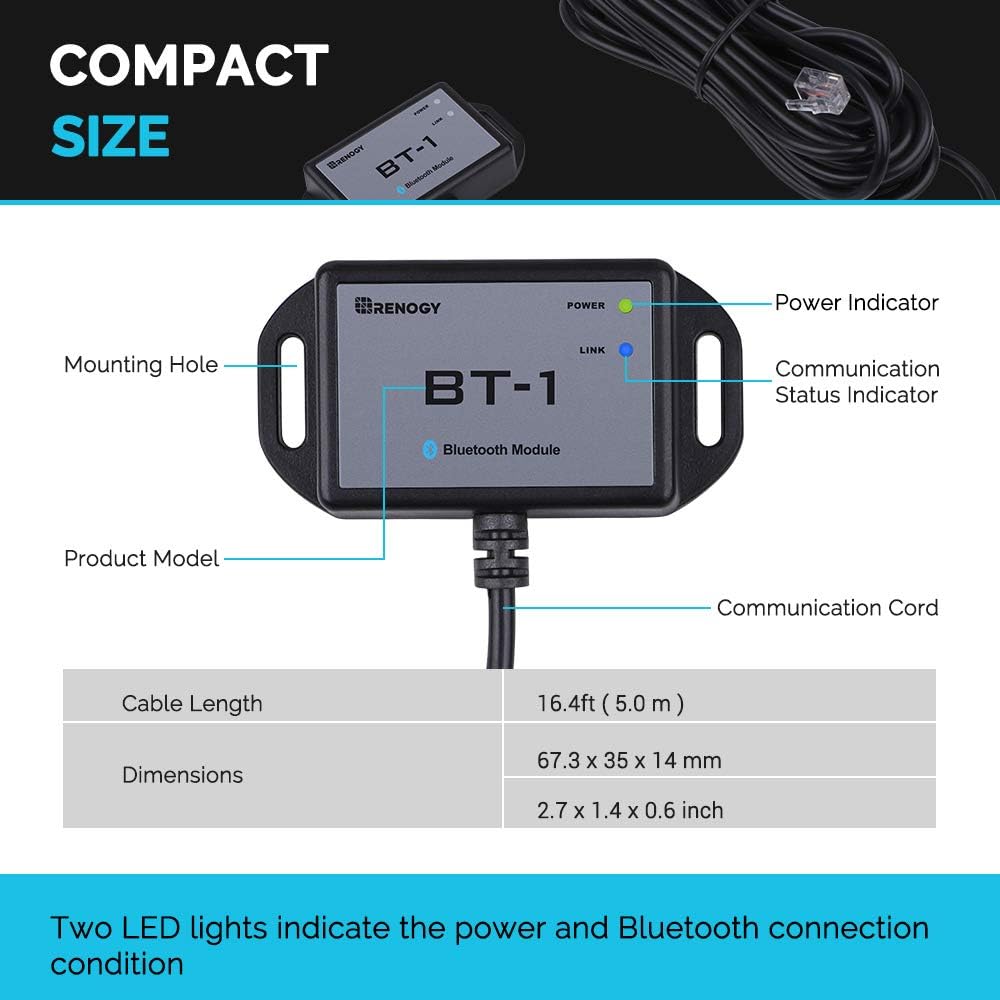
Image: A detailed view of the Renogy BT-1 Bluetooth Module with labels pointing to its components: Power Indicator (green LED), Communication Status Indicator (blue LED), Mounting Hole, Product Model (BT-1 Bluetooth Module), and Communication Cord (RJ12 cable).
Operating Instructions
Once the BT-1 module is successfully paired with the Renogy DC Home app, you can begin monitoring and controlling your solar charge controller.
- Real-time Data Monitoring: The app displays real-time system data, including solar panel voltage, current, power, battery voltage, state of charge, and temperature.
- Parameter Adjustment: Depending on your charge controller model, the app allows you to adjust various charging parameters, such as battery type, charging voltage settings, and load control.
- Signal Range: The BT-1 module offers a signal range of up to 82 feet (25 meters) for convenient remote monitoring.

Image: A smartphone screen displaying the Renogy DC Home app interface, showing real-time monitoring data for a solar power system, including voltage, current, power, battery status, and temperature, with an indication of an 82ft signal range.

Image: Two smartphone screens showing different views of the Renogy DC Home app, demonstrating its intuitive interface for monitoring solar system data. Next to the phones is a Renogy Rover 20A MPPT Charge Controller with the BT-1 module connected, illustrating the integrated system.
Maintenance
The Renogy BT-1 Bluetooth Module requires minimal maintenance. Follow these guidelines to ensure optimal performance:
- Keep Clean: Periodically wipe the module with a dry, soft cloth to remove dust and debris. Avoid using harsh chemicals or abrasive cleaners.
- Check Connections: Ensure the RJ12 cable remains securely plugged into both the BT-1 module and the charge controller.
- Environmental Conditions: While the module has an IP54 protection grade, avoid exposing it to extreme temperatures, direct water immersion, or highly corrosive environments.
- Firmware Updates: Check the Renogy DC Home app or Renogy's official website periodically for any available firmware updates for the BT-1 module or your charge controller.
Troubleshooting
If you encounter issues with your Renogy BT-1 Bluetooth Module, refer to the following common troubleshooting steps:
| Problem | Possible Cause | Solution |
|---|---|---|
| BT-1 Power LED is off. | No power from charge controller or faulty connection. | Ensure the RJ12 cable is securely connected to both the BT-1 and the charge controller. Verify the charge controller is powered on. |
| BT-1 Link LED is flashing but not connecting. | Bluetooth pairing issue or out of range. |
|
| Renogy DC Home app freezes or crashes. | App software issue or device incompatibility. |
|
| App displays charging data but not discharge data. | Limitation of the connected charge controller model or app version. | Some basic charge controllers may not output discharge data via the communication port. Consult your charge controller's manual or Renogy support for specific model capabilities. Ensure your app is updated. |
Specifications
| Feature | Detail |
|---|---|
| Model Number | Bluetooth Module (BT-1 RS232) |
| Communication Port | RJ12 |
| Bluetooth Version | 4.2 BLE |
| Signal Range | Up to 82 feet (25 meters) |
| Power Source | Powered via RJ12 port |
| LED Indicators | Power (Green), Link (Blue) |
| Protection Grade | IP54 |
| Dimensions | 2.65"L x 1.38"W x 0.55"H (67.3 x 35 x 14 mm) |
| Item Weight | 4.6 ounces (130 Grams) |
| Manufacturer | Renogy |
| UPC | 810009714415 |
Warranty Information
For detailed warranty information regarding the Renogy BT-1 RS232 Bluetooth Module, please refer to the official Renogy website or the warranty card included with your product. Warranty terms and conditions may vary by region and product.
Customer Support
If you require further assistance or have questions not covered in this manual, please contact Renogy Customer Support. Renogy is committed to providing prompt responses and professional technical guidance.
- Online Support: Visit the official Renogy website for FAQs, support articles, and contact options.
- Email Support: Refer to your product packaging or the Renogy website for the appropriate support email address.
- Phone Support: Contact numbers for technical support can be found on the Renogy website.


