
CUCKOO CAC-I0510FW Air Purifier 3-in-1
CUCKOO True HEPA Air Purifier
Model: CAC-I0510FW Air Purifier 3-in-1
User Instruction Manual
1. Important Safety Information
Please read all instructions carefully before using the appliance and retain them for future reference. Failure to follow these instructions may result in electric shock, fire, or serious injury.
- Always unplug the air purifier before moving it, opening the grille, changing filters, or whenever it is not in use.
- Do not operate the air purifier if the cord or plug is damaged, or if the connection to the wall outlet is loose.
- Keep the power cord away from heated surfaces.
- Do not use the air purifier in wet or damp environments, such as bathrooms.
- Do not insert fingers or foreign objects into any openings.
- This appliance is not intended for use by persons (including children) with reduced physical, sensory or mental capabilities, or lack of experience and knowledge, unless they have been given supervision or instruction concerning use of the appliance by a person responsible for their safety.
- Children should be supervised to ensure that they do not play with the appliance.
2. Product Overview
The CUCKOO True HEPA Air Purifier (CAC-I0510FW) is designed to improve indoor air quality by capturing airborne particles and odors. It features a multi-stage filtration system and smart sensors for optimal performance.
2.1 Components

The air purifier consists of the main unit, a multi-layer filter, and a power cord. The control panel is located on the top surface of the unit.
2.2 Key Features
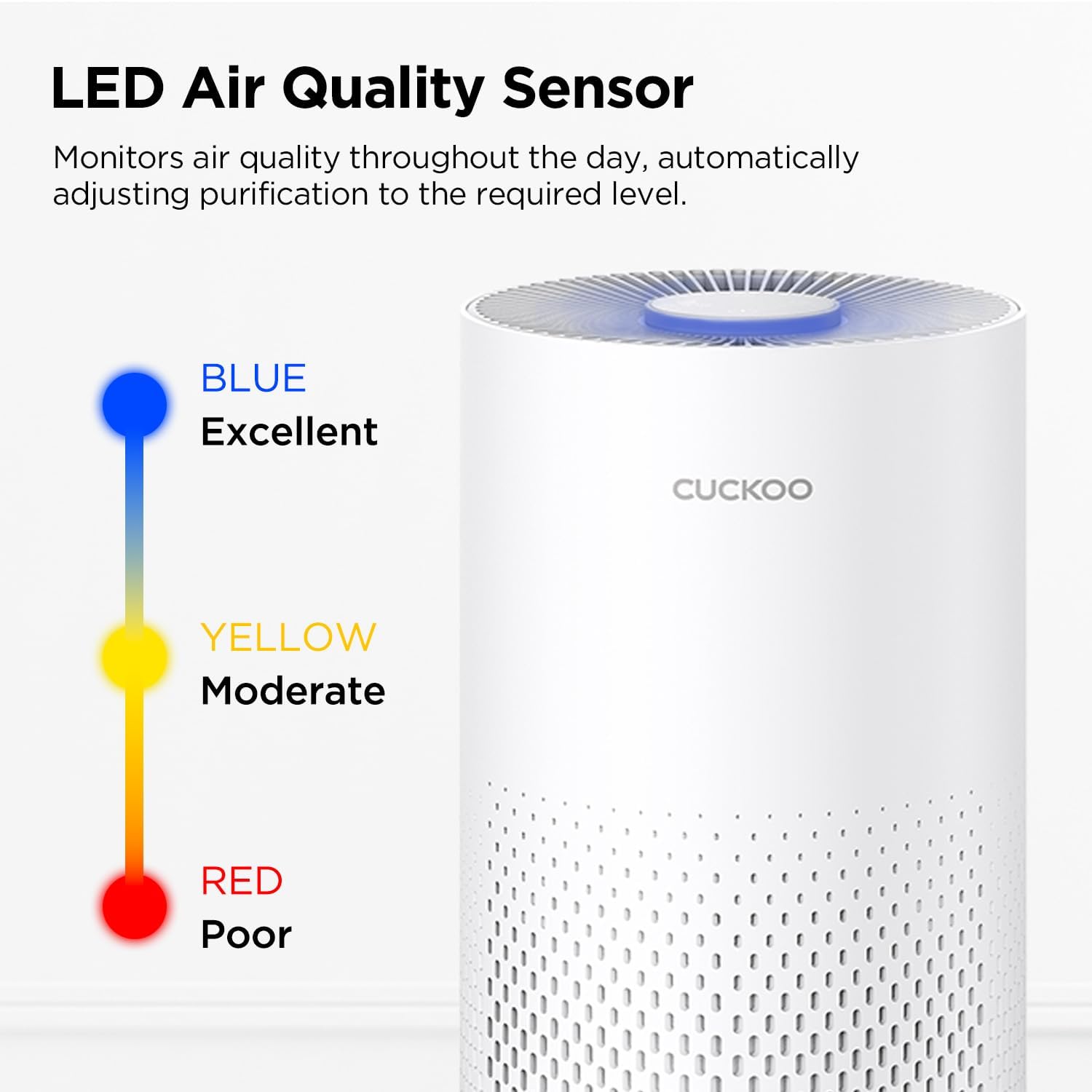
- Smart Dust Sensor: Detects the pollution status of the air indoors in real-time and adjusts fan speed accordingly.
- Coverage Area: Ideal for small to mid-sized spaces, covering up to 456 square feet.
- 3 Color LED Display: Indicates the cleanliness of indoor air through the dust sensor. Blue for Excellent, Yellow for Moderate, Red for Poor.
- Sleep Mode: Designed to slow down the fan speed and dim the lights for a calm and quiet ambiance, ensuring a good night's rest.
- 3-Stage Filtration System: Includes a Pre-Filter, True HEPA H13 filter, and Activated Carbon filter for comprehensive air purification.
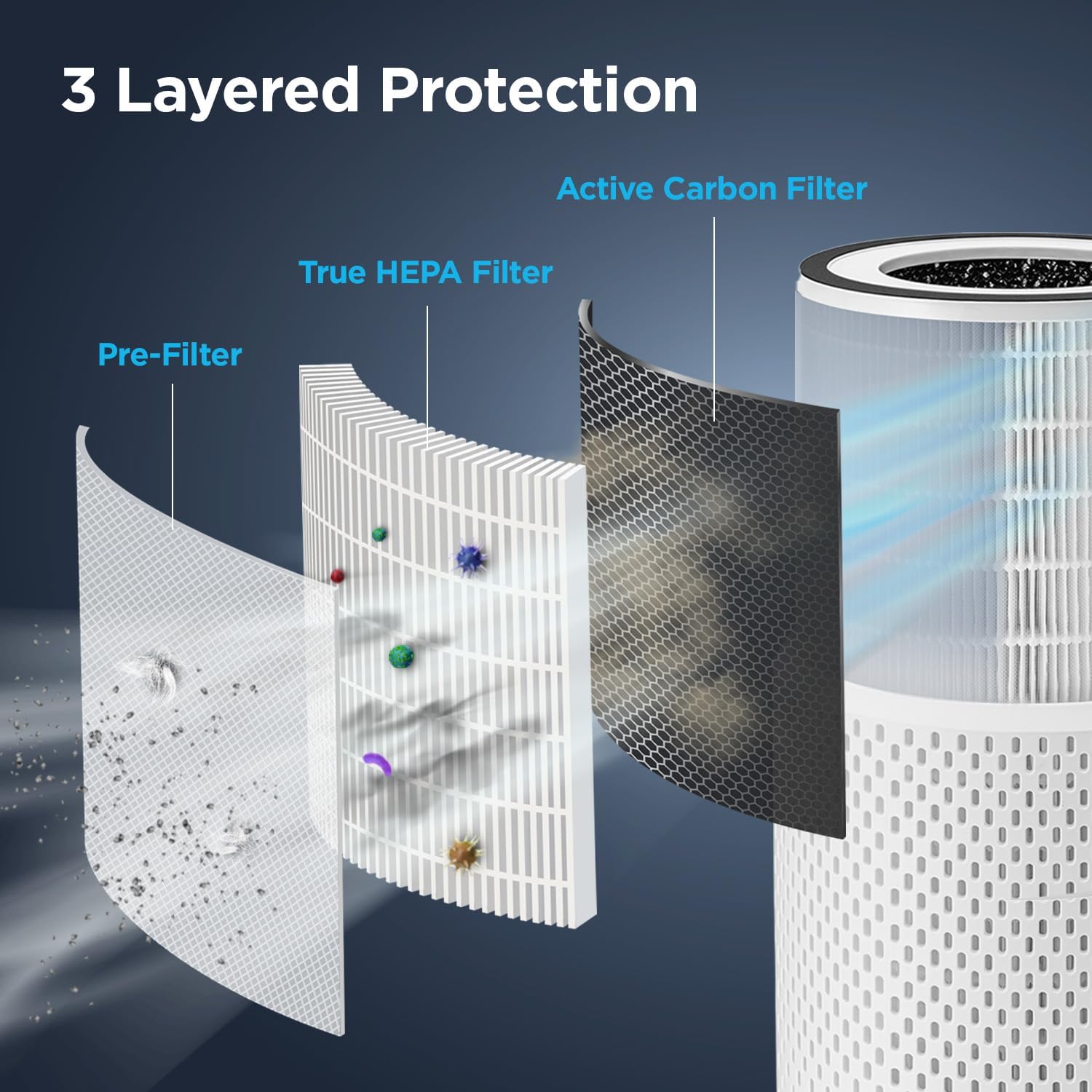
The advanced 3-in-1 filtration system works together to capture airborne particles such as pet dander, smoke, odors, dust, and gases.

This air purifier is designed for effective air purification in rooms up to 456 square feet, providing one air change per hour.
3. Setup and Installation
3.1 Unpacking
- Carefully remove the air purifier from its packaging.
- Remove all packaging materials, including any protective film or tape.
- Ensure all components are present: main unit, 3-in-1 filter, and power cord.
3.2 Filter Installation
The air purifier comes with one True HEPA H13 filter pre-installed, but it may be wrapped in plastic for shipping. Please remove the plastic before first use.
- Turn the air purifier upside down.
- Twist the base cover counter-clockwise to unlock and remove it.
- Carefully pull out the filter assembly.
- Remove any plastic packaging from the filter.
- Insert the filter back into the unit, ensuring it is seated correctly.
- Replace the base cover and twist clockwise to lock it securely.
3.3 Placement
Place the air purifier on a firm, level surface. Ensure there is at least 6 inches (15 cm) of clear space around all sides of the unit for optimal airflow.

Consider the dimensions when choosing a suitable location for your air purifier.
4. Operating Instructions
4.1 Power On/Off
Plug the power cord into a standard electrical outlet. Press the Power button on the control panel to turn the unit on or off.
4.2 Fan Speed Control
The air purifier offers multiple fan speed settings. Press the Fan Speed button to cycle through available speeds (e.g., Low, Medium, High, Auto).
In Auto mode, the smart dust sensor will automatically adjust the fan speed based on the detected air quality.
4.3 Air Quality Indicator
The LED light on the top of the unit indicates the current air quality:
- Blue: Excellent Air Quality
- Yellow: Moderate Air Quality
- Red: Poor Air Quality

4.4 Sleep Mode
Activate Sleep Mode for quiet operation during rest periods. In this mode, the fan speed will be reduced, and the display lights will dim to create a peaceful environment.

4.5 Timer Function
Set the air purifier to operate for a specific duration using the Timer button. Available timer settings typically include 2, 4, or 8 hours. The unit will automatically turn off once the set time has elapsed.
5. Maintenance
5.1 Filter Replacement
The air purifier is equipped with a filter replacement indicator that will alert you when it's time to change the filter. This is typically indicated by a specific light on the control panel.
To replace the filter, follow the steps outlined in Section 3.2 "Filter Installation", ensuring the unit is unplugged before proceeding. Dispose of the old filter responsibly.
Note: Filter lifespan varies depending on air quality and usage. Replace the filter when the indicator light illuminates or when you notice a decrease in performance or an increase in odors.
5.2 Cleaning the Unit
- Always unplug the air purifier before cleaning.
- Wipe the exterior of the unit with a soft, damp cloth. Do not use abrasive cleaners or solvents.
- The pre-filter can be gently vacuumed to remove larger dust particles between replacements of the main filter. Do not wash the HEPA or Activated Carbon filters.
- Ensure the unit is completely dry before plugging it back in.
6. Troubleshooting
| Problem | Possible Cause | Solution |
|---|---|---|
| Unit does not turn on. | Not plugged in; Power outlet not working; Power button not pressed. | Ensure power cord is securely plugged into a working outlet. Press the Power button. |
| Reduced airflow or purification. | Filter is dirty or clogged; Air inlets/outlets blocked. | Check and replace the filter if necessary. Ensure no obstructions around the air inlets and outlets. |
| Unusual noise. | Filter not installed correctly; Foreign object inside unit. | Ensure filter is properly seated. Unplug and check for any foreign objects. |
| Air quality indicator always red/yellow. | High pollution level; Sensor dirty. | Allow time for purification. Clean the dust sensor (refer to maintenance section if applicable). |
If the problem persists after attempting these solutions, please contact CUCKOO customer support.
7. Specifications
| Specification | Value |
|---|---|
| Model Number | CAC-I0510FW Air Purifier 3-in-1 |
| Product Dimensions | 7.78"D x 7.78"W x 15.3"H |
| Weight | 4.2 Pounds |
| Floor Area Coverage | Up to 456 Square Feet |
| Noise Level | 41 dB (decibels) |
| Filter Type | 3-Stage (Pre-Filter, True HEPA H13, Activated Carbon) |
| Manufacturer | Cuckoo |
8. Warranty and Support
For warranty information and customer support, please refer to the warranty card included with your product or visit the official CUCKOO website. Keep your purchase receipt as proof of purchase for warranty claims.
For further assistance, you may contact CUCKOO customer service through their official channels. Always provide your product model number (CAC-I0510FW) when seeking support.
You can visit the CUCKOO Store for more information: CUCKOO Official Store
Related documentsCAC-I0510FW Air Purifier 3-in-1


Ask a question about this manual
Ask about setup, troubleshooting, compatibility, parts, safety, or missing instructions. Manuals+ will review the question and use this page’s manual context to help answer it.