
Important Safety Instructions
Read all instructions before using this dehumidifier. Failure to follow these instructions may result in electric shock, fire, or personal injury. Keep this manual for future reference.
- Use only on a grounded 115V, 60Hz electrical outlet.
- Do not operate with a damaged power cord or plug. If the power cord is damaged, it must be replaced by the manufacturer or a qualified service agent.
- Do not block air inlets or outlets. Ensure adequate space around the unit for proper airflow.
- Keep the unit upright during operation and transport. Tilting the unit may cause water leakage or malfunction.
- Unplug the dehumidifier from the power outlet before cleaning, servicing, or moving the unit.
- Do not use the dehumidifier near water or in excessively wet environments, such as bathrooms without proper ventilation.
- This appliance is not intended for use by persons (including children) with reduced physical, sensory or mental capabilities, or lack of experience and knowledge, unless they have been given supervision or instruction concerning use of the appliance by a person responsible for their safety.
Product Overview
The AIRPLUS AP10-2011EE Dehumidifier is designed to efficiently remove excess moisture from the air, helping to create a more comfortable indoor environment and prevent issues related to high humidity, such as mold and mildew growth.
Components

Image Description: A white, rectangular AIRPLUS dehumidifier with a black top panel and small wheels visible at the base. The AIRPLUS logo is prominently displayed on the front. This image provides a general view of the unit's exterior.
- Control Panel: Located on the top of the unit for setting functions and monitoring status.
- Air Inlet: Positioned at the rear of the unit, where humid air is drawn in.
- Air Outlet: Located at the top, releasing dry air back into the room.
- Water Tank: A removable reservoir at the front for collecting condensed water.
- Drain Hose Connection: A port at the back for continuous drainage.
- Casters: Four universal wheels at the base for easy mobility.
- Washable Filter: A removable filter located at the air inlet to capture dust and particles.
Setup
- Placement: Place the dehumidifier on a level, stable surface in the desired location. Ensure there is at least 8 inches (20 cm) of unobstructed space around the unit, especially near the air inlets and outlets, to allow for proper airflow and efficient operation. Avoid placing it against walls or furniture that could block ventilation.
- Power Connection: Plug the power cord into a grounded 115V, 60Hz electrical outlet. Do not use extension cords or power strips.
- Drainage Options: The unit offers two methods for water drainage.
Manual Drainage
The unit collects water in its internal 1.5-liter (50 OZ) water tank. When the tank is full, the dehumidifier will automatically shut off, and the "FULL" indicator light on the control panel will illuminate. To empty the tank, carefully pull it out from the front of the unit, discard the collected water, and then securely reinsert the tank until it clicks into place. The unit will resume operation once the tank is properly reinserted.

Image Description: An illustration showing the water tank being pulled out from the front of the dehumidifier for manual emptying. Blue arrows indicate the direction of removal.
Continuous Drainage
For continuous operation without the need to manually empty the water tank, attach the included drain hose to the drainage port located at the back of the unit. Ensure the hose is securely connected and sloped downwards to allow gravity to drain the water into a suitable floor drain or a larger container. Periodically check the hose for kinks or blockages to ensure uninterrupted drainage.

Image Description: An illustration demonstrating the continuous drainage setup, with a hose connected to the back of the dehumidifier leading to an external drain. Blue arrows indicate water flow.
Operating Instructions
Control Panel
The control panel allows you to manage all functions of the dehumidifier. Familiarize yourself with the buttons and indicators:

Image Description: A close-up of the dehumidifier's top-mounted control panel. It features touch-sensitive buttons for ON/OFF, MODE, HUMIDITY, and TIMER, along with LED indicators for STANDARD, RAINING, DRYING, SLEEP, IONIZER, FULL, and DEFROST. A digital display shows current humidity or timer settings.
- ON/OFF Button: Press to power the unit on or off.
- MODE Button: Press repeatedly to cycle through the available operating modes: Standard, Drying, Raining, and Sleep. The corresponding indicator light will illuminate.
- HUMIDITY Button: In Standard Mode, press to adjust the desired target humidity level. The setting can be adjusted in 5% increments from 40% to 80% Relative Humidity (RH).
- TIMER Button: Press to set the auto-start or auto-stop time. The timer can be set from 1 to 24 hours.
- IONIZER Indicator: Illuminates when the ionizer function is active, which helps to purify the air.
- FULL Indicator: Illuminates when the water tank is full and needs to be emptied. The unit will pause operation.
- DEFROST Indicator: Illuminates when the unit is undergoing an automatic defrost cycle. This is normal operation in cooler conditions.
Operating Modes
- Standard Mode: This is the default mode. You can manually set your desired humidity level using the HUMIDITY button. The unit will operate to maintain the set humidity.
- Drying Mode: Provides continuous operation for maximum moisture removal. This mode is suitable for drying clothes or in very damp environments where rapid dehumidification is needed.
- Raining Mode: Automatically targets and maintains a comfortable humidity level of 45% RH.
- Sleep Mode: Designed for quiet operation, typically below 45dB. In this mode, the unit targets a humidity level of 50% RH, and the display lights may dim for minimal disturbance.
Timer Function
The timer function allows you to program the unit to automatically turn on or off after a set period. Press the TIMER button to select the desired number of hours (1-24). If the unit is off, setting the timer will program it to auto-start. If the unit is on, setting the timer will program it to auto-stop.

Image Description: An illustration showing the dehumidifier with a circular arrow indicating a 24-hour cycle, representing the auto-start/auto-stop timer function. A sun and moon icon suggest day and night operation.
Maintenance
Regular maintenance ensures optimal performance and extends the lifespan of your dehumidifier.
Cleaning the Air Filter
A clean air filter is crucial for efficient operation and air quality. It is recommended to clean the filter every two weeks or more frequently depending on usage and air quality.
- Turn off the dehumidifier and unplug it from the power outlet.
- Locate the air filter at the back of the unit.
- Gently pull out the filter from its slot.
- Wash the filter with warm, soapy water. Rinse thoroughly under running water.
- Allow the filter to air dry completely before reinserting it. Do not use a dishwasher or expose to direct sunlight.
- Reinsert the dry filter into the unit, ensuring it is securely in place.

Image Description: An image showing the removable air filter being pulled out from the back of the dehumidifier for cleaning. A blue arrow indicates the direction of removal.
Cleaning the Water Tank
Periodically clean the water tank to prevent the growth of mold, mildew, and bacteria.
- Remove the water tank from the unit.
- Wash the tank with warm water and a mild detergent. Use a soft brush if necessary to remove any residue.
- Rinse thoroughly to remove all soap residue and dry completely before placing it back into the dehumidifier.
Storing the Dehumidifier
If the unit will not be used for an extended period, follow these steps for proper storage:
- Turn off and unplug the unit.
- Empty and clean the water tank.
- Clean the air filter.
- Allow the unit to dry for at least 24 hours in a well-ventilated area to prevent internal moisture buildup.
- Store the dehumidifier in an upright position in a cool, dry place, away from direct sunlight and extreme temperatures.
Troubleshooting
Before contacting customer service, please refer to the following table for common issues and their solutions.
| Problem | Possible Cause | Solution |
|---|---|---|
| Dehumidifier does not turn on. | No power; Water tank full or improperly inserted; Room temperature too low. | Check power connection and outlet; Empty and properly reinsert water tank; Ensure room temperature is above 41°F (5°C). |
| No water collected or insufficient dehumidification. | Humidity setting too high; Air filter clogged; Room temperature too low; Unit size too small for space; Doors/windows open. | Lower target humidity; Clean air filter; Ensure room temperature is adequate; Close doors and windows; Consider if unit capacity matches room size. |
| Unit is noisy. | Unit not on a level surface; Air filter clogged; Fan obstruction. | Place on a flat, stable surface; Clean air filter; Check for any obstructions around the fan. |
| "FULL" indicator is on, but tank is not full. | Float switch stuck or misaligned. | Remove and reinsert water tank, ensuring the float switch moves freely. Clean any debris around the float switch. |
| Defrost indicator is on. | Unit is automatically defrosting. | This is normal operation. The unit will automatically resume dehumidifying once the defrosting cycle is complete. Do not unplug the unit during defrosting. |
Specifications
Technical details for the AIRPLUS AP10-2011EE Dehumidifier.
| Feature | Detail |
|---|---|
| Model Name | AP10-2011EE |
| Dehumidification Capacity | 30 Pints per Day (at 80% RH, 86°F) |
| Coverage Area | Up to 1,500 Sq. Ft. |
| Water Tank Volume | 1.5 Liters (50 OZ) |
| Product Dimensions (D x W x H) | 6.55" x 11.14" x 19.65" |
| Item Weight | 22.6 pounds |
| Wattage | 192 watts |
| Operation Mode | Continuous |
| Special Features | Continuous Draining, Defrost, Drying, Ionizer, Timer |
| Color | White |
| Manufacturer | AIRPLUS |
| Date First Available | May 13, 2024 |
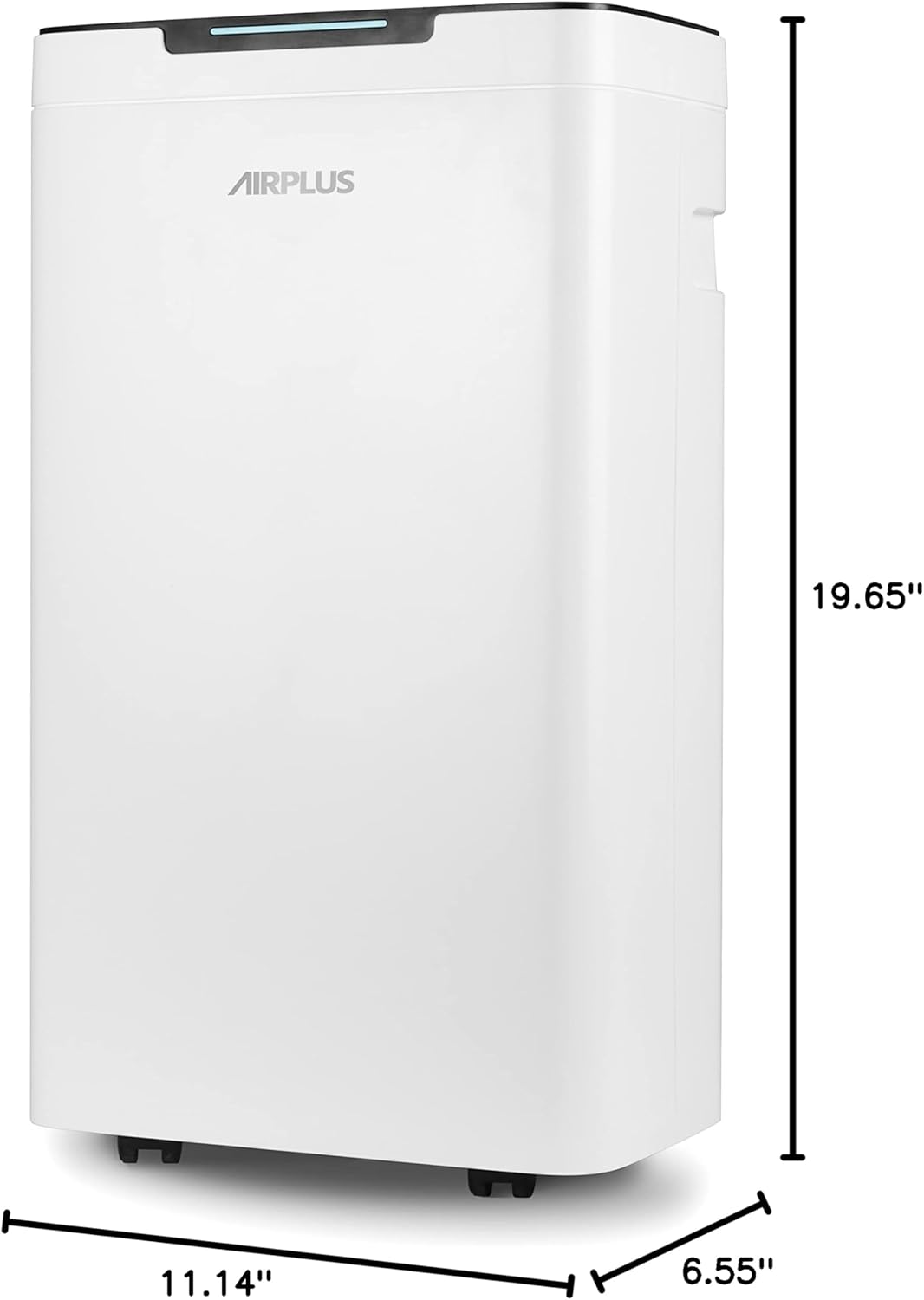
Image Description: An image of the dehumidifier with its dimensions labeled: 19.65 inches height, 11.14 inches width, and 6.55 inches depth. This provides a clear visual reference for the unit's size.
Warranty and Support
For detailed warranty information, including coverage periods and terms, please refer to the warranty card provided with your AIRPLUS AP10-2011EE Dehumidifier. In case of technical issues, questions, or to request service, please contact AIRPLUS customer support through the contact information provided in your product packaging or on the official AIRPLUS website.
Manufacturer: AIRPLUS
Date First Available: May 13, 2024


