
1. Introduction
This manual provides detailed instructions for the installation, operation, and maintenance of the Fafeicy TM626 DIN Rail Mount AC220V Power Timer Switch. This digital timer is designed for precise time control of electrical appliances and systems, offering programmable on/off cycles for various applications.
The TM626 is suitable for controlling street lights, factory equipment, advertising signs, production machinery, radio and television equipment, stage lighting, and other power equipment that requires regular automated switching.
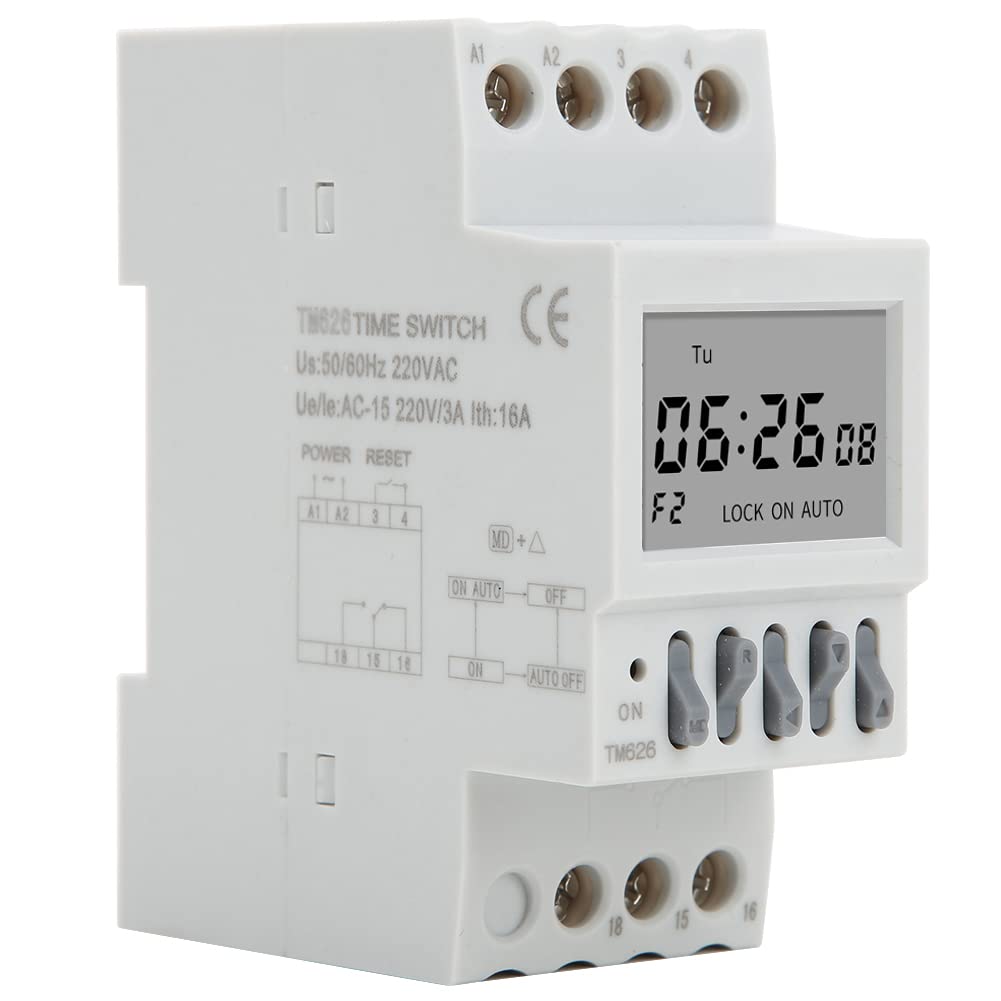
Image 1.1: Angled view of the Fafeicy TM626 Power Timer Switch, showing the display and terminal connections.

Image 1.2: The TM626 timer switch is ideal for automating various applications, including street lighting, industrial equipment, and advertising displays.
2. Safety Information
Please read and understand all safety instructions before installing or operating this device. Failure to follow these instructions may result in electric shock, fire, or serious injury.
- Ensure the power supply is disconnected before any installation or maintenance work.
- Installation should only be performed by a qualified electrician.
- Do not exceed the specified voltage (AC220V) and current (16A) ratings.
- Keep the device away from water and high humidity environments.
- Do not attempt to open or repair the device yourself. Contact qualified personnel for service.
3. Product Overview
The Fafeicy TM626 is a compact digital timer switch designed for DIN rail mounting. It features a clear LCD display for time and program settings, along with intuitive control buttons.
3.1 Components
- LCD Display: Shows current time, day, and programming status.
- Control Buttons: Used for setting time, programming, and manual override.
- Terminal Blocks: For connecting power input and load output.
- DIN Rail Clips: For secure mounting on a standard DIN rail.

Image 3.1: Front view of the TM626 timer switch, highlighting the LCD display and control buttons.

Image 3.2: Side view of the TM626, illustrating the integrated DIN rail mounting clips.
4. Specifications
| Feature | Specification |
|---|---|
| Brand | Fafeicy |
| Model Number | TM626 (Fafeicy txusog0m3i) |
| Operating Voltage | AC220V (50/60Hz) |
| Rated Current | 16A |
| Screen Size | 1.6 Inches |
| Mechanical Life | ≥ 30,000 times |
| Electrical Life | ≥ 10,000 times |
| Dimensions (Approx.) | Width: 35mm (1.4in), Height: 82mm (3.2in), Depth: 68mm (2.7in) |
| Mounting | DIN Rail |
| Country of Origin | China |

Image 4.1: Dimensional drawing of the TM626 timer switch, showing key measurements.

Image 4.2: The TM626 timer switch, illustrating its robust design for long mechanical and electrical life.
5. Setup and Installation
Follow these steps for proper installation and initial setup of your TM626 timer switch.
5.1 Mounting
- Ensure the main power supply is OFF before mounting.
- Locate a standard 35mm DIN rail within your electrical panel.
- Align the DIN rail clips on the back of the TM626 with the DIN rail.
- Press the timer firmly onto the rail until it clicks into place.
5.2 Wiring
Refer to the wiring diagram on the device and below for correct connections. Incorrect wiring can damage the device or cause electrical hazards.

Image 5.1: Side view of the TM626 showing the wiring terminals and a simplified internal diagram. Terminals A1 and A2 are for power input (AC220V). Terminals 15, 16, 18 are for load output (15: Common, 16: Normally Closed, 18: Normally Open).
- Connect the AC220V power supply to terminals A1 and A2.
- Connect the common wire of your load to terminal 15.
- For normally open operation (load turns ON when timer activates), connect the load's live wire to terminal 18.
- For normally closed operation (load turns OFF when timer activates), connect the load's live wire to terminal 16.
- Ensure all connections are secure and insulated.
5.3 Initial Power-Up
After wiring, restore power. The display should light up. If the display is blank, check power connections. The timer may require an initial charge if it has been stored for a long time; allow it to be powered for a few minutes.
6. Operating Instructions
The TM626 timer switch allows you to set the current time and program multiple on/off cycles.
6.1 Setting Current Time and Day
- Press the CLOCK button (if available, or a similar button for time setting).
- Use the D+ (Day), H+ (Hour), and M+ (Minute) buttons to adjust the current day, hour, and minute.
- Press CLOCK again to save and exit.
6.2 Programming On/Off Cycles
The TM626 typically supports multiple ON/OFF programs. The exact number may vary, but common models support 8-16 programs.
- Press the PROG button. The display will show "1 ON".
- Use D+ to select the day(s) for this ON event (e.g., Mon-Fri, Sat-Sun, every day, specific days).
- Use H+ and M+ to set the desired ON time.
- Press PROG again. The display will show "1 OFF".
- Use D+, H+, and M+ to set the desired OFF time for the first program.
- Repeat steps 1-5 for additional ON/OFF programs (e.g., "2 ON", "2 OFF", etc.).
- After setting all desired programs, press the CLOCK button to exit programming mode and save settings.
6.3 Manual Override
The MANUAL or ON/AUTO/OFF button allows you to manually override the programmed settings.
- Pressing this button cycles through modes: ON (always on), AUTO (follows programs), OFF (always off).
- Select AUTO for the timer to execute its programmed schedules.
6.4 Reset Function
To clear all settings and return the timer to its factory default state, locate the small RESET button (often recessed) and press it using a pointed object (e.g., a pen tip). This will erase all time and program settings.
7. Maintenance
The Fafeicy TM626 timer switch requires minimal maintenance to ensure long-term reliable operation.
- Cleaning: Use a soft, dry cloth to wipe the exterior of the device. Do not use abrasive cleaners or solvents.
- Inspection: Periodically check wiring connections for tightness and signs of wear or damage.
- Battery Backup: The device typically includes an internal battery for retaining settings during power outages. This battery is usually non-replaceable by the user and recharges when the device is powered.
8. Troubleshooting
If you encounter issues with your TM626 timer switch, refer to the following common problems and solutions:
| Problem | Possible Cause | Solution |
|---|---|---|
| Display is blank. | No power supply; internal battery discharged. | Check power connections to A1/A2. Allow device to be powered for several minutes to charge the internal battery. |
| Load does not turn ON/OFF as programmed. | Incorrect programming; timer in manual ON/OFF mode; incorrect wiring; faulty load. | Verify program settings. Ensure the timer is in AUTO mode. Check wiring connections (15, 16, 18). Test the load independently. |
| Time is incorrect. | Time not set correctly; power interruption (though internal battery should prevent this). | Reset and re-set the current time and day. Ensure the internal battery is charged. |
| Buttons are unresponsive. | Device malfunction; temporary software glitch. | Perform a full reset using the recessed RESET button. If the issue persists, contact support. |
9. Warranty and Support
For warranty information or technical support, please refer to the documentation provided with your purchase or contact Fafeicy customer service through their official channels. Keep your purchase receipt as proof of purchase.
For general inquiries, you may visit the Fafeicy Brand Store.