
Introduction
Thank you for choosing the QCY T9S TWS True Wireless Earbuds. This manual provides essential information for the safe and efficient use of your new earbuds. Please read it carefully before use and retain it for future reference.

Image: QCY T9S TWS Earbuds and charging case, illustrating key features like Bluetooth 5.0 connectivity, low latency, and integration with the QCY app. Also shows battery life details: 20 hours total with case, 70 hours standby, 4 hours call time, 2 hours quick charge.
What's in the Box
Upon unpacking, please ensure all items listed below are present and in good condition:
- QCY-T9S TWS Earbuds
- Charging Case
- 3 Pairs of Eartips (S, M, L)
- 3 Pairs of Earwings (S, M, L)
- USB Charging Cable
- User Manual

Image: Contents of the QCY T9S package, showing the earbuds, charging case, various eartips and earwings, a USB cable, and the user manual.
Setup
1. Initial Charging
Before first use, fully charge the earbuds and the charging case. Connect the USB charging cable to the charging case and a compatible USB power source (charger under 5V 2.1A). The indicator lights on the case will show charging status.
Note: Do not use any flash or quick charger.
2. Pairing with Your Device
- Ensure the earbuds are in the charging case and the case has sufficient battery.
- Open the charging case lid. The earbuds will automatically enter pairing mode.
- On your device (smartphone, tablet, etc.), enable Bluetooth.
- Search for "QCY-T9S" in the list of available Bluetooth devices and select it to connect.
- Once connected, a voice prompt will confirm successful pairing.

Image: QCY T9S earbuds inside their magnetic charging case, highlighting the "Open to pair" functionality and the availability of the QCY exclusive app for enhanced features.
3. QCY Exclusive App
For advanced features and customization, download the QCY exclusive app from your device's app store. The app allows for custom button settings, equalizer adjustments, finding misplaced earbuds, one-tap factory reset, and OTA firmware updates.
Operating Instructions
Touch Controls
The QCY T9S earbuds feature touch-sensitive controls on each earbud (MFB - Multi-Function Button). Refer to the following table for common operations:
| Action | Function |
|---|---|
| Press MFB | Play/Pause Music, Answer/End Call |
| Double press MFB (Right earbud) | Skip track forward |
| Double press MFB (Left earbud) | Skip track backward |
| Hold MFB for 1s | Ignore Call, Activate Voice Assistant |

Image: Visual guide to the touch controls on the QCY T9S earbuds, detailing actions for music playback, call management, and voice assistant activation.
App Customization
The QCY app provides extensive customization options:
- Custom Button: Reassign touch control functions.
- Equalizer: Adjust audio profiles to your preference.
- Delete Connecting Records: Manage paired devices.
- Find Earbuds: Locate misplaced earbuds.
- One-tap Factory Setting: Reset earbuds to default settings.
- OTA Hardware Updating + New Function Push: Keep your earbuds updated with the latest firmware and features.
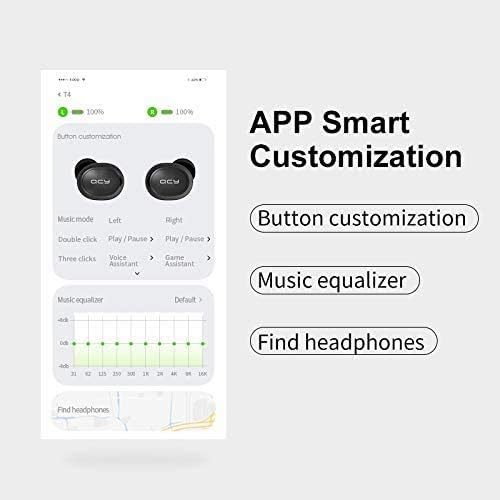
Image: A detailed view of the QCY app's smart customization features, including button remapping, sound equalizer settings, and a function to locate lost earbuds.
Maintenance
- Cleaning: Regularly clean the earbuds and charging case with a soft, dry cloth. Avoid using liquids or abrasive cleaners.
- Storage: When not in use, store the earbuds in their magnetic charging case to protect them from dust, damage, and accidental dropping.
- Battery Care: To prolong battery life, avoid fully discharging the earbuds and charging case frequently. Charge them regularly, even if not in constant use.
- Water Resistance: The earbuds are rated IPX4 waterproof, meaning they are resistant to splashing water from any direction. Do not submerge them in water or expose them to heavy rain.
Troubleshooting
| Problem | Solution |
|---|---|
| Earbuds not pairing | Ensure earbuds are charged. Place them back in the case, close the lid, then open it again to re-enter pairing mode. Check your device's Bluetooth settings and try reconnecting. If issues persist, perform a factory reset via the QCY app. |
| Only one earbud working | Ensure both earbuds are charged. Place both earbuds back into the charging case, close the lid, and then open it again. This should re-sync them. If not, try a factory reset. |
| Poor sound quality or low volume | Check the earbud fit and try different eartip sizes for a better seal. Clean any debris from the earbud speakers. Adjust volume on both your device and through the earbuds' touch controls. Ensure there are no obstructions between the earbuds and your device. |
| Charging issues | Ensure the charging cable is securely connected to both the case and the power source. Use a compatible charger (under 5V 2.1A). Clean the charging contacts on both the earbuds and the case. |
| Microphone not working | Ensure the earbuds are properly connected to your device. Check your device's privacy settings to ensure microphone access is granted to the earbuds. Test in a quiet environment. |
Specifications
| Feature | Detail |
|---|---|
| Bluetooth Version | 5.0 |
| Sound Sensitivity | 104±3 dB |
| Earbud Battery Capacity | 43 mAh |
| Charging Case Battery Capacity | 380 mAh |
| Impedance | 16 Ohm ±15% |
| Operating Range | Over 10 meters (in open space) |
| Chipset | PAU1603 |
| Standby Time | 70 hours |
| Charging Time | Approximately 2 hours |
| Talk Time | Approximately 4 hours |
| Music Time | Approximately 4.5 hours (with charging case: 20 hours) |
| Frequency Response | 20 Hz ~ 20 kHz |
| Dimensions (Case) | 66 × 40 × 30 mm |
| Weight | 40 g |
| Waterproof Rating | IPX4 |
| Control Method | Touch |
| Compatible Devices | All Bluetooth-enabled devices (Android 5.1 or above for app compatibility) |
Image: A visual summary of the QCY T9S earbuds' technical parameters and included accessories.
Warranty and Support
For warranty information, please refer to the warranty card included with your purchase or contact your retailer. For technical support, frequently asked questions, and further assistance, please visit the official QCY website or contact their customer service.
Manufacturer: QCY


