
Introduction
Thank you for choosing the SADES SA908 Wired Gaming Headset. This manual provides detailed instructions for setting up, operating, and maintaining your headset to ensure optimal performance. The SA908 features 7.1 surround sound, a noise-canceling microphone, and comfortable over-ear design for an immersive gaming experience on PC.
Package Contents
Please verify that all items are present in your package:
- SADES SA908 Gaming Headset
- USB Connection Cable (integrated)
- User Manual (this document)
Product Overview
Familiarize yourself with the components of your SADES SA908 Gaming Headset.

Figure 1: SADES SA908 Gaming Headset showing the headset, inline control unit, and integrated USB connection cable.

Figure 2: Detailed view of the inline control unit, indicating the Main Volume Control, Front Volume Control, Center Volume Control, Sibass Volume Control, Side Volume Control, Microphone Mute Switch, and Light Switches.
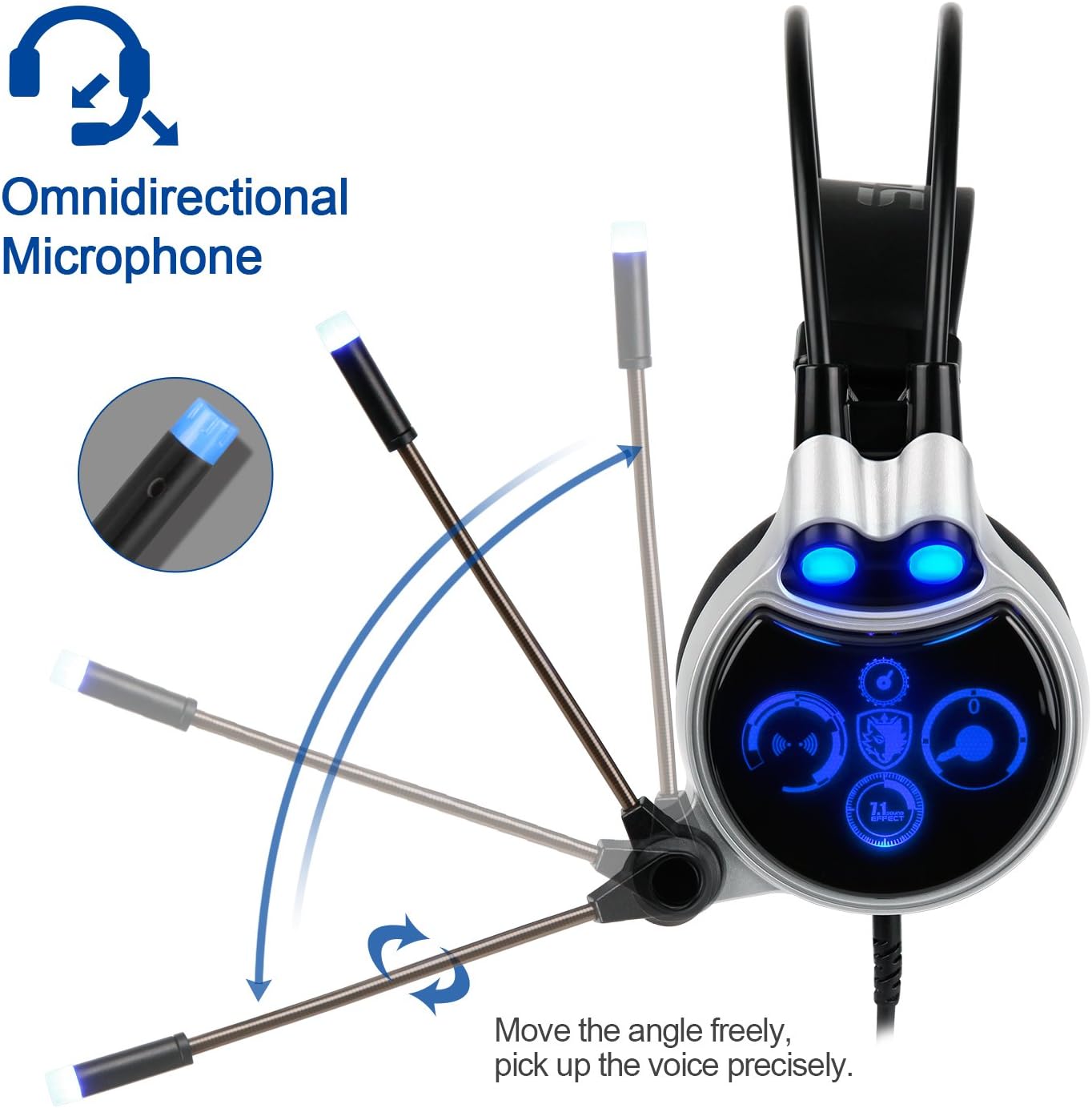
Figure 3: The omnidirectional microphone, demonstrating its adjustable angle for precise voice pickup.

Figure 4: The headset design emphasizing Digital 7.1 Channel Surround Sound and Environmental Sound Canceling capabilities.
Setup Instructions
- Connect the Headset: Plug the USB connector of the SADES SA908 headset into an available USB port on your PC.
- Driver Installation: For optimal 7.1 surround sound functionality, your operating system (Windows XP, Win7, Win8, Win10) may automatically install necessary drivers. If prompted, follow the on-screen instructions.
- Audio Settings Configuration:
- Navigate to your computer's Sound Settings (e.g., Control Panel > Sound or Settings > System > Sound).
- Set the SADES SA908 as your default playback device.
- Set the SADES SA908 Microphone as your default recording device.
- Compatibility Note: This headset is designed for PC use (Windows XP, Win7, Win8, Win10) and is not compatible with XBOX, PS3, PS4, or other console systems.
Operating Instructions
Inline Control Unit (Refer to Figure 2)
- Main Volume Control Rotary: Adjusts the overall audio output volume.
- Front Volume Control: Adjusts the volume of the front audio channels.
- Center Volume Control: Adjusts the volume of the center audio channel.
- Sibass Volume Control Rotary: Adjusts the volume of the subwoofer/bass channel.
- Side Volume Control: Adjusts the volume of the side audio channels.
- Microphone Mute Switch: Toggles the microphone on or off. When muted, the microphone will not pick up sound.
- Light Switches: Controls the LED lighting effects on the headset.
Microphone Usage (Refer to Figure 3)
- The omnidirectional microphone can be adjusted freely to optimize voice pickup. Position it close to your mouth for clear communication.
- Ensure the microphone mute switch on the inline control unit is in the 'unmuted' position when you wish to speak.
7.1 Surround Sound
The SADES SA908 features 7.1 channel surround sound, providing acoustic positioning precision for an enhanced gaming experience. This feature helps in identifying the direction of in-game sounds more accurately.
Technical Specifications
| Loudhailer Diameter | 40mm (NdFeB) |
| Cable Length | 7.2ft (approximately 2.2 meters) |
| Frequency Range | 20 to 20,000 Hz |
| Sensitivity | 115 +/- 3dB at 1kHz |
| Plug Type | USB |
| Impedance | 32 Ohm at 1kHz |
| Max Input Power | 15mW |
| Microphone Sensitivity | -54+/-3dB |
| Distortion | Less than 5% THD |
| Connectivity Technology | Wired |
| Form Factor | Over Ear |
| Noise Control | Sound Isolation |
| Material | Plastic |
| Control Type | Volume Control |
| Compatible Operating Systems | PC (Windows XP, Win7, Win8, Win10) |
Maintenance and Care
- Cleaning: Use a soft, dry cloth to clean the headset. Avoid using harsh chemicals or abrasive materials.
- Storage: Store the headset in a cool, dry place away from direct sunlight and extreme temperatures.
- Cable Care: Avoid sharp bends or excessive pulling on the USB cable to prevent damage.
- Ear Pads: The soft ear-cups are designed for comfort. Handle them gently to maintain their integrity.
Troubleshooting
- No Sound or Low Volume:
- Ensure the USB cable is securely connected to your PC.
- Check the Main Volume Control on the inline unit and your computer's system volume settings.
- Verify that the SADES SA908 is selected as the default playback device in your sound settings.
- Test the headset with another USB port or another PC if possible.
- Microphone Not Working or Low Volume:
- Check if the Microphone Mute Switch on the inline control unit is in the 'unmuted' position.
- Ensure the SADES SA908 Microphone is selected as the default recording device in your sound settings.
- Adjust the microphone's physical position closer to your mouth.
- Check microphone input levels in your computer's sound settings.
- Some applications may have their own microphone volume settings; check these as well.
- Headset Lights Not Working:
- Ensure the headset is properly connected via USB.
- Check the Light Switches on the inline control unit to ensure they are turned on.
Warranty and Support
The SADES SA908 Gaming Headset comes with a 12-month warranty from the date of purchase. This product is CE-, RoHS-, and FCC-Certified for safety and quality.
For any operational issues, quality concerns, or technical support, please do not hesitate to contact SADES customer service or your retailer. You are also covered by the Amazon return policy within 30 days of purchase.
Please retain your proof of purchase for warranty claims.


