
1. Introduction
This manual provides detailed instructions for the installation, operation, and maintenance of your EASYGUARD EC205 2-Way Car Alarm System. This system is designed to enhance vehicle security and convenience with features such as remote engine start, keyless entry, and a 2-way LCD pager display. It is compatible with most DC12V vehicles, including automatic or manual transmission, petrol, and diesel cars.
2. Package Contents
Please verify that all components listed below are included in your package:
- Control Module
- Two 2-Way LCD Pager Remote Key Fobs
- Siren
- Shock Sensor
- Main Wire Harness
- Ignition Wire Harness
- Engine Cut-off Relay
- Starter Relay
- Alarm Antenna
- LED Indicator
- Reset Switch

Figure 1: Overview of all included components.

Figure 2: Labeled diagram of individual components.
Video 1: Unboxing and overview of components for a similar EASYGUARD 2-way car alarm system (EC204).
Video 2: Unboxing and overview of components for a similar EASYGUARD 2-way car alarm system (EC201-M9).
3. Key Features
- 2-Way Car Alarm with LCD Pager Display: Provides real-time feedback on vehicle status.
- Remote Engine Start/Stop: Start or stop your vehicle's engine remotely.
- Keyless Entry: Conveniently lock and unlock your vehicle.
- Shock Sensor Warning: Alerts you to impacts or disturbances to your vehicle.
- Remote Trunk Release: Open your vehicle's trunk remotely.
- Central Door Lock Automation: Automatically locks/unlocks doors.
- Anti-Hijacking: Security feature to prevent vehicle theft.
- Car Finding/Locating: Helps locate your vehicle in a parking lot.

Figure 3: Visual representation of main system features.
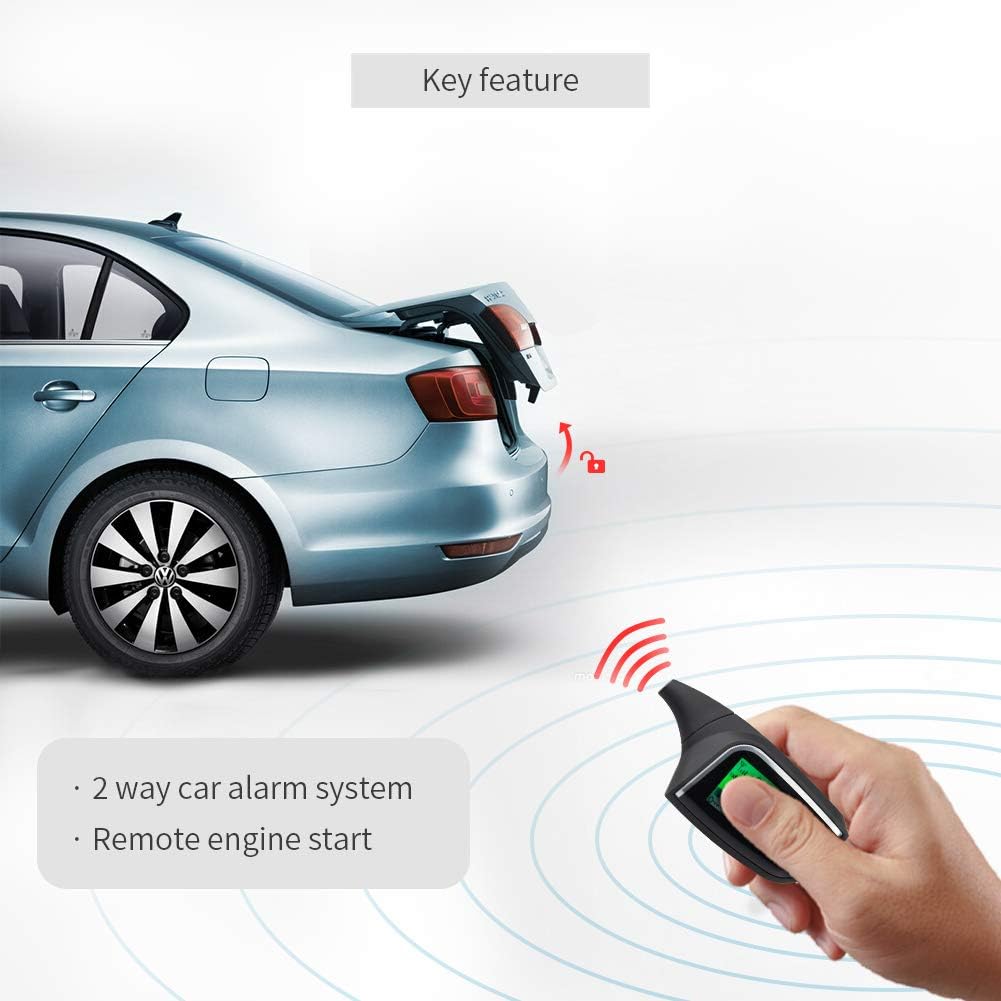
Figure 4: Remote key fob demonstrating remote engine start and trunk release.
4. Setup and Installation
Professional Installation Recommended: This system requires professional installation. Attempting to install it yourself without proper knowledge may damage your vehicle's electrical system or the alarm unit. Consult a certified car alarm installer.
Important Considerations:
- Bypass Module: An extra bypass module (e.g., ASIN: B07NSLPBG7 or B00MEHBVIC) is required for vehicles with a chip immobilizer in the factory OEM key fob. The system is compatible with most universal bypass modules but not with CAN BUS or DATA bypass modules. If using a DATA style bypass module, connect in non-data mode.
- AAA Battery: AAA batteries for the remote pager are not included and must be purchased separately.
Wiring Diagram:
A detailed wiring diagram is available upon request from the manufacturer or your professional installer. Ensure all connections are secure and correctly matched to your vehicle's electrical system.
5. Operating Instructions
The EASYGUARD EC205 system offers various functions controlled via the 2-way LCD pager remote key fobs. Each key fob operates independently, with one active and the other in sleep mode until activated.
Remote Key Fob Functions:

Figure 5: Remote key fob button functions.
- Lock/Arm: Press the lock button once to arm the system and lock the doors. The remote will display 'ARM' and 'LOCK'.
- Unlock/Disarm: Press the unlock button once to disarm the system and unlock the doors. The remote will display 'DISARM' and 'UNLOCK'.
- Remote Engine Start/Stop: Press and hold the engine start button (often indicated by a star or engine icon) for approximately 3 seconds to remotely start or stop the engine. The remote will confirm the command.
- Remote Trunk Release: Press and hold the trunk release button (often indicated by a trunk icon) for approximately 3 seconds to open the trunk.
- Car Finding/Locating: Press a designated button (refer to your specific remote's markings) to activate a short siren chirp and flashing lights to locate your vehicle.
- Anti-Hijacking: This feature can be activated to prevent unauthorized driving. Consult your installer for details on activation and deactivation.
- Emergency Override: In case of remote malfunction, an emergency override procedure allows you to disarm the system. Refer to the detailed wiring diagram or consult your installer.
Passive Keyless Entry (PKE) - (Applicable to models with PKE feature, similar to EC002-NS):
For systems equipped with PKE, the vehicle will automatically unlock when you approach it (within 1-3 meters) and automatically lock when you walk away (2-3 meters) with the remote key fob in your possession. This feature provides hands-free convenience.
Video 3: Demonstration of PKE (Passive Keyless Entry) and remote start functions on a similar EASYGUARD model (EC002-NS).
Video 4: Further demonstration of PKE and push start features on a similar EASYGUARD model (EC002-NS).
6. Maintenance
- Remote Battery Replacement: The 2-way LCD pager remote requires AAA batteries. Replace them when the low battery indicator appears on the display to ensure optimal performance.
- System Check: Periodically test the alarm system's functions (arming, disarming, remote start) to ensure proper operation.
- Cleaning: Keep the remote key fobs and alarm components clean and free from dust and moisture.
7. Troubleshooting
- System Not Responding: Check the remote key fob battery. Ensure you are within the effective operating range (up to 500 meters in open space, but actual range may vary due to interference).
- Remote Start Failure: Verify that the vehicle is in neutral (for manual transmission, if applicable) or park (for automatic transmission). Ensure all doors, hood, and trunk are closed. Check if the bypass module is correctly installed and functioning if your vehicle has a chip immobilizer.
- False Alarms: The shock sensor sensitivity may need adjustment. Consult your installer to adjust the sensitivity level.
- LCD Pager Display Issues: If the display is blank or erratic, replace the AAA battery. If the issue persists, contact support.
8. Specifications

Figure 6: Control module dimensions.
| Specification | Detail |
|---|---|
| Item Weight | 2.99 pounds |
| Package Dimensions | 10.31 x 7.17 x 4.13 inches |
| Item Model Number | EC205 |
| Batteries Required | 2 CR2 batteries (for main unit, not remote pager) |
| Wireless Remote | Yes |
| Compatible Devices | Most DC12V cars |
| Maximum Range | 500 Meters (in wild space) |
| Manufacturer | ieasyguard.com |
| First Available | May 19, 2020 |
9. Warranty and Support
For warranty information, technical support, or any inquiries regarding your EASYGUARD EC205 system, please contact the manufacturer directly or refer to the contact details provided with your purchase. English user manual and wiring diagrams are available upon request.
