
1. Introduction
This manual provides detailed instructions for the proper setup, operation, and maintenance of your Marsden V-110 Animal Scale. Please read this manual thoroughly before using the scale to ensure accurate measurements and safe operation. The Marsden V-110 is designed for weighing medium to large animals, offering a capacity of 150 kg with 100 g readability.
2. Safety Information
- Always place the scale on a firm, flat, and level surface to ensure accurate readings.
- Do not overload the scale beyond its maximum capacity of 150 kg.
- Keep the scale away from excessive moisture, direct sunlight, and extreme temperatures.
- Avoid dropping or subjecting the scale to strong impacts.
- Use only the specified battery type (2 x AAA) and ensure correct polarity during installation.
- Keep the scale clean and free from debris.
3. Package Contents
Please check the package contents to ensure all items are present:
- Marsden V-110 Animal Scale (fully assembled)
- Handheld display unit
- 2 x AAA Batteries
- User Manual
4. Setup
4.1 Battery Installation
- Locate the battery compartment on the handheld display unit.
- Open the battery compartment cover.
- Insert 2 x AAA batteries, ensuring correct polarity (+/-).
- Close the battery compartment cover securely.
4.2 Scale Placement
Place the Marsden V-110 animal scale on a hard, flat, and stable surface. Uneven surfaces can lead to inaccurate readings. Ensure there is sufficient space around the scale for the animal to stand comfortably and for the operator to access the display unit.
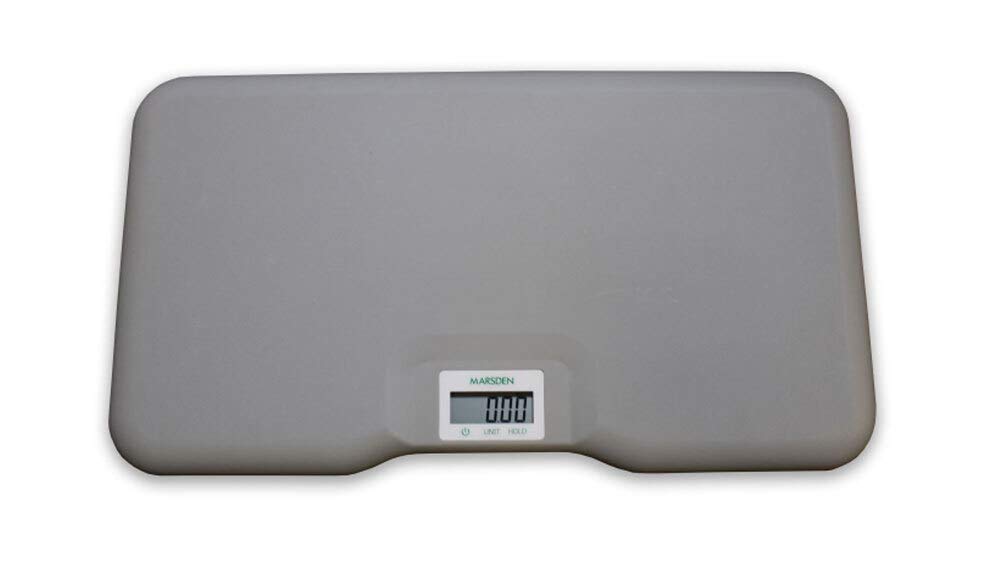
Figure 1: Top-down view of the Marsden V-110 animal scale, showing its large non-slip weighing platform.

Figure 2: A black dog sitting on the Marsden V-110 animal scale, demonstrating its use for weighing animals.
5. Operating Instructions
5.1 Powering On/Off
- To power on the scale, press the ON/OFF button (usually marked with a power symbol ⏻) on the handheld display unit.
- The display will show "8888" then "0.00" indicating it is ready for use.
- To power off, press and hold the ON/OFF button for a few seconds until the display turns off.
5.2 Changing Weighing Units
The Marsden V-110 scale can display weight in kilograms (kg) or pounds (lbs).
- With the scale powered on and displaying "0.00", press the UNIT button.
- The display will toggle between "kg" and "lb". Select your desired unit before weighing.
5.3 Weighing Procedure
- Ensure the scale is powered on and displaying "0.00" in the desired unit (kg or lb).
- Gently guide the animal onto the center of the non-slip weighing platform.
- Allow the animal to settle. The display will stabilize and show the animal's weight.
- If the animal is restless, the HOLD function can be used. Press the HOLD button (if available on your model) to lock the displayed weight once it stabilizes. Press again to release.
- Once the weight is recorded, guide the animal off the scale. The display should return to "0.00".

Figure 3: Close-up of the handheld display unit, showing the digital readout, power button, and UNIT/HOLD functions.
6. Maintenance
6.1 Cleaning
- Wipe the scale platform and display unit with a soft, damp cloth.
- Do not use abrasive cleaners, solvents, or immerse the scale in water.
- Ensure the scale is completely dry before storage or next use.
6.2 Battery Replacement
When the battery indicator appears on the display, replace the batteries promptly to ensure continued accurate operation. Follow the battery installation steps in Section 4.1.
6.3 Storage
Store the scale in a clean, dry place at room temperature. If storing for extended periods, it is recommended to remove the batteries to prevent leakage.
7. Troubleshooting
| Problem | Possible Cause | Solution |
|---|---|---|
| Scale does not turn on | Dead or incorrectly installed batteries. | Check battery polarity; replace batteries if necessary. |
| Inaccurate readings | Scale not on a flat surface; overloaded; animal moving excessively. | Ensure scale is on a level surface; do not exceed 150 kg; use HOLD function if animal is restless. |
| Display shows "Err" | Overload or internal error. | Remove weight from scale; power off and on again. If error persists, contact support. |
8. Specifications
| Feature | Detail |
|---|---|
| Model | V-110 |
| Brand | Marsden |
| Capacity | 150 kg |
| Readability | 100 g |
| Weighing Units | kg, lbs |
| Weighing Plate Dimensions | 900 x 500 x 62 mm (non-slip metal) |
| Display | LCD with LED backlight (handheld device) |
| Power Source | 2 x AAA batteries (included) |
9. Warranty and Support
For warranty information or technical support, please refer to the documentation provided with your purchase or contact Marsden customer service directly. Keep your purchase receipt as proof of purchase.