
1. Important Safety Instructions
Please read all instructions carefully before using the EasyAcc Handheld Fan. Keep this manual for future reference.
- Do not insert fingers or any objects into the fan guard when the fan is operating.
- Keep the fan away from water and high humidity environments.
- Do not disassemble, repair, or modify the fan yourself. Contact qualified personnel for service.
- Use only the specified charging cable and power adapter (5V/1A) to charge the fan.
- Keep out of reach of children. This product is not a toy.
- Avoid dropping or subjecting the fan to strong impacts.
- Do not expose the battery to excessive heat, direct sunlight, or fire.
2. Product Overview
The EasyAcc Handheld Fan is a versatile, portable fan designed for personal cooling. It features a powerful motor, a long-lasting rechargeable battery, and a foldable design for convenience.

Image: The EasyAcc Handheld Fan shown in its upright handheld position and folded into a compact desk fan configuration.
Key Features:
- 5000mAh Rechargeable Battery: Provides up to 20 hours of continuous use on a single charge.
- 4 Adjustable Speeds: From gentle breeze to strong wind, suitable for various environments.
- Power Indicator: LED lights display remaining battery level.
- One-Touch Power Off: Press and hold the power button for 3 seconds to turn off the fan directly from any speed setting.
- Foldable Design: Easily converts from a handheld fan to a desk fan.
- Washable Fan Guard: Removable front cover for easy cleaning.
Components:
- Fan Blades
- Front Fan Guard
- Power Button
- LED Power Indicators (3 lights)
- Foldable Handle/Base
- USB-C Charging Port (located on the handle)

Image: Detailed views showing the fan's hinge mechanism, power button with LED indicators, and the fan blades behind the guard.
3. Setup
Initial Charging:
Before first use, fully charge the fan. Connect the provided USB-C cable to the fan's charging port and the other end to a 5V/1A USB power adapter (not included) or a computer USB port.
- During charging, the LED indicators will flash.
- Once fully charged, all three LED indicators will remain steadily lit.
- A full charge typically takes approximately 3-4 hours.
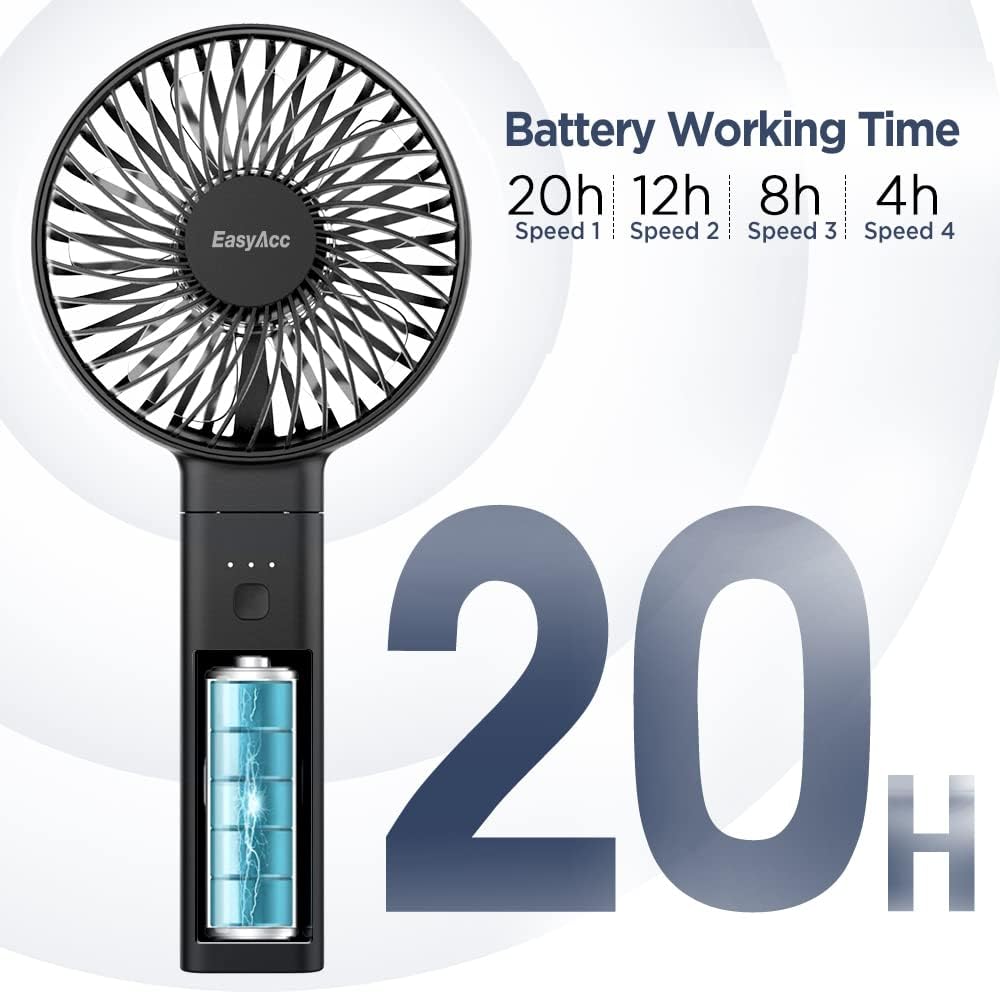
Image: Illustration of battery working time at different speeds (Speed 1: 20h, Speed 2: 12h, Speed 3: 8h, Speed 4: 4h), indicating the fan's long battery life.
Folding and Unfolding:
The fan features a foldable handle that allows it to be used as a handheld device or converted into a stable desk fan.
- To use as a handheld fan, extend the handle fully.
- To use as a desk fan, fold the handle back until it forms a stable base.
4. Operating Instructions
Power On/Off and Speed Adjustment:
- Press the power button once to turn on the fan at Speed 1 (Gentle Breeze).
- Press the power button again to cycle through speeds: Speed 2 (Cool Breeze), Speed 3 (Cooling Wind), Speed 4 (Strong Wind).
- To turn off the fan from any speed, press and hold the power button for approximately 3 seconds.

Image: Illustration showing how to long press the power button for 3 seconds to shut down the fan.
Battery Level Indicator:
The three LED lights above the power button indicate the remaining battery charge:
- 3 Lights On: 100% battery remaining (fully charged).
- 2 Lights On: Approximately 60% battery remaining.
- 1 Light On: Approximately 30% battery remaining.
- 1 Light Flashing (Red): Low battery alert, fan needs to be charged.

Image: Visual guide to the LED power indicators, showing states for low power (red light), 30%, 60%, and 100% battery levels.
5. Maintenance
Cleaning the Fan Guard:
To ensure optimal performance and hygiene, regularly clean the front fan guard.
- Ensure the fan is turned off before cleaning.
- Gently turn the front fan guard clockwise to unlock and remove it.
- Wipe the fan blades and the inside of the guard with a soft, dry cloth. For stubborn dust, a slightly damp cloth can be used, ensuring the fan is completely dry before reassembly.
- To reattach the guard, align it and turn counter-clockwise until it clicks securely into place.

Image: Step-by-step visual guide on how to remove and reattach the fan guard for cleaning.
Storage:
When not in use for extended periods, store the fan in a cool, dry place, away from direct sunlight and extreme temperatures. It is recommended to charge the fan every 3 months to maintain battery health.
6. Troubleshooting
| Problem | Possible Cause | Solution |
|---|---|---|
| Fan does not turn on. | Battery is depleted. | Charge the fan fully. |
| Power button not pressed correctly. | Ensure a firm press. For turning off, long press for 3 seconds. | |
| Weak airflow. | Fan guard is dirty or obstructed. | Clean the fan guard and blades. Ensure no obstructions. |
| Fan is on a low speed setting. | Increase the fan speed. | |
| Fan stops working shortly after charging. | Battery not fully charged or battery degradation. | Ensure the fan is fully charged until all 3 LEDs are solid. If issue persists, contact customer support. |
| Unusual noise during operation. | Obstruction inside the fan or loose parts. | Turn off the fan immediately. Check for any foreign objects. If noise persists, discontinue use and contact support. |
7. Specifications
| Feature | Detail |
|---|---|
| Model Name | FSZD1-21 |
| Brand | EasyAcc |
| Color | Black5000 |
| Power Source | Battery Powered |
| Battery Capacity | 5000mAh (Lithium-ion) |
| Working Hours | 4-20 hours (depending on speed) |
| Number of Speeds | 4 |
| Input Voltage/Current | 5V/1A |
| Charging Port | USB-C |
| Product Dimensions (folded) | 4.33"D x 9.25"W x 1.49"H (approx.) |
| Item Weight | 7.9 ounces (224 grams) |
| Blade Material | Plastic |
| Number of Blades | 5 |
8. Warranty and Support
EasyAcc products come with a standard warranty. For detailed warranty information, please refer to the product packaging or contact EasyAcc customer support.
Customer Support:
If you have any questions, concerns, or require technical assistance, please contact EasyAcc customer support through the following channels:
- Website: easyacc.com
- Refer to your purchase platform for specific contact details.
Note: Product specifications and appearance are subject to change without prior notice for improvement purposes.