
1. Introduction
This manual provides essential instructions for the safe and efficient operation, setup, and maintenance of your TFCFL CNC 6090 Router. This 4-axis machine is designed for precision engraving and cutting on various materials, including wood, aluminum alloy, acrylic, and plastic. Please read this manual thoroughly before operating the machine to ensure proper usage and to prevent damage or injury.
2. Safety Information
Operating a CNC router involves potential hazards. Adhere to all safety guidelines to prevent accidents and ensure personal safety.
- Always wear appropriate personal protective equipment (PPE), including safety glasses, hearing protection, and dust masks.
- Ensure the work area is clean, well-lit, and free from obstructions.
- Never operate the machine under the influence of drugs or alcohol.
- Keep hands and loose clothing away from moving parts and the spindle during operation.
- Disconnect power before performing any maintenance, cleaning, or tool changes.
- Familiarize yourself with the emergency stop button location and function.
- Ensure proper ventilation to manage dust and fumes generated during cutting.
3. Package Contents
Verify that all components listed below are present in your package. If any items are missing or damaged, contact customer support immediately.
- 1X Main Unit (Frame)
- 1X Main Unit (Working Base)
- 2X Fence Baffle
- 1X Control Box
- 1X A-axis Rotary Attachment
- 1X Signal Cable for A-axis
- 1X Water Pump
- 1X USB Cable
- 2X Cutter (2*6mm)
- 2X Cutter (3*6mm)
- 10X Round Head Screws (4*7mm)
- 6X Black Inner Six Angle Screws with Nut (4*10mm)
- 8X Black Inner Six Angle Screws (5*20mm)
- 4X Flat Philip's Head Screws with Nut and Gasket (5*8mm)
- 8X Black Flat Inner Six Angle Screws (6*24mm)
- 12X Aluminum Fasteners
- 1X Wrench (13-15#)
- 1X Wrench (14-17#)
- 2X Hex Wrenches (3mm)
- 2X Hex Wrenches (4mm)
- 1X Teflon Tape
- 2X Fuses (5A)
- 1X Power Cable
- 1X Manual (this document)
- 1X Tools Setting Auto-Check Instrument for CNC

Figure 3.1: Included accessories and components.
4. Setup
4.1 Assembly
Assemble the main unit frame and working base according to the provided diagrams. Secure all components using the appropriate screws and wrenches. Ensure all connections are tight and stable.
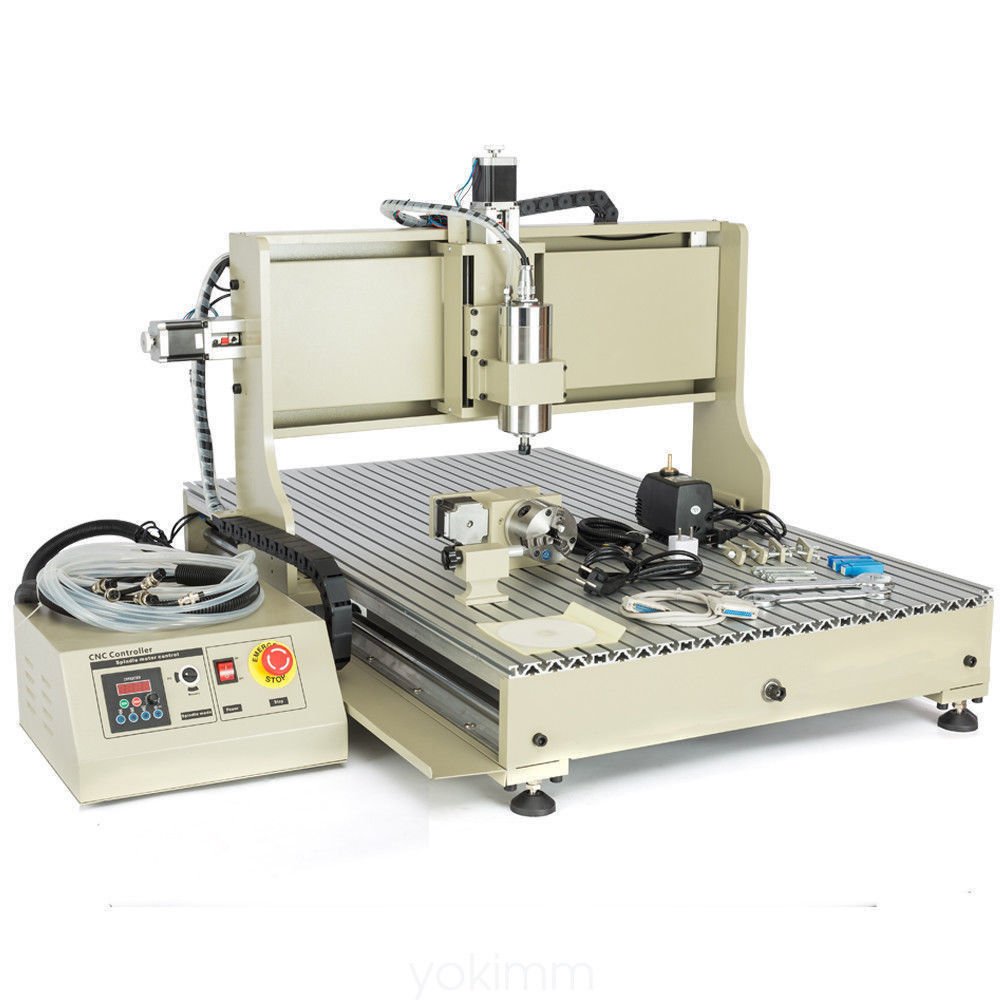
Figure 4.1: Fully assembled TFCFL CNC 6090 Router.

Figure 4.2: Side view of the CNC router, highlighting structural components.
4.2 Electrical Connections
- Connect the main unit to the control box.
- Connect the A-axis rotary attachment to its designated port on the control box using the signal cable.
- Connect the water pump to the spindle for cooling. Ensure the pump is submerged in a suitable water reservoir.
- Connect the USB cable from the control box to your computer.
- Plug the power cable into the control box and then into a grounded electrical outlet.

Figure 4.3: Rear panel of the control box with connection ports.
4.3 Software Installation
The machine communicates via a USB port. Install the necessary control software on your computer. This machine is compatible with the following operating systems:
- Windows XP (32-bit)
- Windows 7 (32-bit)
- Windows XP (64-bit)
- Windows 7 (64-bit)
Ensure your computer meets these requirements for proper operation.
5. Operating Instructions
5.1 Power On and Initial Checks
- Ensure all connections are secure.
- Turn on the main power switch on the control box.
- Verify that the water pump is operating and providing cooling to the spindle.

Figure 5.1: Control box front panel.
5.2 Tool Setting
Use the included Tools Setting Auto-Check Instrument to accurately set the Z-axis zero point for your cutting tools. This ensures precise engraving depth.

Figure 5.2: Tool setting instrument and collets.
5.3 Material Compatibility
The TFCFL CNC 6090 Router is suitable for engraving and cutting a variety of materials, including:
- Wood
- Aluminum Alloy
- Acrylic
- Plastic
Always use appropriate cutting parameters (spindle speed, feed rate, depth of cut) for the specific material being processed.

Figure 5.3: Working base with T-slots.
6. Maintenance
Regular maintenance ensures the longevity and optimal performance of your CNC router.
- Cleaning: Regularly clean the machine, especially the guide rails, ball screws, and working surface, to remove dust and debris. Use a soft cloth and appropriate cleaning agents.
- Lubrication: Apply lubricant to the guide rails and ball screws periodically as recommended by the manufacturer to ensure smooth movement and prevent wear.
- Spindle Cooling: Ensure the water cooling system for the spindle is always functioning correctly. Check water levels and cleanliness of the reservoir.
- Electrical Connections: Periodically inspect all electrical connections for tightness and signs of wear or damage.
- Tool Inspection: Inspect cutting tools before each use for sharpness and damage. Replace dull or damaged tools to maintain cut quality and prevent machine strain.
7. Troubleshooting
This section addresses common issues you might encounter. For problems not listed here, contact customer support.
| Problem | Possible Cause | Solution |
|---|---|---|
| Machine does not power on. | Power cable disconnected, fuse blown, emergency stop engaged. | Check power cable, replace fuse (use 5A fuse), disengage emergency stop button. |
| Spindle not rotating. | VFD not powered, water pump not running, spindle cable loose. | Ensure VFD is powered, check water pump operation, verify spindle cable connection. |
| Machine not responding to software commands. | USB cable disconnected, incorrect software settings, incompatible operating system. | Check USB connection, verify software configuration, ensure OS compatibility (Win XP/7 32/64-bit). |
| Poor engraving quality. | Dull cutting tool, incorrect cutting parameters, loose material clamping. | Replace cutting tool, adjust spindle speed/feed rate, ensure material is securely clamped. |
8. Specifications
- Model: CNC 6090 Router
- Axes: 4-Axis
- Spindle Motor: 2.2KW Water-Cooled VFD
- Spindle Precision: Radial runout ≤0.03mm
- Drive System: Accurate Ball Screws
- Communication Interface: USB Port
- Compatible Operating Systems: Windows XP (32/64-bit), Windows 7 (32/64-bit)
- Applications: Woodworking, advertising industries (sculpture, round carving, handicraft processing, logo making, cutting acrylic, plastic molding)
- Manufacturer: TFCFL
- ASIN: B088RCC7PF
9. Warranty and Support
For warranty information, technical support, or service inquiries, please refer to the documentation provided at the time of purchase or contact your vendor. Keep your purchase receipt as proof of purchase.