
1. Product Overview
The MVMT Canvas Analog Watch Model 28000014-D is a modern men's timepiece designed for everyday wear. It features a durable stainless steel case, a grey analog dial with a date window, and a comfortable green canvas strap. The watch is powered by a reliable quartz movement and offers water resistance up to 100 meters.
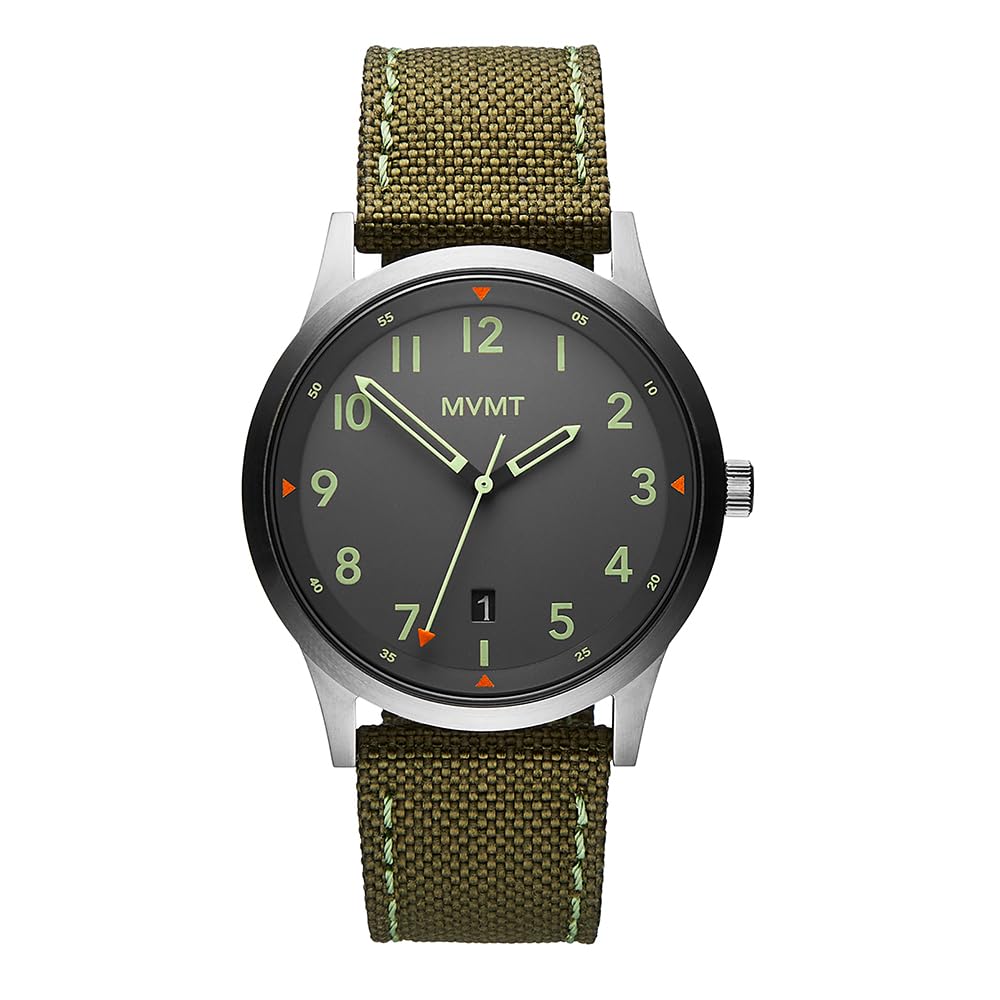
Front view of the MVMT Canvas Analog Watch, showcasing the grey dial, luminous hands, and green canvas strap.
Key Features:
- Case Diameter: 41 mm
- Case Material: Stainless Steel
- Strap Material: Canvas (Green)
- Movement: Quartz
- Display Type: Analog
- Water Resistance: 100 meters (330 feet)
- Crystal Material: Mineral Glass
- Special Feature: Date Window
2. Setup
2.1 Setting the Time and Date
- Pull out the Crown: Gently pull the crown (the small knob on the side of the watch) out to position 2 for setting the date, or position 3 for setting the time.
- Set the Date (Position 2): If your watch has a date function, pull the crown out to position 2. Turn the crown clockwise or counter-clockwise until the correct date appears in the date window. Avoid setting the date between 9 PM and 3 AM, as this can interfere with the automatic date change mechanism.
- Set the Time (Position 3): Pull the crown out to position 3. Turn the crown to move the hour and minute hands to the desired time. Ensure you set the correct AM/PM for the date to change at midnight.
- Push in the Crown: Once the time and date are set, push the crown back into its original position (position 1) to start the watch and ensure water resistance.

Side view of the watch, highlighting the crown used for adjustments.
2.2 Adjusting the Strap
The green canvas strap features a classic buckle closure. To adjust, simply thread the strap through the buckle and secure it in the desired hole for a comfortable fit on your wrist.

Back view of the watch, showing the canvas strap and the classic buckle closure.
3. Operating Your Watch
Your MVMT Canvas Analog Watch is designed for straightforward operation. Once the time and date are set, the watch will function automatically.
3.1 Timekeeping
The watch displays hours, minutes, and seconds via three central hands. The quartz movement ensures accurate timekeeping.
3.2 Date Function
The date window at the 3 o'clock position automatically advances once every 24 hours. If the watch has been stopped or the date is incorrect, refer to Section 2.1 for setting instructions.
4. Maintenance
4.1 Cleaning Your Watch
- Wipe the watch case and crystal with a soft, dry cloth to remove dust and fingerprints.
- For the canvas strap, a slightly damp cloth can be used for spot cleaning. Allow it to air dry completely. Avoid harsh chemicals or abrasive materials.
4.2 Water Resistance
This watch is water resistant up to 100 meters (10 ATM). This means it is suitable for swimming and snorkeling, but not for high-impact water sports or diving. Ensure the crown is fully pushed in before any contact with water.
Important: Do not operate the crown or pushers while the watch is wet or submerged in water.
4.3 Battery Replacement
The watch is powered by a Lithium Ion battery. When the watch stops running, it indicates the battery needs replacement. It is recommended to have the battery replaced by a qualified watch technician to maintain the watch's water resistance and ensure proper function.
4.4 Strap Care
The canvas strap is durable but can show wear over time. Avoid prolonged exposure to direct sunlight, extreme temperatures, and harsh chemicals to preserve its appearance and integrity. If the strap becomes heavily soiled or damaged, consider replacing it.
5. Troubleshooting
5.1 Watch Not Running
- Check the Crown: Ensure the crown is fully pushed into position 1.
- Battery: The battery may need replacement. Consult a professional watch technician.
5.2 Date Not Changing
- Time Setting: Ensure the time is set correctly for AM/PM. The date changes at midnight.
- Manual Adjustment: If the date is stuck, manually advance it using the crown in position 2.
5.3 Water Condensation Inside Crystal
If you notice condensation under the crystal, it indicates a breach in the watch's water resistance. This can be caused by operating the crown underwater, extreme temperature changes, or damage to the seals. Immediately take the watch to a qualified service center to prevent further damage to the movement.
6. Specifications
| Model Number | 28000014-D |
| Case Diameter | 41 mm |
| Case Material | Stainless Steel |
| Case Thickness | 10.2 mm |
| Strap Material | Canvas |
| Strap Width | 22 mm |
| Movement Type | Quartz |
| Display Type | Analog |
| Water Resistance Depth | 100 Metres (10 ATM) |
| Crystal Material | Mineral Glass |
| Battery Type | 1 Lithium Ion (included) |
| Item Weight | 54 Grams |
7. Warranty Information
Your MVMT Canvas Analog Watch Model 28000014-D comes with a Limited 2-Year International Warranty from the date of purchase. This warranty covers manufacturing defects in materials and workmanship under normal use.
The warranty does not cover:
- Battery life.
- Normal wear and tear, including scratches on the crystal, case, or strap.
- Damage caused by improper use, accidents, neglect, unauthorized repairs, or modifications.
- Water damage if the crown was not properly secured or if the watch was exposed to conditions beyond its stated water resistance.
For full warranty terms and conditions, please refer to the official MVMT website or contact customer support.
8. Support
If you require further assistance, have questions not covered in this manual, or need to initiate a warranty claim, please contact MVMT customer service.
You can find more information and contact details on the official MVMT website: