
1. Introduction
Thank you for choosing the Altec Lansing AL-3001 5.1 Channel Wireless Bluetooth Multimedia Speaker. This manual provides essential information for setting up, operating, maintaining, and troubleshooting your new speaker system. Please read this manual thoroughly before using the product to ensure proper operation and to maximize your audio experience.
2. What's in the Box
Upon opening the package, please verify that all the following components are included:
- Altec Lansing AL-3001 5.1 Multimedia Speaker System (1 Subwoofer, 5 Satellite Speakers)
- Remote Control
- RCA Cable
- User Manual
3. Product Overview
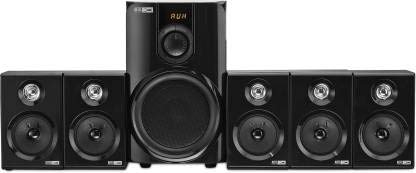
Figure 3.1: Complete Altec Lansing AL-3001 5.1 speaker system, showcasing the central subwoofer and five satellite speakers.
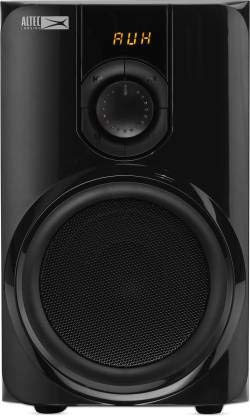
Figure 3.2: Front view of the subwoofer unit, featuring the main speaker and LED display.
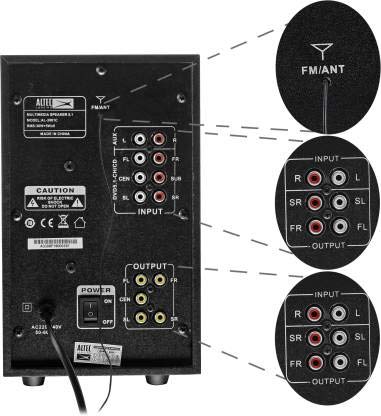
Figure 3.3: Rear panel of the subwoofer, detailing the various input and output ports for connectivity.
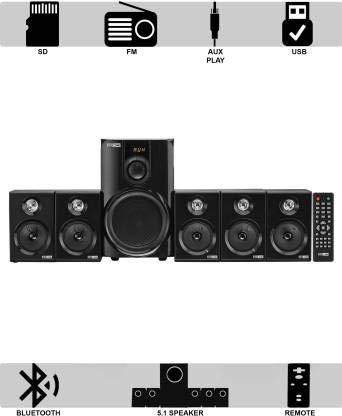
Figure 3.4: Visual representation of available connectivity options including SD card, FM radio, AUX play, and USB.
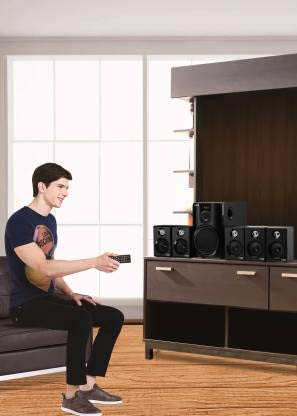
Figure 3.5: A user demonstrating the use of the remote control for convenient operation of the speaker system.
4. Setup
Follow these steps to set up your Altec Lansing AL-3001 speaker system:
- Placement: Position the subwoofer in a central location, ideally on the floor. Arrange the five satellite speakers around your listening area for optimal 5.1 surround sound. Ensure proper left, right, center, surround left, and surround right speaker placement.
- Connect Satellite Speakers: Connect each satellite speaker to the corresponding output port on the rear panel of the subwoofer. Ensure the connections are secure.
- Connect Audio Source:
- AUX: Use the provided RCA cable to connect your audio source (e.g., TV, DVD player, PC) to the 'INPUT' ports on the subwoofer's rear panel.
- Bluetooth: For wireless connection, refer to the 'Bluetooth Pairing' section in Operating Instructions.
- USB/SD Card: Insert your USB drive or SD card into the respective slots on the front panel.
- Power Connection: Plug the power cord into a suitable electrical outlet.
- Power On: Turn on the power switch located on the rear panel of the subwoofer. The LED display on the front will light up.
5. Operating Instructions
5.1. Product Overview Video
This official product video provides a comprehensive overview of the Altec Lansing 5.1 Speaker, detailing its audio performance, specifications, and various connectivity features. It serves as a visual guide to understanding the product's capabilities.
5.2. Connectivity Options
- Bluetooth Pairing:
- Turn on the speaker system.
- Press the 'Mode' button on the remote control or front panel until 'BT' appears on the LED display.
- Enable Bluetooth on your device (smartphone, tablet, PC).
- Search for 'AL-3001' in the list of available devices and select it to pair.
- Once paired, the speaker will indicate a successful connection, and you can start playing audio wirelessly.
- AUX Play: Connect your audio source using the RCA cable to the 'INPUT' ports on the subwoofer. Select 'AUX' mode using the 'Mode' button.
- USB/SD Card Playback: Insert a USB drive or SD card containing MP3 audio files into the respective slots. The system will automatically switch to USB or SD mode and begin playback. Use the remote or front panel controls to navigate tracks.
- FM Radio: Press the 'Mode' button to switch to 'FM' mode. The system will automatically scan and save available radio stations. Use the remote control to tune to different stations.
5.3. Controls
The Altec Lansing AL-3001 can be controlled via the front panel buttons or the included remote control.
- LED Display: Provides visual feedback on the current mode, volume level, and track information.
- Volume Control: Adjust the master volume using the rotary knob on the front panel or the volume buttons on the remote.
- Mode Button: Cycles through input modes (Bluetooth, AUX, USB, SD, FM).
- Playback Controls: Play/Pause, Next/Previous Track buttons are available on both the front panel and remote for media playback.
- Bass/Treble Control: Adjust bass and treble levels using the remote control for personalized sound.
5.4. Audio Performance
The AL-3001 system is designed to deliver a powerful and immersive audio experience:
- 5.1 Channel Surround Sound: Provides a multi-directional audio experience, ideal for movies and gaming.
- Total Output Power: 55 Watts (RMS) for clear and robust sound.
- Subwoofer: Features a 4-inch subwoofer for deep and impactful bass.
- Satellite Speakers: Five 2.75-inch satellite speakers deliver crisp highs and clear mids.
6. Maintenance
To ensure the longevity and optimal performance of your speaker system, follow these maintenance guidelines:
- Cleaning: Regularly wipe the surfaces of the speakers and subwoofer with a soft, dry cloth. Do not use liquid cleaners or abrasive materials, as they may damage the finish.
- Ventilation: Ensure that the ventilation openings on the subwoofer are not blocked. Proper airflow prevents overheating.
- Storage: If storing the system for an extended period, disconnect it from power and store it in a cool, dry place away from direct sunlight and extreme temperatures.
- Cable Management: Keep cables organized and untangled to prevent damage and ensure stable connections.
7. Troubleshooting
If you encounter any issues with your Altec Lansing AL-3001, refer to the following common problems and solutions:
| Problem | Possible Cause | Solution |
|---|---|---|
| No sound from speakers. | Power off; incorrect input mode; loose connections; volume too low. | Ensure power is on; select correct input mode (AUX, BT, USB, SD, FM); check all cable connections; increase volume. |
| Bluetooth not connecting. | Speaker not in pairing mode; device Bluetooth off; out of range. | Ensure speaker is in 'BT' mode; turn Bluetooth on/off on your device; move device closer to the speaker (within 1 foot for optimal connection). |
| Poor FM radio reception. | Weak signal; antenna not extended. | Adjust the position of the FM antenna; try auto-scanning for stations again. |
| USB/SD card not recognized. | Unsupported file format; corrupted media; incorrect insertion. | Ensure files are in MP3 format; try a different USB drive/SD card; re-insert the media correctly. |
If the problem persists after trying these solutions, please contact customer support.
8. Specifications
| Feature | Detail |
|---|---|
| Model Name | Altec Lansing AL-3001 C Multimedia Speaker 5.1 |
| Speaker Type | Multimedia |
| Special Features | Radio, Remote Control |
| Recommended Uses | For Computers |
| Compatible Devices | Laptop, MP3 Player, Tablet, FM Radio, Smartphone |
| Controller Type | Remote Control |
| Surround Sound Channel Configuration | 5.1 |
| Colour | Black |
| Included Components | User manual, RCA cable, Remote |
| Item Weight | 4.12 kg (4120 Grams) |
| Wireless Communication Technology | Bluetooth |
| Speaker Size | Subwoofer: 4 inches, Satellite: 2.75 inches |
| Power Source | Corded Electric |
| Wattage | 55 Watts |
| Total USB ports | 1 |
| Maximum Operating Distance (Bluetooth) | 1 Feet (approx. 0.3 meters) |
| Product Dimensions (Subwoofer) | 14.5 x 26.5 x 24.5 cm |
9. Warranty and Support
For warranty information and customer support, please refer to the warranty card included in your product packaging or visit the official Altec Lansing website. You may also contact the distributor, Compuage Infocom Limited, for assistance.
Manufacturer: Altec Lansing
Importer and Distributor: Compuage Infocom Limited, Lotus Corporate Park, Goregaon (E), Mumbai
– 400 063
Phone: +91-22-67114444


