
Altec Lansing AL-1005 A
Altec Lansing AL-1005 A BT Portable Speaker User Manual
Model: AL-1005 A
Introduction
This manual provides detailed instructions for the safe and efficient operation of your Altec Lansing AL-1005 A BT Portable Speaker. Please read this manual thoroughly before using the product and retain it for future reference.
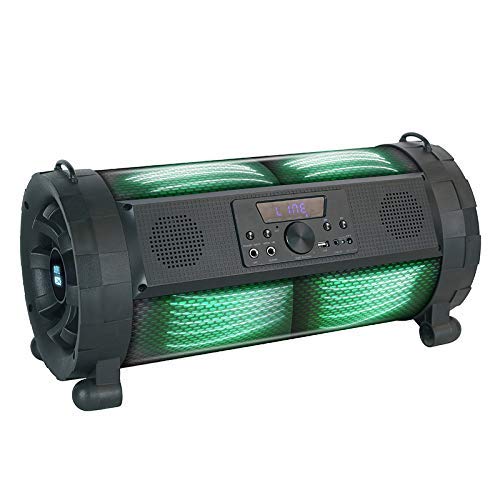
Image: The Altec Lansing AL-1005 A BT Portable Speaker, featuring a black barrel design with illuminated green DJ lights, a central control panel, and integrated handles.
Package Contents
Verify that all items are present in the package:
- Altec Lansing AL-1005 A BT Portable Speaker
- User Manual
- Charger Adapter
- Remote Control
- Strap Holder
- Wireless Microphone
Product Overview
The AL-1005 A is a portable barrel-design speaker equipped with various features for an enhanced audio experience.
Key Features:
- 80W Speaker Output
- Wireless Bluetooth Connectivity
- AUX Input
- USB Playback
- Guitar Input
- Integrated DJ Lights
- 2000 mAh Battery (Up to 6 hours playtime)
- Wireless Microphone Included
- Remote Control Included
Setup
Charging the Speaker:
- Connect the charger adapter to the speaker's charging port.
- Plug the adapter into a standard power outlet.
- Allow the speaker to charge fully before first use. The charging indicator light will change when charging is complete.
Attaching the Strap Holder:
The strap holder can be attached to the designated loops on the speaker for easier portability.
Microphone Setup:
- Ensure the wireless microphone has fresh batteries (1 AA battery required, included).
- Turn on the microphone. It should automatically pair with the speaker.
Operating Instructions
Power On/Off:
Press and hold the Power button on the control panel or remote control to turn the speaker on or off.
Bluetooth Pairing:
- Turn on the speaker. It will automatically enter Bluetooth pairing mode.
- On your device (smartphone, tablet, etc.), enable Bluetooth and search for available devices.
- Select "AL-1005 A" from the list of devices.
- Once paired, the speaker will indicate a successful connection.
AUX Input:
Connect an audio device using a 3.5mm AUX cable to the AUX input port on the speaker. The speaker will automatically switch to AUX mode.
USB Playback:
Insert a USB flash drive containing audio files into the USB port. The speaker will automatically detect and begin playing music from the drive.
Guitar Input:
Connect a guitar or other instrument to the dedicated guitar input port for amplified sound.
Controlling Playback and Volume:
- Use the volume knob on the speaker or the volume buttons on the remote control to adjust the master volume.
- Use the Play/Pause, Next, and Previous buttons on the speaker's control panel or remote for media playback control.
DJ Lights:
The speaker features integrated DJ lights. These lights typically activate automatically with music playback or can be controlled via a dedicated button on the control panel or remote, if available.
Maintenance and Care
- Cleaning: Use a soft, dry cloth to clean the speaker's exterior. Do not use abrasive cleaners or solvents.
- Storage: Store the speaker in a cool, dry place away from direct sunlight and extreme temperatures.
- Battery Care: To prolong battery life, avoid fully discharging the battery frequently. Charge the speaker regularly, even if not in use for extended periods.
- Water Resistance: This product is not waterproof. Avoid exposure to water or excessive moisture.
Troubleshooting
| Problem | Possible Cause | Solution |
|---|---|---|
| Speaker does not power on. | Low battery; Power button not pressed correctly. | Charge the speaker; Press and hold the Power button for a few seconds. |
| No sound from speaker. | Volume too low; Incorrect input mode; Device not paired (Bluetooth). | Increase volume; Select correct input (Bluetooth, AUX, USB); Re-pair Bluetooth device. |
| Bluetooth connection unstable. | Device too far from speaker; Interference. | Move device closer to speaker (within 1 foot for optimal range); Avoid obstacles between devices. |
| Microphone not working. | Microphone off; Low microphone battery. | Ensure microphone is turned on; Replace microphone batteries. |
Specifications
| Feature | Detail |
|---|---|
| Model Name | AL-1005 A |
| Speaker Type | Bookshelf (Portable Barrel Design) |
| Speaker Output Power | 80 Watts |
| Connectivity | Bluetooth, Auxiliary, USB |
| Battery Capacity | 2000 mAh |
| Battery Life | Up to 6 Hours |
| Included Components | User manual, charger adapter, remote, strap holder, wireless mic |
| Dimensions (LxWxH) | 28.5 x 25 x 60 cm |
| Item Weight | 4.2 kg |
| Special Features | DJ lights, Guitar Input |
| Wireless Communication Technology | Bluetooth |
| Maximum Operating Distance (Bluetooth) | 1 Feet |
Warranty Information
For warranty details and terms, please refer to the warranty card included with your product or contact Altec Lansing customer support. Extended warranty options may be available from your retailer.
Customer Support
For technical assistance, service, or inquiries, please contact Altec Lansing customer support. Contact information can typically be found on the manufacturer's official website or on the product packaging.
Manufacturer: Altec Lansing
Importer/Distributor (India): Compuage Infocom Limited
Address: Lotus Corporate Park Goregoan (E), Mumbai – 400 063
Phone: +91-22-67114444
Related documentsAL-1005 A


Ask a question about this manual
Ask about setup, troubleshooting, compatibility, parts, safety, or missing instructions. Manuals+ will review the question and use this page’s manual context to help answer it.