
BFT P125002 SB-BAT
BFT Gate Opener P125002 SB-BAT 24v DC Battery Backup Kit User Manual
Model: P125002 SB-BAT
1. Product Overview
The BFT SB-BAT (P125002) is a 24v DC battery backup system designed to ensure continuous operation of your gate opener even during power outages. This kit provides a reliable power source, activating automatically when the main power supply is interrupted and recharging when power is restored.
It is compatible with various BFT gate opener models, including the Deimos BT series, VIRGO - LINX, EOS-SCE, HYDRA N, DEIMOS BT-QSC D-NETTUNO S, SB BAT/SB CARBAT (DEIMOS BT-SB 300), BT BAT 2 (URANO BT ARES 1000 & ARES 1500) NETTUNO B, VENERE D, ARGO, LIBRA C MA - LIBRA C LX.
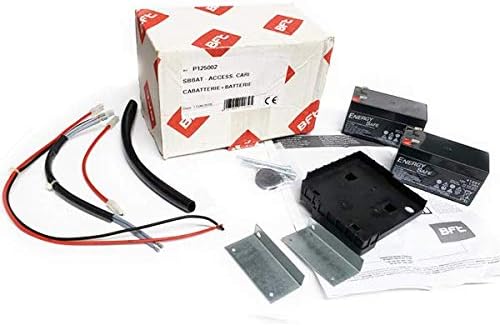
Figure 1: Contents of the BFT P125002 SB-BAT Battery Backup Kit, including batteries, wiring, and mounting hardware.
2. Setup and Installation
Installation of the BFT SB-BAT kit is designed to be straightforward. It integrates with your existing BFT gate opener system.
2.1. Safety Precautions
- Ensure the main power to the gate opener is disconnected before beginning installation.
- Wear appropriate personal protective equipment (PPE).
- Refer to your specific gate opener's manual for compatibility and connection points.
2.2. Installation Steps
- Unpack Components: Carefully remove all items from the packaging. Verify all components are present as shown in Figure 1.
- Mount the Battery Housing: Securely mount the battery housing unit near your gate opener's control board, ensuring it is protected from environmental elements.
- Connect Batteries: Insert the two 12V 1.2Ah batteries into the housing. Connect them according to the wiring diagram provided with the kit (typically in series to achieve 24V DC).
- Connect to Gate Opener: Connect the battery backup system's wiring to the designated battery input terminals on your BFT gate opener's control board. Consult your gate opener's manual for precise terminal locations.
- Secure Wiring: Ensure all wiring is neatly routed and secured to prevent accidental disconnections or damage.
- Restore Power: Once all connections are secure and verified, restore main power to the gate opener. The smart charger board will begin charging the batteries.
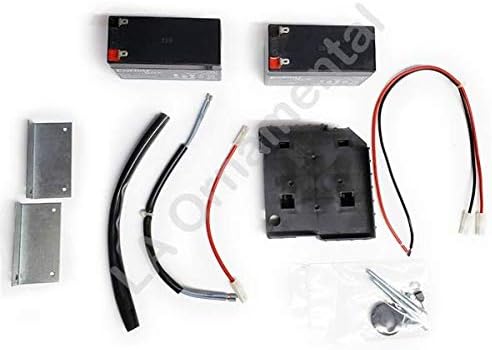
Figure 2: A closer view of the battery backup kit components, highlighting the batteries and connection wires.
3. Operation
The BFT SB-BAT battery backup system operates automatically to provide uninterrupted gate functionality.
- Normal Operation: When main power is available, the smart charger board continuously charges and maintains the batteries.
- Power Outage: In the event of a power outage, the system automatically switches to battery power, allowing the gate opener to continue functioning normally.
- Power Restoration: Once main power is restored, the system automatically switches back to main power and resumes charging the batteries.
4. Maintenance
Regular maintenance ensures the longevity and reliability of your battery backup system.
- Visual Inspection: Periodically inspect the batteries and wiring for any signs of damage, corrosion, or loose connections.
- Cleanliness: Keep the battery housing and terminals clean and free of dust or debris.
- Battery Health Check: While the system has an intelligent charger, it is advisable to periodically test the battery backup by temporarily disconnecting main power to ensure the gate operates on battery power. Reconnect main power after testing.
- Battery Replacement: Batteries have a finite lifespan. If you notice a significant decrease in backup operation time, it may be time to replace the batteries. Use only recommended replacement batteries (2x 12V 1.2Ah).
5. Troubleshooting
This section addresses common issues you might encounter with your BFT SB-BAT battery backup kit.
| Problem | Possible Cause | Solution |
|---|---|---|
| Gate does not operate during power outage. |
|
|
| Batteries do not seem to be charging. |
|
|
6. Specifications
Key technical specifications for the BFT SB-BAT (P125002) battery backup system:
- Model: P125002 SB-BAT
- System Voltage: 24V DC
- Charge Voltage: 27.2V
- Charge Current: 130mA
- Battery Capacity: 2x (12V 1.2Ah)
- Exhausted Battery Protection Threshold: 20.4V
- Battery Recharging Time: 12-14 hours
- Fuse: 20A
- Manufacturer: BFT
7. Warranty and Support
For warranty information or technical support, please refer to the documentation included with your purchase or contact BFT customer service directly. Keep your proof of purchase for warranty claims.
You can find more information about BFT products on their official website or through authorized distributors.
Related documentsP125002 SB-BAT

Ask a question about this manual
Ask about setup, troubleshooting, compatibility, parts, safety, or missing instructions. Manuals+ will review the question and use this page’s manual context to help answer it.