
1. Introduction
Thank you for choosing the Mistral MSF041R 16-inch Stand Fan. This manual provides important information regarding the assembly, operation, maintenance, and safety of your new fan. Please read it thoroughly before use and retain it for future reference.
Key Features:
- 16-inch fan blade for effective air circulation
- 3-speed selection for customized airflow
- 8-hour programmed timer for convenience
- Left and right oscillation for wider coverage
- Multi-function remote control for easy operation
- LED display for clear status indication
- Convertible height adjustment
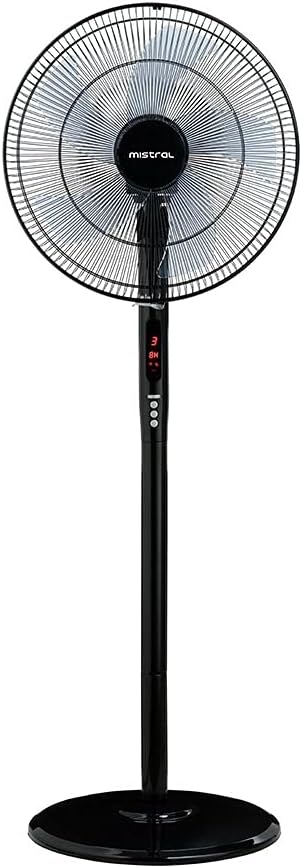
Figure 1: Mistral MSF041R 16-inch Stand Fan, fully assembled, showcasing its black finish and control panel.
2. Important Safety Instructions
To reduce the risk of fire, electric shock, or injury, always follow basic safety precautions when using electrical appliances.
- Read all instructions before using this fan.
- Always unplug the fan before moving, cleaning, or whenever the fan is not in use.
- Ensure the plug is fully inserted into the outlet.
- Do not operate any fan with a damaged cord or plug.
- Do not run the power cord under carpeting or cover it with throw rugs, runners, or similar coverings.
- Avoid placing the fan in areas where it may be easily tipped over.
- Do not insert fingers or foreign objects into any grille opening.
- This appliance is not intended for use by persons (including children) with reduced physical, sensory, or mental capabilities, or lack of experience and knowledge, unless they have been given supervision or instruction concerning use of the appliance by a person responsible for their safety.
- Children should be supervised to ensure that they do not play with the appliance.
3. Package Contents
Upon unpacking, please verify that all components are present and undamaged:
- 1 x Mistral MSF041R Stand Fan Unit (includes fan head, stand pole, and base)
- 1 x Multi-function Remote Control
- 1 x User Manual (this document)
4. Assembly Instructions
The Mistral MSF041R Stand Fan requires minimal assembly. Follow these steps to set up your fan:
- Base Assembly: Place the stand pole into the base. Secure it firmly using the provided locking mechanism or screw from underneath the base.
- Fan Head Attachment: Carefully attach the fan head unit to the top of the stand pole. Ensure it clicks into place or is securely fastened with any provided screws or knobs.
- Height Adjustment: Adjust the fan's height to your desired level by loosening the height adjustment knob on the stand pole, extending or retracting the pole, and then tightening the knob securely.
- Power Connection: Once assembled, place the fan on a stable, flat surface and plug the power cord into a suitable electrical outlet.
5. Operating Instructions
Your Mistral MSF041R Stand Fan can be operated using the control panel on the fan unit or the multi-function remote control.
Control Panel / Remote Control Functions:
- Power Button: Press to turn the fan ON or OFF.
- Speed Button: Press repeatedly to cycle through the 3 available fan speeds (Low, Medium, High). The current speed will be indicated on the LED display.
- Oscillation Button: Press to activate or deactivate the left and right oscillation function. When active, the fan head will sweep from side to side.
- Timer Button: Press to set the programmed timer. Each press will increase the timer setting in increments (e.g., 1 hour, 2 hours, up to 8 hours). The set time will be shown on the LED display. The fan will automatically turn off once the set time expires.
LED Display:
The integrated LED display shows the current fan speed and the remaining time if the timer function is active.
Height Adjustment:
To adjust the fan's height, loosen the adjustment knob on the stand pole, raise or lower the fan head to the desired position, and then firmly tighten the knob to secure it.
6. Maintenance and Cleaning
Regular cleaning and maintenance will ensure optimal performance and extend the lifespan of your fan.
- Always unplug the fan from the power outlet before cleaning or performing any maintenance.
- Use a soft, damp cloth to wipe the exterior surfaces of the fan. Do not use abrasive cleaners or solvents.
- To clean the fan blades, carefully remove the front grille (refer to assembly instructions in reverse if necessary). Wipe the blades with a soft, damp cloth. Ensure blades are completely dry before reattaching the grille.
- Do not immerse the fan in water or allow water to drip into the motor housing.
- Store the fan in a cool, dry place when not in use.
7. Troubleshooting
If you encounter issues with your Mistral MSF041R Stand Fan, refer to the following common problems and solutions:
| Problem | Possible Cause | Solution |
|---|---|---|
| Fan does not turn on. | No power supply. Power button not pressed. | Ensure the fan is plugged into a working outlet. Press the power button on the fan or remote. |
| Fan operates but no oscillation. | Oscillation function is off. | Press the oscillation button on the fan or remote to activate. |
| Remote control not working. | Batteries are depleted or incorrectly inserted. Obstruction between remote and fan. | Replace remote control batteries (if applicable, check battery type). Ensure a clear line of sight to the fan's receiver. |
| Fan makes unusual noise. | Loose parts or debris in fan blades. | Unplug the fan and check for any obstructions or loose components. Clean blades if necessary. |
If the problem persists after attempting these solutions, please contact customer support.
8. Specifications
| Brand | MISTRAL |
| Model | MSF041R |
| Electric Fan Design | Floor Fan |
| Mounting Type | Stand Fan |
| Controller Type | Remote Control |
| Power Source | Corded Electric |
| Product Dimensions | 15.7D x 17.7W x 51.6H centimetres |
| Item Weight | 6.85 Kilograms |
| Special Features | Oscillating, 3 Speed Selection, 8-Hour Timer, LED Display, Convertible Height |
| Assembly Required | No (Minimal setup) |
| Batteries Required | No (for fan unit) |
9. Warranty and Support
This Mistral MSF041R Stand Fan comes with a 2-year guarantee from the date of purchase. Please retain your proof of purchase for warranty claims.
For technical support, warranty inquiries, or service requests, please refer to the contact information provided with your purchase documentation or visit the official Mistral website.


