
1. Important Safety Information
Before operating the Razor T25 Electric Scooter, please read and understand all safety warnings and instructions. Failure to follow these instructions may result in serious injury or property damage.
- Always wear appropriate safety gear, including a helmet, knee pads, and elbow pads.
- Observe all local laws and regulations regarding electric scooter use.
- Do not ride in wet conditions, on uneven surfaces, or at night without proper lighting.
- Ensure the battery is fully charged and all components are securely fastened before each ride.
- The scooter is designed for riders aged 18 and up, with a maximum weight limit of 220 pounds (100 kg).
2. Product Overview
The Razor T25 Electric Scooter is a foldable and portable electric scooter designed for urban commuting and travel. It features a 250-watt brushless hub-driven motor and a 36V lithium-ion battery, offering a balance of speed and range for adult riders.
Key Features:
- Motor: 250-watt, kick-to-start, variable-speed, brushless, hub-driven motor.
- Battery: UL certified rechargeable 36V lithium-ion battery pack.
- Speed: Up to 15.5 mph (25 km/h).
- Range: Up to 18 miles (29 km) on a single charge.
- Riding Modes: Three selectable modes (Pedestrian, Cruising, Sport).
- Brakes: Hand-operated electronic front brake and rear disc brake.
- Visibility: LED headlight, brake-activated taillight, and reflectors.
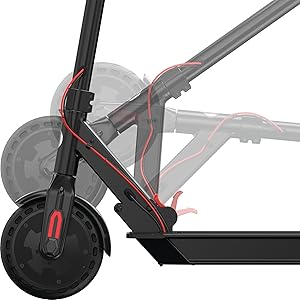
- Portability: Folding design for easy storage and transport.

3. Setup
3.1 Unboxing and Initial Assembly
The Razor T25 Electric Scooter comes partially assembled. Follow these steps to complete the setup:
- Carefully remove all components from the packaging.
- Unfold the scooter by releasing the folding mechanism. Ensure it locks securely into the upright position.
- Insert the handlebar assembly into the stem.
- Secure the handlebars using the provided four screws and Allen wrench. Ensure they are tightened firmly.
3.2 Initial Battery Charge
Before first use, fully charge the scooter's battery. The initial charge time is approximately 8 hours.
- Locate the charging port, typically on the bottom of the scooter deck.
- Connect the charger to the scooter and then to a standard wall outlet.
- The charger indicator light will change (e.g., red to green) when charging is complete.
- Do not overcharge the battery. Disconnect the charger once charging is complete.
4. Operating Instructions
4.1 Powering On/Off
To power on the scooter, press and hold the power button on the handlebar display until the display illuminates. To power off, press and hold the power button again until the display turns off.

4.2 Riding Modes
The T25 offers three riding modes to suit different preferences and environments:
- Pedestrian Mode: Approximately 9.3 mph (15 km/h) maximum speed. Suitable for crowded areas or when a slower pace is desired.
- Cruising Mode: Approximately 12.4 mph (20 km/h) maximum speed. A balanced mode for general riding.
- Sport Mode: Approximately 15.5 mph (25 km/h) maximum speed. For maximum performance and speed.
Switch between modes using the dedicated button on the handlebar display.
4.3 Acceleration
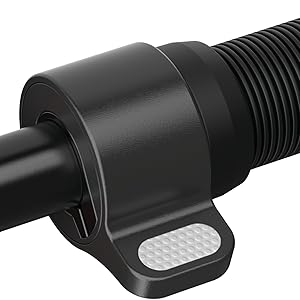
The scooter features a thumb-activated acceleration control. Gently press the thumb lever to engage the motor and increase speed. The scooter is kick-to-start, meaning you need to push off with your foot to initiate movement before the motor engages.
4.4 Braking
The T25 is equipped with a single hand-operated control that activates both the electronic front brake and the rear disc brake. Apply gentle pressure to the brake lever to slow down. Practice braking in a safe, open area to become familiar with its response, as the disc brake can be quite responsive.


5. Charging the Battery
The Razor T25 Electric Scooter is powered by a 36V lithium-ion battery. Proper charging procedures ensure battery longevity and safe operation.
- Use only the charger supplied with your Razor T25 scooter.
- Ensure the charging port is clean and dry before connecting the charger.
- Connect the charger to the scooter's charging port, then plug the charger into a standard 100-240V AC wall outlet.
- The charging indicator light on the charger will typically be red during charging and turn green when the battery is fully charged.
- A full charge from empty takes approximately 8 hours.
- Do not leave the scooter charging unattended for extended periods after the light indicates a full charge.
- Store the scooter and charger in a dry, well-ventilated area away from direct sunlight and extreme temperatures.
6. Maintenance
Regular maintenance helps ensure the safety and longevity of your Razor T25 Electric Scooter.
6.1 General Care and Cleaning
- Wipe the scooter clean with a damp cloth after each use. Avoid using harsh chemicals or abrasive cleaners.
- Do not use a high-pressure washer or submerge the scooter in water.
- Inspect the frame for any cracks or damage before each ride.
6.2 Wheels and Tires
The T25 features airless tires, which require less maintenance than pneumatic tires. However, regularly inspect them for wear, cuts, or embedded debris.
6.3 Brakes
- Regularly check the brake lever for proper function and responsiveness.
- Ensure the rear disc brake is clean and free of obstructions.
- If the brakes feel too grabby or too loose, consult a qualified technician for adjustment.
6.4 Storage
When not in use, store the scooter in a cool, dry place. If storing for an extended period, ensure the battery is partially charged (around 50%) and recharge it every 30-60 days to prevent deep discharge.
7. Troubleshooting
This section addresses common issues you might encounter with your Razor T25 Electric Scooter.
7.1 Scooter Not Powering On
- Ensure the battery is fully charged.
- Check all cable connections for looseness or damage.
- If the issue persists, contact customer support.
7.2 Loss of Power or Reduced Range
- Verify the battery is fully charged before each ride.
- Riding conditions (e.g., uphill, heavy loads, cold weather) can affect range and power.
- Battery performance may degrade over time with extensive use.
7.3 Throttle Malfunction
If the throttle is unresponsive or inconsistent, inspect the thumb lever for any physical damage or obstruction. Issues with the throttle may require professional service.
8. Specifications
| Feature | Specification |
|---|---|
| Brand | Razor |
| Model Name | T25 |
| Motor | 250-watt, brushless, hub-driven |
| Battery | 36V Lithium-ion |
| Maximum Speed | 15.5 mph (25 km/h) |
| Maximum Range | 18 miles (29 km) |
| Weight Limit | 220 Pounds (100 kg) |
| Item Weight | 27 Pounds (12.2 kg) |
| Frame Material | Aluminum |
| Wheel Material | Polyurethane |
| Wheel Size | 200 Millimeters |
| Handle Height | 42.5 Inches (108 cm) |
| Brake Style | Hand-operated, electric front and rear disc |
| Age Range (Description) | Adult |
9. Warranty and Support
9.1 Warranty Information
The Razor T25 Electric Scooter comes with a 90-day Limited Manufacturer Warranty. This warranty covers manufacturing defects and workmanship under normal use. Please retain your proof of purchase for warranty claims. For full details, refer to the warranty documentation included with your product or visit the official Razor website.
9.2 Customer Support
For technical assistance, troubleshooting not covered in this manual, or warranty inquiries, please contact Razor USA, LLC customer support.
- Manufacturer: Razor USA, LLC
- Online Support: Visit the Razor Store on Amazon for product information and support resources.


