
SENTRY KX200
Sentry Industries Inc. HPXKX200 Gaming Keyboard + Mouse 2 Pack
Model: KX200 User Manual
Introduction
Thank you for purchasing the Sentry Industries Inc. HPXKX200 Gaming Keyboard and Mouse 2 Pack. This combo kit is designed to enhance your gaming and computing experience with its responsive keyboard and precise mouse. The keyboard features 104 keys with RGB backlighting, while the mouse offers 7200 DPI sensitivity and RGB lighting. Both devices connect via USB for reliable performance.
This manual provides detailed instructions for setup, operation, maintenance, and troubleshooting to ensure optimal use of your new gaming peripherals.
Package Contents
- 1 x Sentry HPXKX200 104-Key RGB USB Gaming Keyboard
- 1 x Sentry HPXKX200 7200 DPI RGB Gaming Mouse
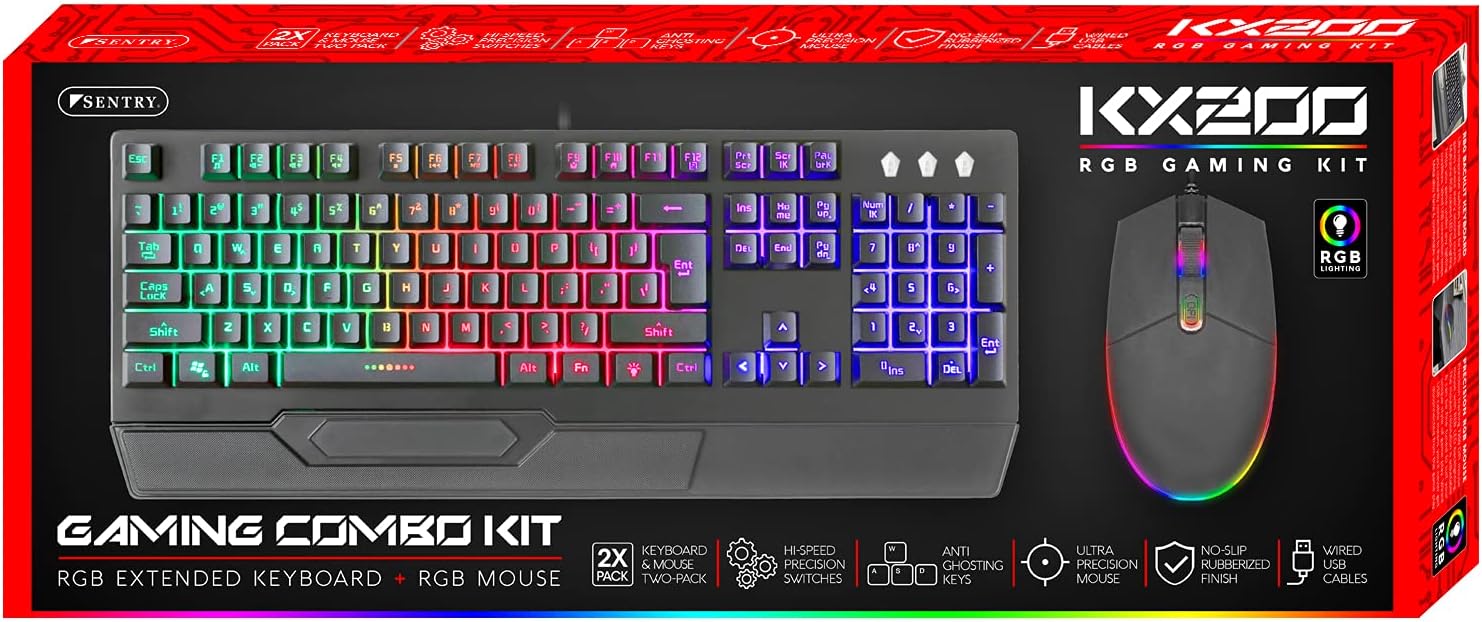
Image: The retail packaging for the Sentry HPXKX200 Gaming Keyboard and Mouse combo kit, showing both devices and key features.
Setup Instructions
Follow these steps to connect your Sentry HPXKX200 Gaming Keyboard and Mouse to your computer:
- Unpack the Devices: Carefully remove the keyboard and mouse from their packaging.
- Connect the Keyboard: Locate an available USB port on your computer. Insert the USB connector of the keyboard firmly into the USB port.
- Connect the Mouse: Locate another available USB port on your computer. Insert the USB connector of the mouse firmly into the USB port.
- Driver Installation: Your operating system (e.g., Windows) should automatically detect and install the necessary drivers. This process may take a few moments.
- Verify Connection: Once drivers are installed, the keyboard and mouse RGB lighting should illuminate, indicating they are ready for use.

Image: The Sentry HPXKX200 Gaming Keyboard, showcasing its full layout and attached USB cable for connection.

Image: The Sentry HPXKX200 Gaming Mouse, highlighting its ergonomic design and attached USB cable.

Image: A close-up view of a standard USB-A connector, which is used to connect both the keyboard and mouse to a computer.
Operating Instructions
Keyboard Usage
The 104-key layout provides a full range of standard typing and function keys. The RGB backlighting enhances visibility and aesthetics.
- Typing: Use the alphanumeric keys for standard text input.
- Function Keys (F1-F12): These keys perform various functions, often in combination with the 'Fn' key, depending on your operating system and applications.
- RGB Lighting Control: Specific key combinations (e.g., Fn + Scroll Lock, Fn + Home/End) may cycle through different RGB lighting modes or adjust brightness. Refer to the keyboard's specific key legends for lighting controls.
Mouse Usage
The 7200 DPI RGB mouse offers precise tracking and comfortable use.
- Left Click: Primary action, selection.
- Right Click: Context menu.
- Scroll Wheel: Scroll through documents and web pages. The scroll wheel also functions as a middle click button.
- DPI Adjustment: The DPI button (often located near the scroll wheel) allows you to cycle through different sensitivity settings (DPI levels) to match your preference for various tasks or games. The mouse supports up to 7200 DPI.
- RGB Lighting: The mouse features integrated RGB lighting that typically changes based on DPI settings or cycles through colors automatically.

Image: The Sentry HPXKX200 Gaming Keyboard and Mouse side-by-side, illustrating their design and illuminated RGB features.
Maintenance
Proper care will extend the life of your gaming peripherals:
- Cleaning: Use a soft, dry cloth to wipe down the surfaces of the keyboard and mouse. For stubborn dirt, slightly dampen the cloth with water or a mild, non-abrasive cleaner. Avoid excessive moisture.
- Dust Removal: Use compressed air to remove dust and debris from between the keyboard keys and from the mouse's optical sensor.
- Avoid Liquids: Do not immerse the devices in water or expose them to excessive liquids.
- Storage: Store the keyboard and mouse in a cool, dry place when not in use.
Troubleshooting
If you encounter issues with your Sentry HPXKX200 Gaming Keyboard and Mouse, try the following solutions:
| Problem | Possible Solution |
|---|---|
| Keyboard/Mouse not responding |
|
| RGB lighting not working |
|
| Mouse cursor erratic or not moving |
|
| Keys not registering on keyboard |
|
Specifications
| Feature | Detail |
|---|---|
| Brand | SENTRY |
| Model Number | KX200 |
| Connectivity Technology | USB (Wired) |
| Keyboard Type | 104-Key RGB USB Keyboard |
| Mouse DPI | 7200 DPI RGB Mouse |
| Color | Black |
| Operating System Compatibility | Windows (and generally compatible with other OS supporting USB peripherals) |
| Product Dimensions (Keyboard) | Approximately 21.65 x 9.84 x 3.15 inches |
| Item Weight | Approximately 2.2 pounds (combined) |
Warranty and Support
Sentry Industries Inc. products are manufactured to high-quality standards. For information regarding warranty coverage, technical support, or service inquiries, please refer to the warranty card included with your product or visit the official Sentry Industries Inc. website. Please retain your proof of purchase for warranty claims.
Ask a question about this manual
Ask about setup, troubleshooting, compatibility, parts, safety, or missing instructions. Manuals+ will review the question and use this page’s manual context to help answer it.