
1. Important Safety Information
Always consult a qualified electrician for installation and service of electrical equipment. Improper installation or use can result in serious injury or death. Disconnect power at the main service panel before working on circuit breakers or electrical panels.
- Ensure all local and national electrical codes are followed.
- Wear appropriate personal protective equipment (PPE), including safety glasses and insulated gloves.
- Do not install or operate this device if it appears damaged.
- This circuit breaker is designed for use only with Leviton Load Centers.
2. Product Overview
The Leviton LB220-T is a 20 Amp, 2-Pole Plug-on Standard Branch Circuit Breaker designed for use in Leviton Load Centers. It provides thermal-magnetic protection for 120/240 VAC circuits.
Key Features:
- Easy Installation: Revolutionary design allows the entire Load Center to be wired at rough-in without any circuit breakers present.
- Intuitive Operation: Color indicators in the handle show operational status at-a-glance.
- Comfortable Use: Rocker-style switches require less activation force than traditional circuit breakers.
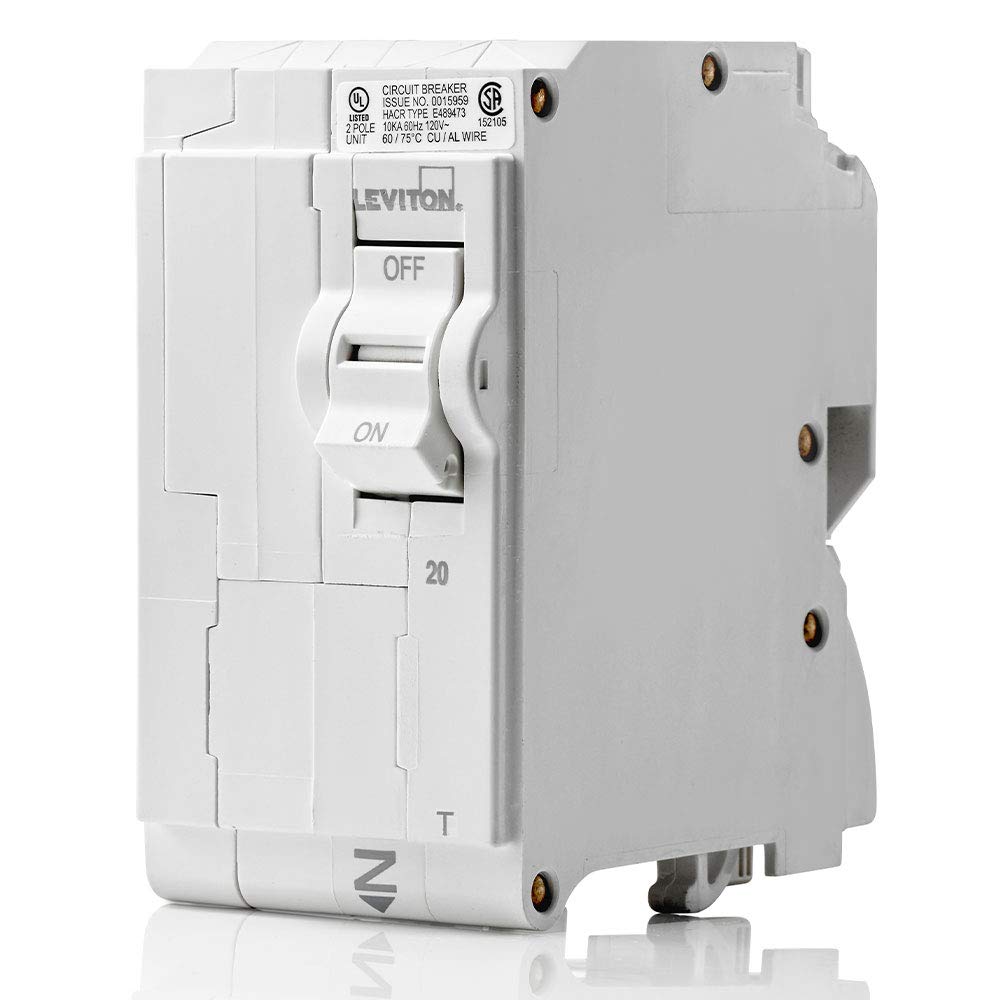
This image displays the main view of the Leviton LB220-T circuit breaker, highlighting its compact design and the 'ON' and 'OFF' positions of the rocker switch. The rating of '20' amps is visible, along with regulatory markings.
3. Installation (Setup)
The Leviton LB220-T circuit breaker features a plug-on design for simplified installation into compatible Leviton Load Centers. This design allows for up to 25% faster installation compared to traditional methods.
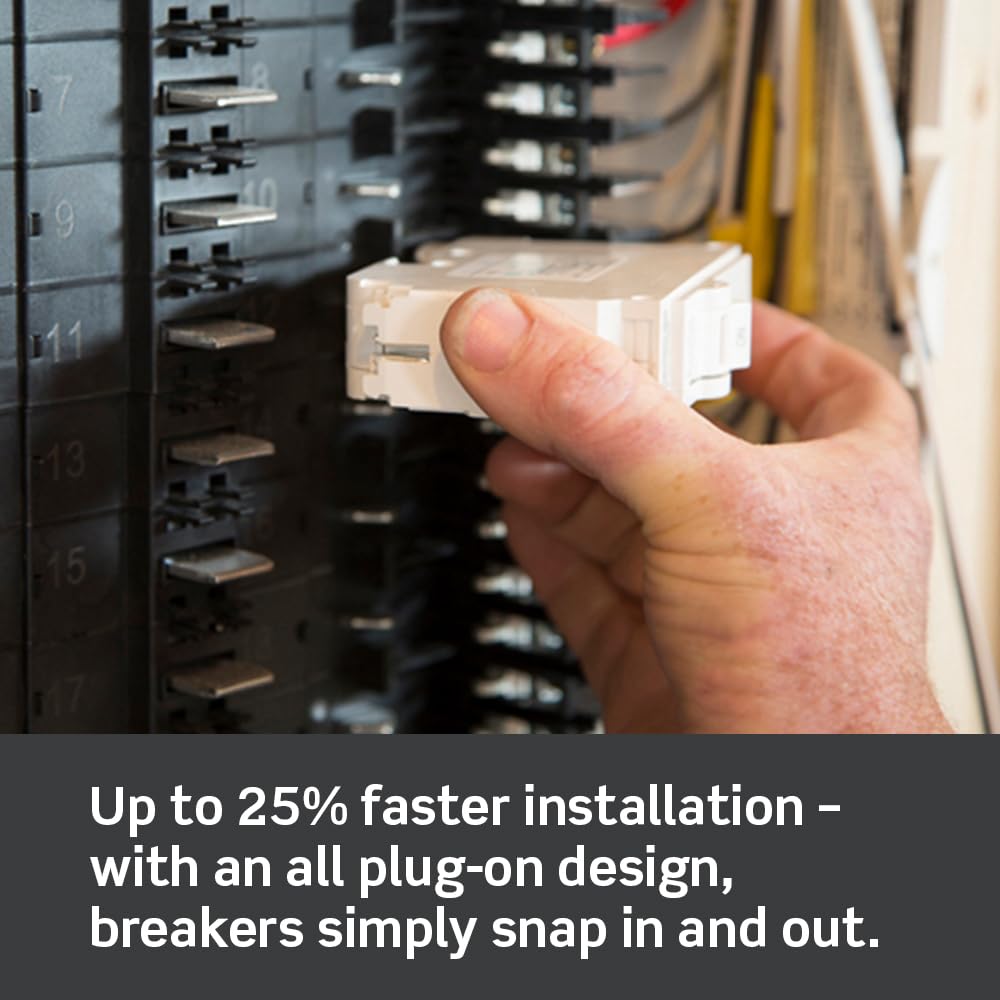
This image illustrates a hand inserting a Leviton circuit breaker into a load center. The plug-on design allows the breaker to simply snap into place, facilitating quick and secure connections.
General Installation Steps:
- Power Disconnection: Ensure all power to the load center is turned OFF at the main service disconnect. Verify with a voltage tester.
- Wire Preparation: Strip the circuit wires to the recommended length as specified in the load center's instructions.
- Breaker Connection: Connect the circuit wires to the appropriate terminals on the LB220-T breaker. Ensure connections are tight and secure.
- Mounting: Align the breaker with the bus bar connections in the load center and firmly push until it clicks into place.
- Cover Installation: Replace the load center cover and restore power.
4. Operation
The LB220-T circuit breaker features a rocker-style switch for easy operation and clear visual indicators for its status.

This image shows two Leviton circuit breakers, one in the 'ON' position with a green indicator and another in a tripped or 'OFF' position with a red indicator. These color indicators provide an immediate visual cue of the breaker's operational status.
- ON Position: Push the rocker switch to the 'ON' position. A color indicator (typically green) will be visible, indicating the circuit is active.
- OFF Position: Push the rocker switch to the 'OFF' position. The color indicator will change (typically to red or black), indicating the circuit is de-energized.
- Tripped Condition: If an overload or short circuit occurs, the breaker will automatically trip to the 'OFF' position. The color indicator will show the tripped status. To reset, push the switch fully to 'OFF' and then back to 'ON'.

This image highlights the line-side powered LEDs on Leviton circuit breakers, which provide easy fault type identification. Different LED patterns or colors can indicate specific fault conditions, aiding in quicker troubleshooting.
5. Maintenance
Leviton circuit breakers are designed for long-term, reliable operation with minimal maintenance. However, periodic inspection is recommended.
- Visual Inspection: Periodically inspect the breaker for any signs of physical damage, discoloration, or loose connections.
- Cleanliness: Ensure the area around the breaker and within the load center is free from dust, debris, and moisture.
- Testing: For breakers with test buttons (e.g., GFCI/AFCI types, not applicable to this standard breaker), perform monthly tests as recommended by the manufacturer.
- Professional Check: If you notice frequent tripping, unusual noises, or burning smells, contact a qualified electrician immediately.
6. Troubleshooting
If your circuit breaker trips frequently or fails to operate correctly, consider the following common issues:
- Frequent Tripping: This often indicates an overload on the circuit. Disconnect some appliances or devices from the circuit and try resetting the breaker. If it continues to trip, there may be a short circuit or ground fault, requiring professional inspection.
- Breaker Won't Reset: If the breaker immediately trips again after being reset, there is likely a persistent fault (overload, short circuit, or ground fault) on the circuit. Do not force the breaker. Consult an electrician.
- No Power to Circuit: If the breaker is in the 'ON' position but there is no power, check other breakers in the load center. Ensure the main breaker is 'ON'. If the issue persists, contact a qualified electrician.
7. Specifications
| Specification | Value |
|---|---|
| Brand | Leviton |
| Model Number | LB220-T |
| Current Rating | 20 Amps |
| Number of Poles | 2 |
| Voltage Rating | 120/240 VAC |
| Circuit Breaker Type | Standard, Thermal-Magnetic |
| Mounting Type | Plug-In Mount |
| Product Dimensions | 3.1 x 2 x 3.9 inches |
| Weight | 10.56 ounces |
8. Warranty and Support
Leviton products are backed by a manufacturer's warranty. For specific warranty details, please refer to the documentation included with your purchase or visit the official Leviton website. For technical support, installation assistance, or to report an issue, please contact Leviton customer service directly.
Online Resources: www.leviton.com


